http://xim.tech
XIM NEXUS
PC Connection
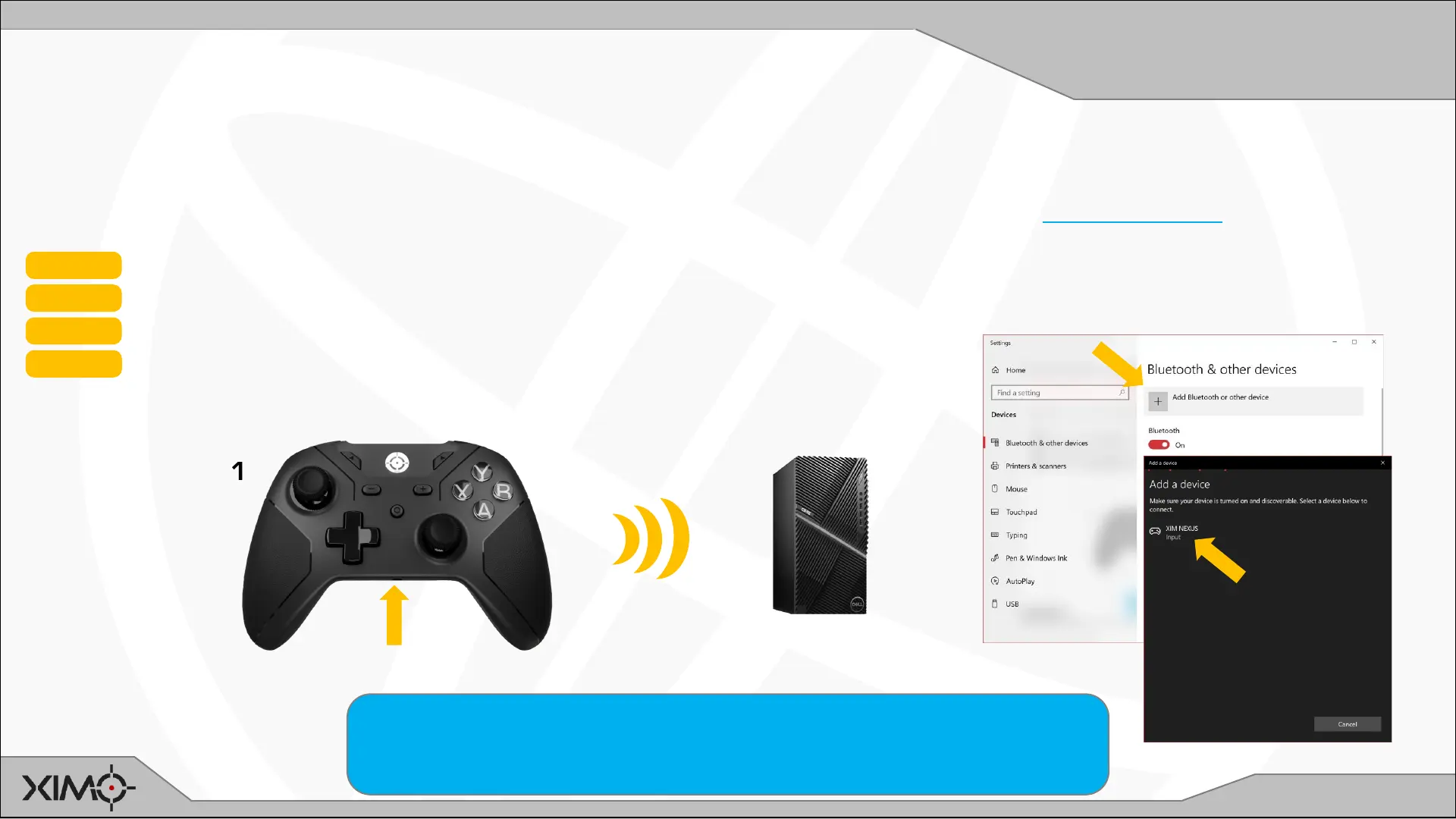
Controller can connect directly to a PC either wireless or wired without the use of Adapter. For wireless connections, your
PC requires Bluetooth connectivity.
NOTE: Pairing to a device removes Controller’s prior pairing (such as to Adapter). Learn how to later re-pair to Adapter.
STEP 1 Ensure Controller and PC are powered ON
STEP 2 Press and Hold P on the back of Controller until it starts blinking CYAN (about 3s)
STEP 3 Scan for Bluetooth devices on your PC
STEP 4 Select XIM NEXUS when it shows on the list
1
2
Connecting to your PC
If your PC doesn’t have Bluetooth, or, if your PC’s has poor Bluetooth performance,
you can use Adapter on your PC. Adapter doesn’t require a console controller be
connected to it. It will flash PURPLE when ready.
3
4


 To Next Page