© Copyright 2016 - Xsarius
41
Upload
Your able to update software
Play files
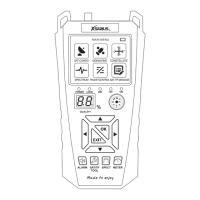
Open the mainmenu. Select the option “PC Update”. Open the “USB menu”. Use the navigation buttons to select the
type of file. Use the cursor up and down to browse through the folders and files. Press the “OK” button to open the
selected folder or file.
Music:
The Xsarius Satmeter HD Combo Plus supports .Mp3 music files. While playing a music file you have the following
options:
Cursor up/down: Switch between music files
Cursor left/right: Change the volume level
Exit: Close the current menu
Pause/play: Pause or play the current file.
Rewind: Rewind quickly
Fast forward: Forward quickly
Repeat everything (Single Repeat, Single, Random, All)
Images:
The Xsarius Satmeter HD Combo Plus supports images files (.jpeg, .bmp)
Video:
The Xsarius Satmeter HD Combo Plus supports video files: .AVI, .MKV, .MP4, .MOV, .MPG, .3GP, .MPG, .PS, .DAT, .VOB,
.TS, .M2TS, .FLV.
Restricted tot “Codec“ and cannot be guaranteed.


 To Next Page