8 9
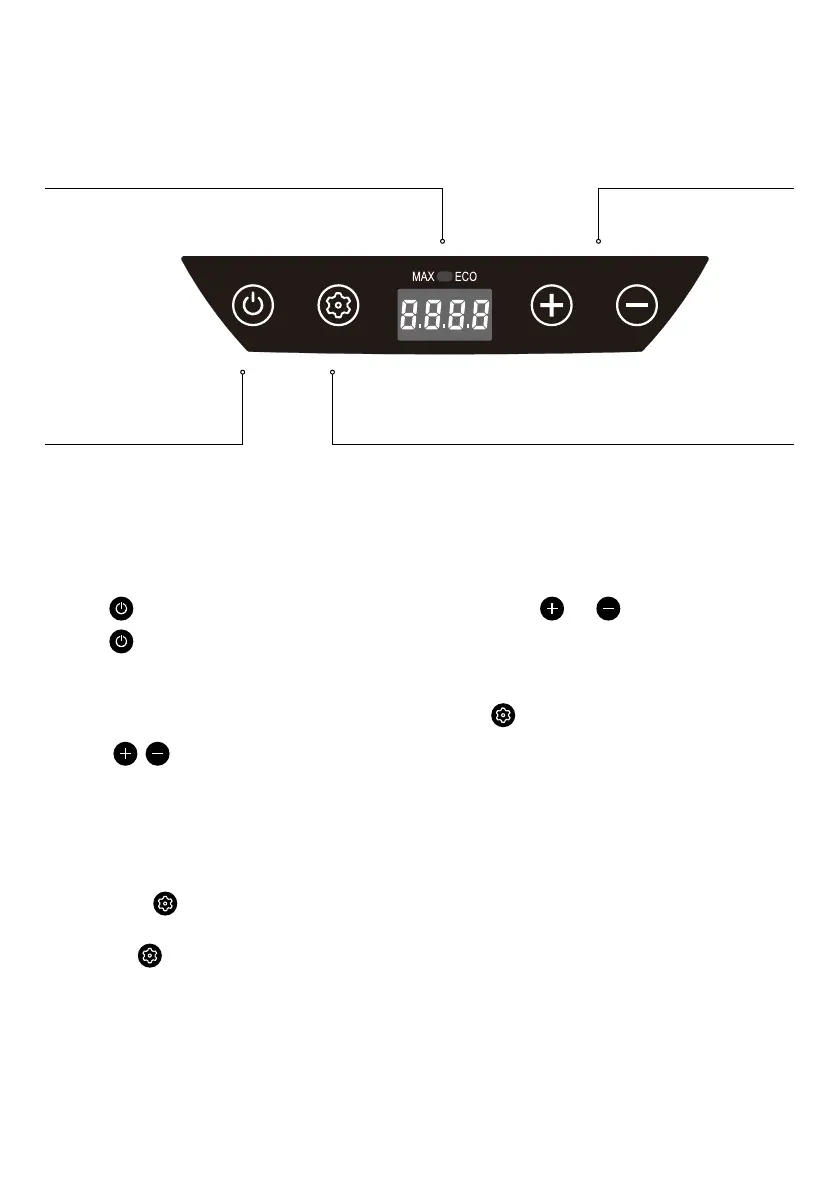
TEMPERATURE CONTROL UNIT
POWER
1. Press button to turn fridge ON.
2. Press
button again to turn
fridge OFF.
TEMPERATURE SETTING
1. Press
to set temperature. Wait for 3
sec for display to stop flashing, then setting
will be saved and display will change to actual
temperature reading
BATTERY PROTECTION
1 Press & hold button for 3 seconds to enter
battery protection setting mode
2 Press the
button again to cycle between the
3 protection levels - H1 (Hi) -> L3 (Low) ->
N2 (Med)
3 Wait for 3 seconds for the display to stop
flashing, then the setting will be saved and the
display will show the actual temperature reading
TEMPERATURE SCALE
1. Press & Hold and buttons for 3 sec to
switch between Celcius (°C) or Fahrenheit (°F)
MAX/ECO MODE
1. Press button to switch between MAX mode or
ECO mode
MAX - Indicator will show green light
ECO - Indicator will show white light
POWER OFF MEMORY
If power is cut to the fridge, the ON/OFF status,
mode and temperature settings will resume to the
previous settings as soon as the power is restored.
SET BUTTONPOWER ON/OFF BUTTON
UP AND DOWN BUTTONSTEMP. DISPLAY


 To Next Page