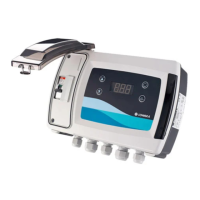
The EOP1 Operator Panel is a remote keypad and display designed for the installation, operation, and maintenance of Flygt drives. It serves as a user interface for controlling and monitoring drive systems, offering a range of features for both single and multiple drive configurations.
Function Description:
The EOP1 Operator Panel acts as a remote interface for Flygt drives, providing a display and keypad for interaction. Its primary functions include:
- System Setup: Facilitating the initial configuration of the drive system, including communication address setup.
- Operation Control: Allowing users to start and stop drives, navigate menus, adjust values, and select options within submenus. It supports both manual and automatic operating modes.
- Monitoring and Diagnostics: Displaying operational data, drive messages, and fault codes, which are crucial for troubleshooting and maintaining the system.
- Multi-Drive Network Management: Capable of connecting to a network of up to 63 drives, enabling centralized control and monitoring.
- Dual Operator Panel Support: Allows for two operator panels to be connected to a single drive or a network of multiple drives, provided their Optipad IDs are correctly configured.
- Language Selection: Offers the ability to change the display language for user convenience.
Important Technical Specifications:
- Signal Interface: Standard 8-way RJ45 connector.
- Supply Input: 24 V +/- 10%, DC, 30 mA.
- RS485 Signal: Industry standard 2-wire +5 V differential.
- Protection Rating: IP54, indicating protection against dust and splashing water.
- Maximum Cable Length: 25 m (82.5 ft) using shielded twisted pair with internal power.
- Operating Temperature: -10 to 50°C (14 to 122°F).
- Relative Humidity: <95% non-condensing.
- UV-light Protection: The product must be protected from direct sunlight.
- Dimensions:
- Width: 110 mm (4.3 in)
- Height: 90 mm (3.5 in)
- Cut-out Width: 81 mm (3.2 in)
- Cut-out Height: 102 mm (4.0 in)
- Depth: 18 mm (0.7 in)
Usage Features:
The EOP1 Operator Panel is designed for ease of use with a clear display and intuitive button layout:
- Keypad Functions:
- Navigate Button: Used to enter/exit menus (2 seconds press) and confirm selections/changes (< 2 seconds press).
- Up Button: Increases a value or selection in a submenu.
- Off Button: Resets a tripped drive and stops the drive in manual mode.
- Down Button: Decreases a value or selection in a submenu.
- Hand Button: Enters manual mode.
- Auto Button: Enters automatic mode.
- Communication Address Setup: The panel automatically sets the communication address at initial start-up, but it can be manually adjusted from 1 to 63 using the up or down buttons.
- Multi-Drive Network Operation: Users can select a specific drive address (xx) within a network by pressing the off and down buttons simultaneously, then using the up and down buttons to choose the address, and finally pressing the off button to establish communication.
- Two Operator Panel Configuration: When using two operator panels, the identity of the second panel must be changed from the default Optipad ID 01 to Optipad ID 02. This is done by pressing the navigate, off, and down buttons simultaneously, then selecting the identity with the up or down buttons, and confirming with the off button. Note that uploading new drive software is not possible when Optipad ID 02 is present in the network.
- Display Language Change: The display language can be changed by pressing the on and up buttons simultaneously, selecting the desired language with the up or down buttons, and activating it with the navigate button.
- Display Messages: The panel provides various messages such as "Scanning for Drive xx," "Load...", "SC-OBS" (communication link failure), "Select Language," "Select Drive Address xx," and "Select Optipad ID" to guide the user through operations and indicate system status.
Maintenance Features:
The manual emphasizes safety and provides guidance for troubleshooting:
- Safety Precautions: Strict adherence to safety instructions is required during installation, operation, and maintenance to prevent personal injury, property damage, and product malfunction. This includes ensuring power isolation, proper grounding, and supervision by certified electricians for all electrical work.
- Qualified Personnel: The product is intended to be operated by qualified personnel only.
- Spare Parts: Only original spare parts should be used for replacement to avoid malfunctions, damage, and to maintain warranty validity.
- Disposal: Local regulations and codes for sorted waste disposal must be observed for packaging and the product itself.
- Troubleshooting: The manual includes a section on error messages and remedies for common issues:
- "Select Drive Address xx" (Communication Failure): Remedies include checking cable connections, verifying the drive address in the network, and ensuring the operator panel device number is 1 if only one panel is connected.
- "Err-id" (Duplicate Device Number): Requires changing the device number of one of the operator panels in a two-panel setup.
- "SC-OBS" (Communication Link Failure during Operation): Remedies include checking electrical connections, ensuring correct data cable connection, pressing the off button to initiate a drive search, and verifying that all drives in the system have different addresses.
- Storage Guidelines: The product must be stored in a covered, dry location, free from heat, dirt, and vibrations, and protected against humidity, heat sources, mechanical damage, and heavy weights. The ambient storage temperature range is -40°C to 60°C (-40°F to 140°F).

 Need help?
 General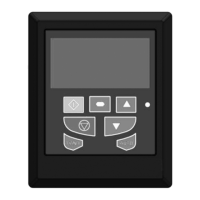

 To Next Page