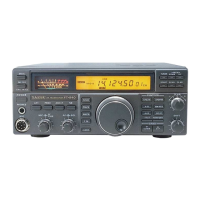
Display
One of these segments lights along with the TONE indicator when the
repeater function
(RPTK
button) is activated in the FM mode, indicat-
ing the direction of repeater offset. TONE indicates the CTCSS tone is
also activated to access CTCSS-controlled repeaters (page 21).
This indicator appears whenever the fast
(x
10) tuning rate is activated by the FAST
button below the tuning knob.
This indicator appears when the auto-
matic antenna tuner detects an abnor-
mally high SWR
that it cannot match.
This indicator appears while the
automatic antenna tuner is seeking
an impedance match with the an-
tenna. It also flashes each time the
main microprocessor sends fre-
quency update data to the tuner mi-
croprocessor (while you tune).
This indicator blinks after pressing the
M
*
VFO or VFO M button, to indi-
cate that Memory ChecKing is active.
While it is
blinkiqg, you can press the
DOWNIUP buttons to check the con-
tents of memories, without affecting op-
eration. Wait 3 seconds and Memory
ChecKing stops. See page 23.
While selecting memories
during Memory
CHecK-
ing, this indicator appears
when the selected mem-
ory is vacant. The fre-
quency display is blank.
---
-
SKIP
-
VFO-A
-
-
I
-vFo-B
I,)
1,1
I,)
,-j
rtKm
1
WMTuNE
MIEM
1
LI
LI
-
I-/
-
17
1
MHz
kHz
These three indicators appear
when the respective functions are
active: split transceive (page
21),
GENeral coverage
(1
00-kHz)
DOWNIUP stepping (page
13),
and dial or panel lock (page 15).
shows the current
VFOImemory
the right of the display, or when
retuning a memory (M TUNE).
-
These two small digits display the
memory number when operating on a
memory. For VFO operation, you can
choose one of two functions:
last-se-
lected memory number (default), or
the 10-Hz digit of the operating fre-
quency (one digit only). Hold the UP
button while switching the transceiver
on to toggle these choices.
This is the current operating fre-
quency, with decimals at the MHz and
kHz positions. The rightmost large
digit is 100's of Hz. The displayed
frequency changes when you trans-
mit with either clarifier offset or split
(Memory scan skip) This indi-
cator appears when display-
ing a memory that has been
selected to be skipped during
memory scanning (page 25).
I
transceive enabled.
I



 To Next Page
 Loading...