19
O1X
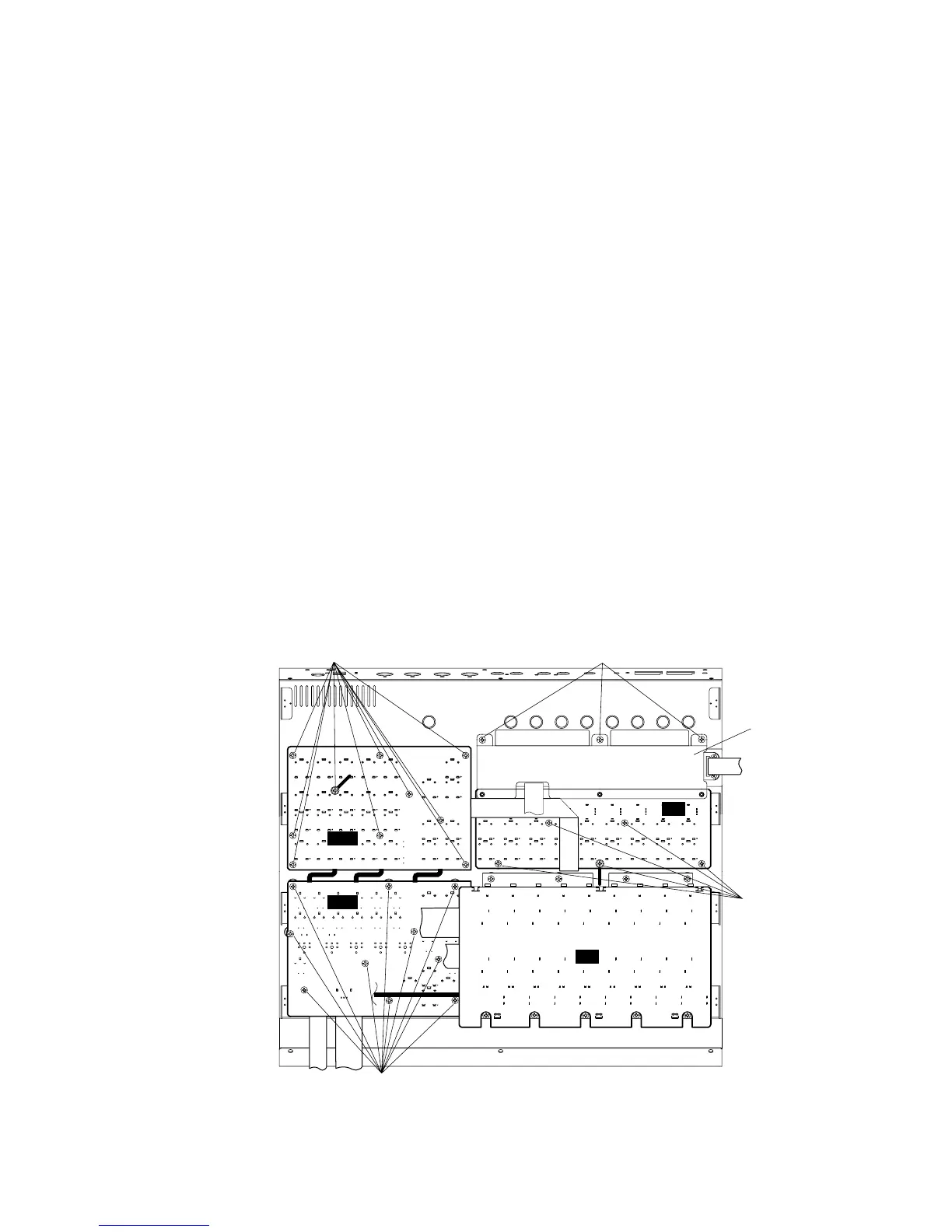
(Fig. 5)
6. PN1 Circuit Board
(Time required : About 4 min.)
6-1. Pull out the dial knob from the control panel. (Fig. 1)
6-2. Remove the side panel L and R. (See procedure 1)
6-3. Remove the bottom cover. (See procedure 2)
6-4. Remove the MF circuit board. (See procedure 5)
6-5. Remove the ten (10) screws marked [32]. The PN1 circuit
board can then be removed. (Fig. 5)
* When installing the PN1 circuit board, tighten the screws
"1 and 2" of those marked [32] first.
6. PN1シート (所要時間:約4分)
6-1. コントロールパネルからダイアルツマミを抜き取り
ます。(Fig.1)
6-2. サイドパネルL、Rを外します。(1項参照)
6-3. ボトムカバーを外します。(2項参照)
6-4. MFシートを外します。(5項参照)
6-5. [32]のネジ10本を外し、PN1シートを外します。(Fig.5)
※ PN1シートの取り付けの際は、[32]ネジ1→2を先に締めま
す。
[26]: Bind Head Tapping Screw-B 3.0 x 6 MFZN2Y (EP600130)
[32]: Bind Head Tapping Screw-B 3.0 x 6 MFZN2Y (EP600130)
[42]: Bind Head Tapping Screw-B 3.0 x 6 MFZN2Y (EP600130)
[52B]: Bind Head Tapping Screw-B 3.0 x 6 MFZN2Y (EP600130)
+バインドBタイト
+バインドBタイト
+バインドBタイト
+バインドBタイト
7. PN2 Circuit Board
(Time required : About 6 min.)
7-1. Remove the side panel L and R. (See procedure 1)
7-2. Remove the bottom cover. (See procedure 2)
7-3. Remove the DM circuit board and MLN2 circuit board.
(See procedure 3)
7-4. Remove the AN circuit board. (See procedure 4)
7-5. Remove the three (3) screws marked [52A]. The AN
support angle can then be removed. (Fig. 3)
* When installing the AN support angle, tighten the screws
"1 and 2" of those marked [52A] first.
7-6. Remove the ten (10) screws marked [42]. The PN2 circuit
board can then be removed. (Fig. 5)
* When installing the PN2 circuit board, tighten the screws
"1 and 2" of those marked [42] first.
7. PN2シート (所要時間:約6分)
7-1. サイドパネルL、Rを外します。(1項参照)
7-2. ボトムカバーを外します。(2項参照)
7-3. DM、MLN2シートを外します。(3項参照)
7-4. ANシートを外します。(4項参照)
7-5. [52A]のネジ3本を外し、ANサポートアングルを外しま
す。(Fig.3)
※ ANサポートアングルの取り付けの際は、[52A]ネジ1→2を
先に締めます。
7-6. [42]のネジ10本を外し、PN2シートを外します。(Fig.5)
※ PN2シートの取り付けの際は、[42]ネジ1→2を先に締めま
す。
1
1
2
2
2
1
MF
RE
PN1
PN2
[42] [26]
[52B]
[32]
LCD shield plate
(LCDシールド板





 To Next Page