Selecting & Playing Voices
YDP-160/140 Owner’s Manual
24
Using the Metronome
Your digital piano features a built-in metronome (a device that keeps an accurate tempo) that is
convenient for practicing.
1. Start the metronome.
Press the [METRONOME] button to turn on the metronome.
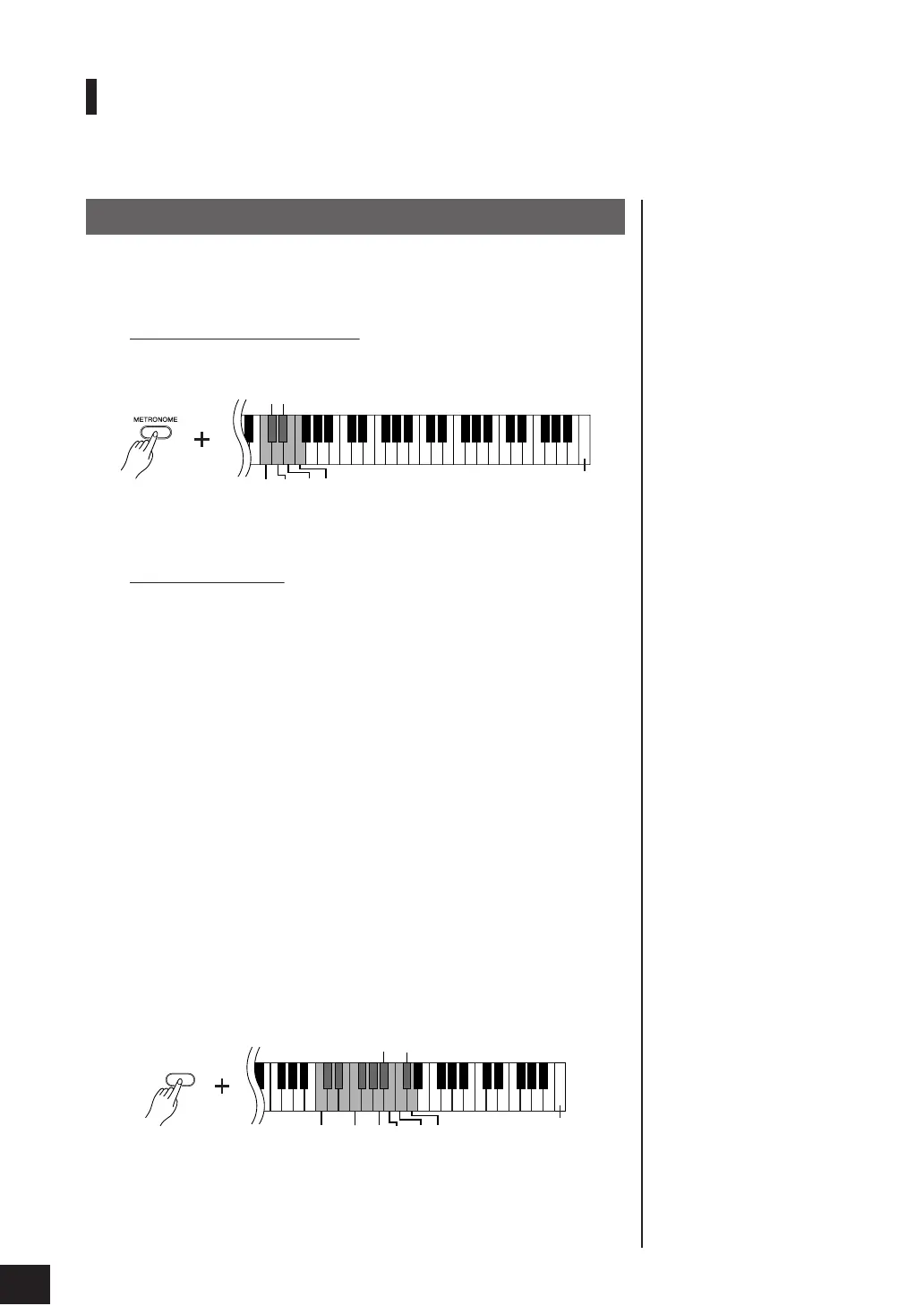
Determines the Time Signature
While holding down the
[METRONOME] button, press one of the C3–F3 keys.
C3 key: No downbeat, C
3 key: 2/4, D3 key: 3/4, D
3 key: 4/4, E3 key: 5/4,
F3 key: 6/4
Adjusting the Tempo
You can adjust the metronome tempo by pressing the
[+] or [–] button while the
metronome is playing.
The tempo of the metronome and preset song playback can be set from 32 to
280 beats per minute.
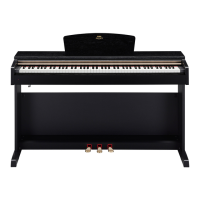
A number is assigned to each of the following keys.
While holding down the
[METRONOME] button, press a sequence of C4–A4
keys to specify a three-digit number.
Select a number starting from the left-most digit. For example, to set the tempo
“95,” press the C4 (0), A4 (9) and F4 (5) keys in sequence.
Increasing the tempo value in steps of one:
While the metronome is playing, press the
[+] button. Alternatively, press and
hold down the [METRONOME] button, and press the C
5 key.
Decreasing the tempo value in steps of one:
While the metronome is playing, press the
[–] button. Alternatively, press and
hold down the [METRONOME] button, and press the B4 key.
Increasing the tempo value in steps of ten:
Press and hold down the [METRONOME] button, and press the D5 key.
Decreasing the tempo value in steps of ten:
Press and hold down the
[METRONOME] button, and press the A
4 key.
To reset the tempo to default
value of 120 while the metro-
nome is stopped, press the
[METRONOME], [+] and [–] but-
tons simultaneously.
Resetting the tempo to default:
While the metronome is playing, press the
[+] and [–] buttons simultaneously.
Alternatively, press and hold down the
[METRONOME] button, and press the
C5 key.
Procedure
D
3
C
3
C3
D3
E3
F3
The highest key
C4 A4F4
METRONOME
024579
8631
C
5
A
4
B4
C5
D5
The highest key
22


 To Next Page