12
AUDIOGRAM 3 Owner’s Manual
Quick Guide
5
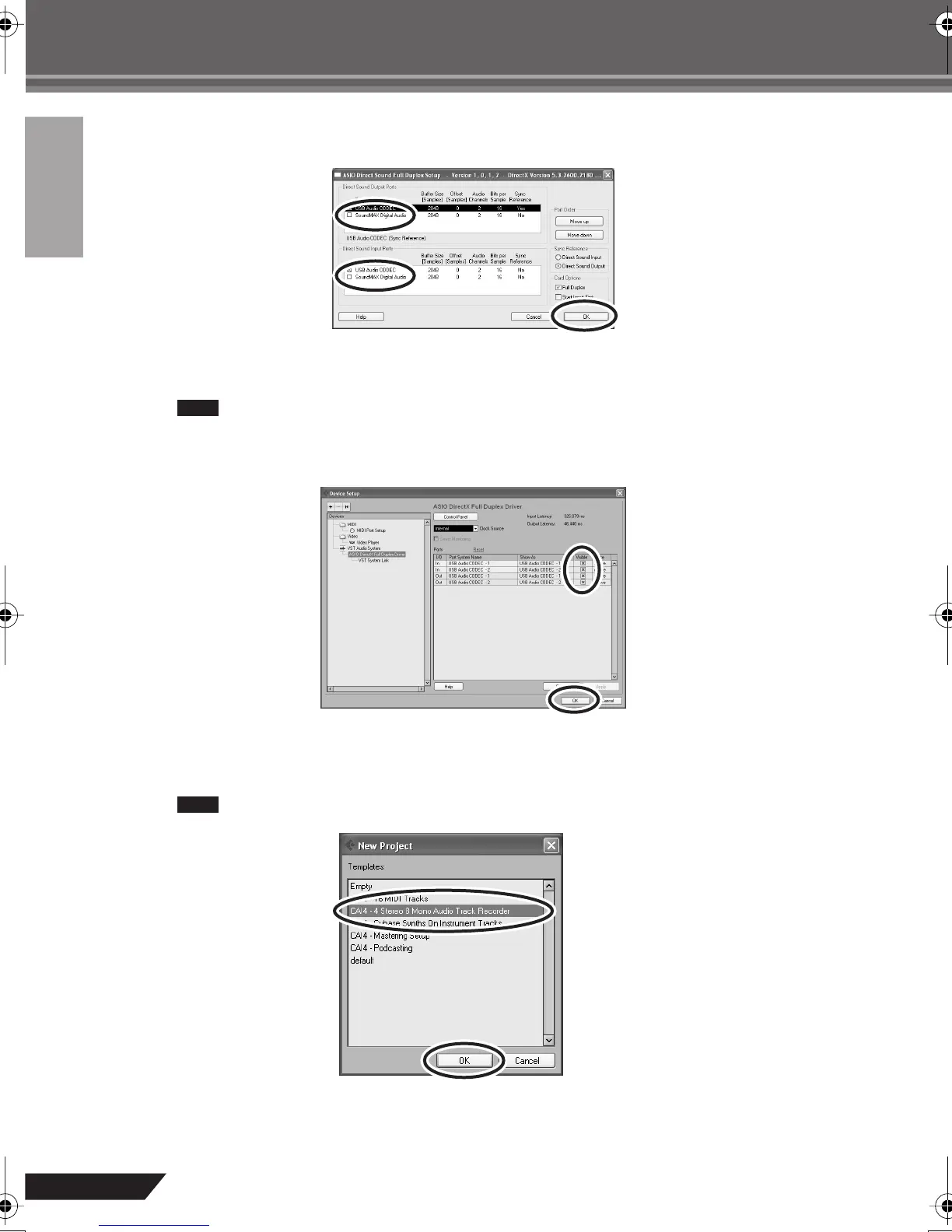
The ASIO Direct Sound Full Duplex Setup dialog box will be displayed. Check only the
input port and output port [USB Audio CODEC] checkbox.
6
Make sure that “USB Audio CODEC 1/2” are shown in the [Port System Name] field, and
check the [Visible] column in the Device Setup window. Click [OK] to close the window.
• If the [Port System Name] field does not change, close and restart the Cubase AI, then
open the Device Setup window.
• The input ports may not be shown if you are using Windows Vista. If so, refer to the “The
input ports are not shown” section in the Troubleshooting section (page 20).
7
Select [New Project] from the [File] menu to create a new project file.
The new project dialog window will open. For this example select [CAI4 - 4 Stereo 8 Mono Audio Track
Recorder] and click [OK].
Recorded Cubase AI data is stored as a “project file”.
NOTE
NOTE
audiogram3en.book Page 12 Wednesday, April 2, 2008 2:40 PM



 To Next Page