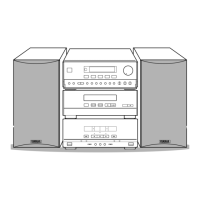
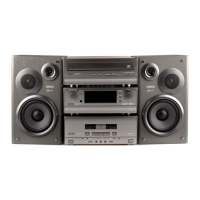
Why can't I set the timer on my Yamaha CC-5 Stereo System?
- JJeanne MendozaSep 8, 2025
If you can’t set the timer on your Yamaha Stereo System, it might be because the current time is not set. Make sure to set the current time on the system.
Why can't I set the timer on my Yamaha CC-5 Stereo System?
If you can’t set the timer on your Yamaha Stereo System, it might be because the current time is not set. Make sure to set the current time on the system.
Why isn't the timer working correctly on my Yamaha CC-5 Stereo System?
If the timer on your Yamaha Stereo System isn’t functioning as expected, make sure you turn off the power using the TIMER button after setting the timer, not the POWER switch.
How to fix a Yamaha CC-5 Stereo System that has no power?
If your Yamaha Stereo System isn't powering on even when you press the power switch, the AC supply lead might not be properly plugged in. Ensure the AC supply lead is securely plugged into the outlet.
Why does the sound stop suddenly on my Yamaha CC-5 Stereo System?
If the sound on your Yamaha Stereo System stops suddenly at the same spot, the disc may be dirty; try cleaning it. Also, the volume might be set too high, so try lowering the volume.
How to improve AM broadcast sensitivity on Yamaha CC-5?
If the AM (LW or MW) broadcast sensitivity is poor on your Yamaha Stereo System, ensure the MW/LW (AM) loop antenna is properly connected. You can also try changing the orientation of the antenna or installing an external MW/LW (AM) antenna.
What to do if Yamaha CC-5 Stereo System doesn't play disc?
If your Yamaha Stereo System doesn't start playing even with a disc loaded, make sure the disc is loaded label side up. Also, the disc might be dirty, so try cleaning it.
What causes buzzing during AM broadcasts on Yamaha CC-5 Stereo System?
If you're experiencing buzzing or static during AM (LW or MW) broadcasts on your Yamaha Stereo System, it could be due to interference from sources like lightning, fluorescent lights, or nearby electrical appliances. While difficult to eliminate, grounding the MW/LW (AM) loop antenna may lessen the noise. Also, move the stereo away from TVs or microprocessors.
Why does noise increase during stereo broadcasts on Yamaha CC-5?
If noise increases during stereo broadcasts on your Yamaha Stereo System, the antenna input might be too weak. Check the antenna connections. If the issue persists, consider installing a multi-element type FM antenna.
Why are Yamaha CC-5 stereo broadcasts noisy?
If stereo broadcasts are noisy and the STEREO indicator blinks on and off on your Yamaha Stereo System, the antenna input may be insufficient. Install an antenna appropriate for the electric field strength of your area.
How to reduce static in FM broadcasts on my Yamaha Stereo System?
If you're getting excessive static in FM broadcasts on your Yamaha Stereo System, it could be due to interference. Try positioning the FM antenna as high and as far away from nearby roads as possible, and connect it using a coaxial cable.
Provides guidelines for CATV system installers regarding grounding.
States that the digital component may not cause harmful interference.
Lists all components included with the system for user verification.
Explains the unit's standby mode and how to fully power it off.
Reminds users about copyright laws for recording.
Provides troubleshooting steps for system freezes or incorrect display indications.
Warns against moisture and details laser beam dangers.
Identifies buttons, displays, and indicators for the CD player section.
Details buttons and indicators for the tuner and timer functions.
Identifies controls for the amplifier, including volume, tone, and input selection.
Details controls for both Tape A and Tape B, including playback and common functions.
Details connectors and switches on the rear of the tuner/CD player unit.
Identifies input/output terminals and power supply connections on the amplifier.
Shows connectors for the tape deck section.
Describes speaker terminals and AST port on the speaker unit.
Explains buttons for controlling CD playback functions via remote.
Details buttons for tuning and station selection using the remote.
Identifies remote buttons for tape deck playback, recording, and dubbing.
Step-by-step guide for inserting batteries into the remote control transmitter.
Instructions on aiming the remote and optimizing signal reception.
Describes recommended ways to arrange the system components.
Details how to connect supplied and external FM/AM antennas for optimal reception.
Instructions for connecting speaker wires to the correct terminals.
Guide for connecting main system units using provided cables.
Steps for plugging the system into an AC power outlet.
Steps to load a disc and start playback from track one.
How to start playback directly or interrupt and resume it.
Instructions on how to stop playback and switch the unit to standby.
Lists common issues and precautions for playing CDs.
How to play specific tracks directly using the remote control.
How to automatically find the beginning of tracks on the CD.
How to manually fast-forward or rewind through a track.
How to select and order up to 20 tracks for playback.
How to review or clear programmed track selections.
How to set the unit to repeat the entire disc or a programmed sequence.
How to set the unit to repeat a single selected track.
How to turn off the repeat playback function.
How to play tracks in a random, unpredictable order.
How to cycle through different time display formats during playback.
How the unit automatically stores strong radio stations.
Step-by-step guide to manually store desired radio stations.
How to select and listen to stored radio stations.
Instructions for switching the unit to standby mode after use.
How to erase all stored radio station presets.
Important notes on tape types, tabs, and deck features.
Steps for loading and playing tapes in either compartment.
How to start playback directly or stop and remove tapes.
How to wind tapes and search for specific selections.
How to set the unit for continuous playback between tapes or sides.
Explanation of Dolby B and C NR systems for hiss reduction.
How to control the overall sound level and speaker balance.
Adjusting bass and treble frequencies for desired sound response.
Selecting sound ambience programs like Hall, Jazz Club, Rock Concert.
How to record CDs onto tape automatically synchronized with playback.
How to pause or permanently stop the recording process.
Procedure for changing the source CD while a recording is in progress.
How to automatically split CD tracks between tape sides for efficient use.
How to cancel the auto editing function or stop the recording.
How to check which tracks will be recorded and which cannot.
How to copy tapes from one cassette to another, including speed options.
How to stop the tape dubbing operation.
Steps to record radio programs onto cassette tape.
How to erase content from cassette tapes.
How to set the timer to automatically play tuner, CD, or cassette.
Guide to setting the timer for recording radio broadcasts.
How to check or disable programmed timer operations.
How to set the unit to automatically turn off after a set time.
How to confirm, change, or stop the sleep timer.
How to coordinate timer playback with sleep timer functions.
How to connect video players or other AUX devices.
Connecting DAT players and turntables to the system.
Guide for connecting headphones and adjusting volume.
Instructions for cleaning tape heads, capstans, and pinch rollers.
How to clean the unit's exterior cabinet safely.
Lists technical details for the tuner and CD player components.
Details power output, consumption, and dimensions of the amplifier.
Provides technical data for the cassette tape deck functions.
Lists technical details for the speaker system, including drivers and power handling.
| Brand | Yamaha |
|---|---|
| Model | CC-5 |
| Category | Stereo System |
| Language | English |
Loading...