EasyManua.ls Logo

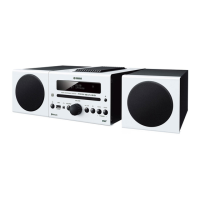
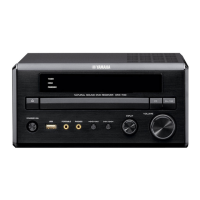
Yamaha PianoCraft DRX-730 - User Manual

Yamaha PianoCraft DRX-730
80 pages
Print Icon
To Next Page IconTo Next Page
Loading...
OWNER'S MANUAL
MICRO COMPONENT SYSTEM
DRX-730
UA

Table of Contents

Questions and Answers

  • T
    Trevor AlvarezSep 2, 2025
    Why can't I play some files on my Yamaha PianoCraft DRX-730 Stereo System via USB?
    • L
      Lisa ScottSep 2, 2025
      If you can't play some files on your Yamaha Stereo System via USB, remember that only MP3, WMA, MPEG-4 AAC, and JPEG files without copy protection (DRM) can be played. Also, ensure you are using supported file formats.
  • C
    Christopher AndrewsAug 25, 2025
    How to fix a Yamaha PianoCraft DRX-730 remote that is not working?
    • J
      Joseph SimsAug 25, 2025
      If your Yamaha Stereo System remote control isn't working, it could be due to several reasons. Ensure you're within the remote's operating range and that the DRX-730's remote control sensor isn't exposed to direct sunlight or inverter-type fluorescent lighting. Also, verify that the correct input source is selected, as some buttons have different functions depending on the source. If none of these help, the batteries may be depleted and need replacing. Here are some steps to try: * Use the remote control within its operating range. * Change the lighting or move the DRX-730. * Select the correct input source. * Replace both batteries with new ones.
  • M
    Mrs. Patricia RobinsonSep 23, 2025
    Why can’t I select foreign language soundtracks or subtitles on my Yamaha PianoCraft DRX-730 Stereo System?
    • J
      jordan34Sep 23, 2025
      If you can’t select foreign language soundtracks or subtitles on your Yamaha Stereo System, the loaded disc may not contain them. See the disc’s packaging for details. Also, operation might be restricted by the disc; use the disc’s menu to select foreign language soundtracks and subtitles.
  • W
    williamsonnancySep 7, 2025
    Why does my Yamaha Stereo System display 'Unknown iPod'?
    • C
      Christine CarterSep 7, 2025
      If your Yamaha Stereo System displays 'Unknown iPod', use only supported iPod models.
  • C
    Courtney PageSep 13, 2025
    How to fix poor reception with outdoor FM antenna on Yamaha Stereo System?
    • A
      Amber BradshawSep 13, 2025
      If reception is poor even with an outdoor FM antenna, it could be due to multipath interference from the FM signal being reflected off obstacles. Adjust the FM antenna’s height, direction, or location.
  • J
    Jessica JonesSep 4, 2025
    How to fix Yamaha PianoCraft DRX-730 noisy radio reception?
    • S
      Shane FrancisSep 5, 2025
      If you're experiencing noisy radio reception on your Yamaha Stereo System: * Make sure the FM antenna is connected properly. * If the signal from the tuned FM station is weak, reduce the noise by switching to Manual Tuning mode, or connect an outdoor FM antenna (sold separately).
  • S
    Sean SimsAug 30, 2025
    Why does my Yamaha PianoCraft DRX-730 DRX-730 turn off unexpectedly?
    • A
      Alicia RivasAug 30, 2025
      If your Yamaha DRX-730 Stereo System turned off unexpectedly, it could be due to: * The sleep timer being set. Turn the DRX-730 back on again. * The Auto Standby function automatically setting the DRX-730 to standby. Check the Auto Standby setting.
  • W
    William PriceSep 16, 2025
    Why can’t I play content stored on a USB mass storage device on my Yamaha PianoCraft DRX-730 Stereo System?
    • M
      Michelle KingSep 16, 2025
      If you can’t play content from a USB device, it could be that not all USB storage devices are recognized by the DRX-730. Try another USB storage device. Only USB storage devices formatted with FAT16 or FAT32 are supported; reformat the USB storage device with FAT16 or FAT32 if necessary. If the USB storage device is connected to a USB hub, connect it directly to the DRX-730’s USB port, as USB hubs are not supported.
  • T
    Tammy KaiserSep 10, 2025
    How to fix 'HDMI ERROR' on Yamaha PianoCraft DRX-730?
    • B
      Brenda ClaySep 12, 2025
      If you see an “HDMI ERROR” message or there’s no picture on the HDMI TV, the wrong HDMI resolution might be selected, or an HDMI error has occurred. Check the HDMI Resolution setting and correct it as necessary. You may also need to reset the HDMI settings.
  • W
    walter22Aug 27, 2025
    Why is my Yamaha Stereo System remote control not working?
    • W
      William DavisAug 27, 2025
      If the remote control for your Yamaha DRX-730 Stereo System isn't working, here are a few things to check: * Make sure you're using the remote within its operating range. * Ensure the DRX-730's remote control sensor isn't exposed to direct sunlight or inverter-type fluorescent lighting. Try changing the lighting or moving the unit. * Verify that the correct input source is selected. * Replace the batteries with new ones.

Summary

Introduction

Features

Lists the key capabilities and playback formats supported by the DRX-730 unit.

Supplied accessories

Details the items included in the package with the DRX-730, such as remote and antennas.

Unit Components Overview

Describes the controls and connectors on the front panel and rear panel of the DRX-730.

Remote Control Functions

Explains the functions of each button on the DRX-730's remote control for operation.

Getting Started

Installing batteries in the remote control

Provides step-by-step instructions for inserting batteries into the remote control.

Connecting speakers

Guides users on how to connect the speaker system to the DRX-730 receiver.

Connecting a TV

Details various methods (HDMI, Component, Composite) to connect the DRX-730 to a TV.

Connecting power cable

Explains how to connect the DRX-730 unit to an AC wall outlet for power.

General Functions

Turning on the DRX-730

Instructions on how to power the DRX-730 unit on and off or put it into standby mode.

Selecting input sources

How to choose between different audio and video sources connected to the DRX-730.

Adjusting the volume

Steps to control the sound output level using the unit or remote control.

Setting the clock

Guide to setting the current time, which is necessary for timer functions.

Playing Discs

Basic Disc Playback

Instructions on loading and starting playback for various disc types like DVD, CD, etc.

Navigating Disc Content

How to select chapters, tracks, languages, and subtitles on a loaded disc.

Advanced Playback Options

Explains repeat, random, and A-B repeat playback functions for enhanced viewing.

Disc Navigation

How to browse and select content using visual thumbnails on screen for specific disc types.

Using the Tuner

Tuning in to radio stations

Explains how to search for and tune into FM and AM radio stations.

Auto and Manual Tuning

Details automatic search and manual frequency adjustment methods for finding radio stations.

Using presets

How to store and recall favorite radio stations for quick access.

Using the Timer

Setting Timer Input Source

Specifies which input source the DRX-730 will use when the timer activates.

Setting Timer Times

Guides on setting the specific on and off times for the DRX-730 to turn on or go to standby.

Enabling;Disabling Timer

Instructions on enabling or disabling the programmed timer functions.

Portable Device Playback

Music Player and iPod Playback

How to connect and play music from portable players and iPods using docks.

USB Playback

Guide to connecting and playing music or viewing photos from USB storage devices.

Bluetooth Playback

How to enjoy music wirelessly from Bluetooth-compatible devices via an optional receiver.

Audio Settings and Video Adjust

Audio Settings

Accesses options to fine-tune audio output like DRC and Dialog for disc playback.

Video Adjust Settings

Allows adjustment of picture quality like brightness, contrast, and sharpness for TV output.

Initial Settings

Initial Settings Menu

Main menu for configuring system parameters including audio, video, and language.

Digital Audio and Video Output Settings

Configures digital audio formats and video output settings for connected displays.

Language and Parental Lock Settings

Manages default languages for menus/subtitles and restricts DVD content playback.

Appendix

Supported Discs and Formats

Lists all compatible disc types and file formats that the DRX-730 can play.

Maintenance and Care

Provides guidance on proper handling, storage, and cleaning of discs and the unit.

Resetting the DRX-730

Instructions on how to restore the DRX-730 to its original factory default settings.

Troubleshooting

Offers solutions to common issues encountered during operation of the DRX-730.

Yamaha PianoCraft DRX-730 Specifications

General IconGeneral
Tuner BandsFM/AM
Frequency Response20Hz - 20kHz
Speaker Impedance6 Ohms
CD PlayerYes
MD Player/RecorderYes
Input Sensitivity150mV (line)
Speakers2-Way Bass Reflex
Total Harmonic Distortion0.05%

Related product manuals