17
CD-1330
CD-1330
The date of update
更新日付
The firmware version
ファームウェアバージョン
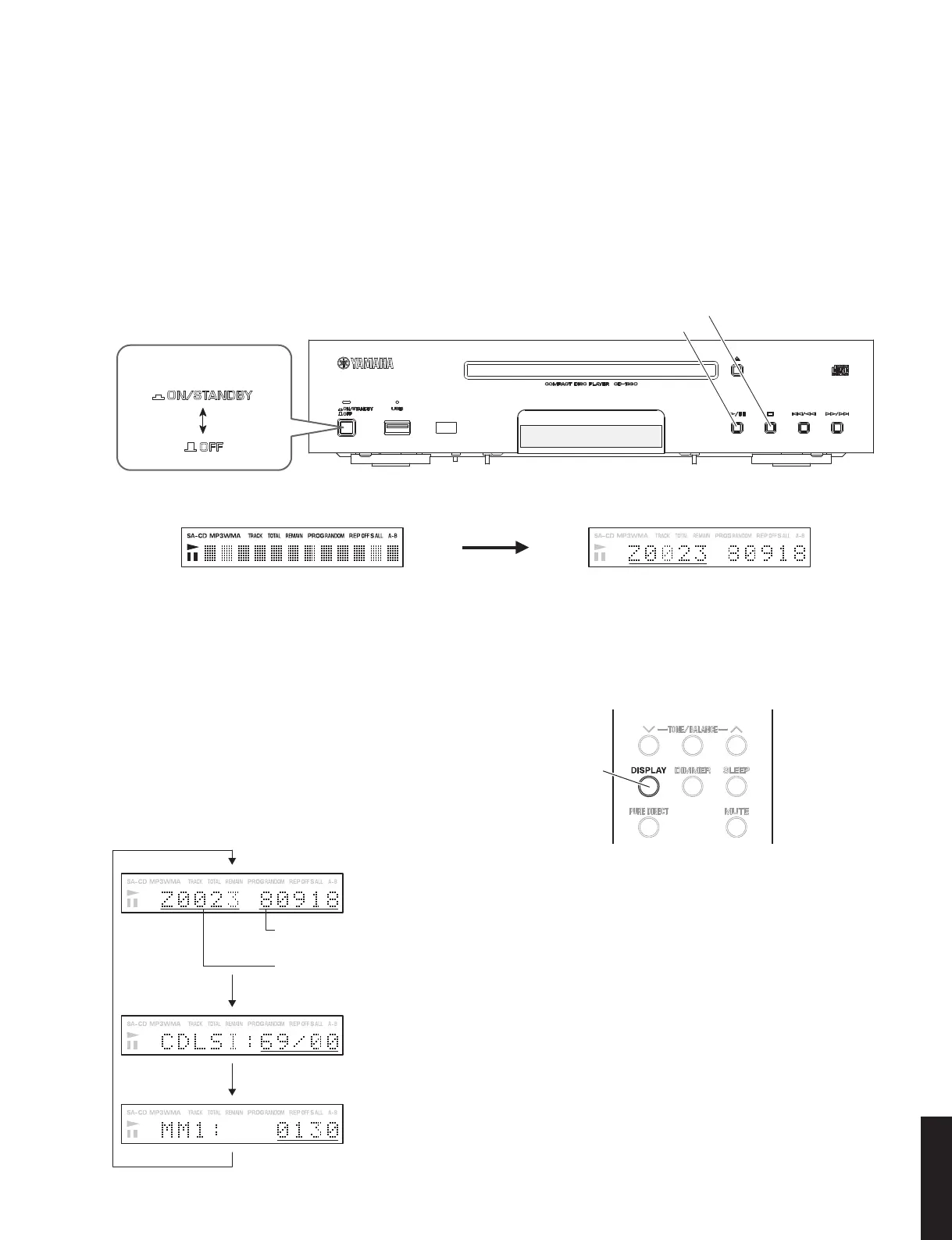
"PLAY/PAUSE" key
"STOP" key
"ON/STANDBY, OFF" switch
Remote control
"DISPLAY" key
Fig. 2
When the power is ON (All light up)
電源オン時(全点灯)
Firmware version of microprocessor is displayed.
マイコンのファームウェアバージョン表示
2. リモコンの “DISPLAY” キーを押すたびに、下図
の順で表示が切り替わります。
2. Every time you press the “DISPLAY” key, the dis-
play changes in the order as shown below.
The firmware version of the microprocessor (IC304) and its date of update are displayed.
(
Initial
display)
マイコン(IC304)のファームウェアバージョンおよび更新日付を表示します。(初期表示)
The firmware version of the CDLSI (IC602) is displayed.
CDLSI(IC602)のファームウェアバージョンを表示します。
The firmware version of the USB-microprocessor (IC604) is displayed.
USB マイコン(IC604)のファームウェアバージョンを表示します。
● Confirmation of firmware version
Before and after updating the firmware, check the firm-
ware version.
1. While pressing the “PLAY/PAUSE” and “STOP”
keys, press the “ON/STANDBY, OFF” switch of this
unit to turn on the power, and then release these 2
keys. (Fig. 1)
The firmware version is displayed. (Fig. 1)
● ファームウェアバージョンの確認
ファームウェア更新の前後に、ファームウェアのバー
ジョンを確認します。
1. 本機の “PLAY/PAUSE” キーと “STOP” キーを押し
ながら、“ON/STANDBY、OFF” スイッチを押して
電源を入れ、これら 2 つのキーを放します。(Fig.1)
ファームウェアバージョンが表示されます。(Fig.1)
Fig. 1



 To Next Page