EasyManua.ls Logo

Yamaha CS-80 - VCO (Voltage Controlled Oscillator)

Yamaha CS-80
56 pages
Print Icon
To Next Page IconTo Next Page
To Previous Page IconTo Previous Page
Loading...
USING THE PROGRAMMABLE
PANELS
TO
DUPLICATE
THE
PRESET
PATCHES
I
28
As
stated
elsewhere
in
this
manual,
the
preset
patches
were all
derived
from
settings
of the
programmable
panels.
Normally,
there
would
be
no
need
to duplicate
the presets
by programming
the
panels.
However,
setting
up
the panels
to emulate
the
presets
can serve
as
a good
point of
departure
for
developing
your
own
patches.
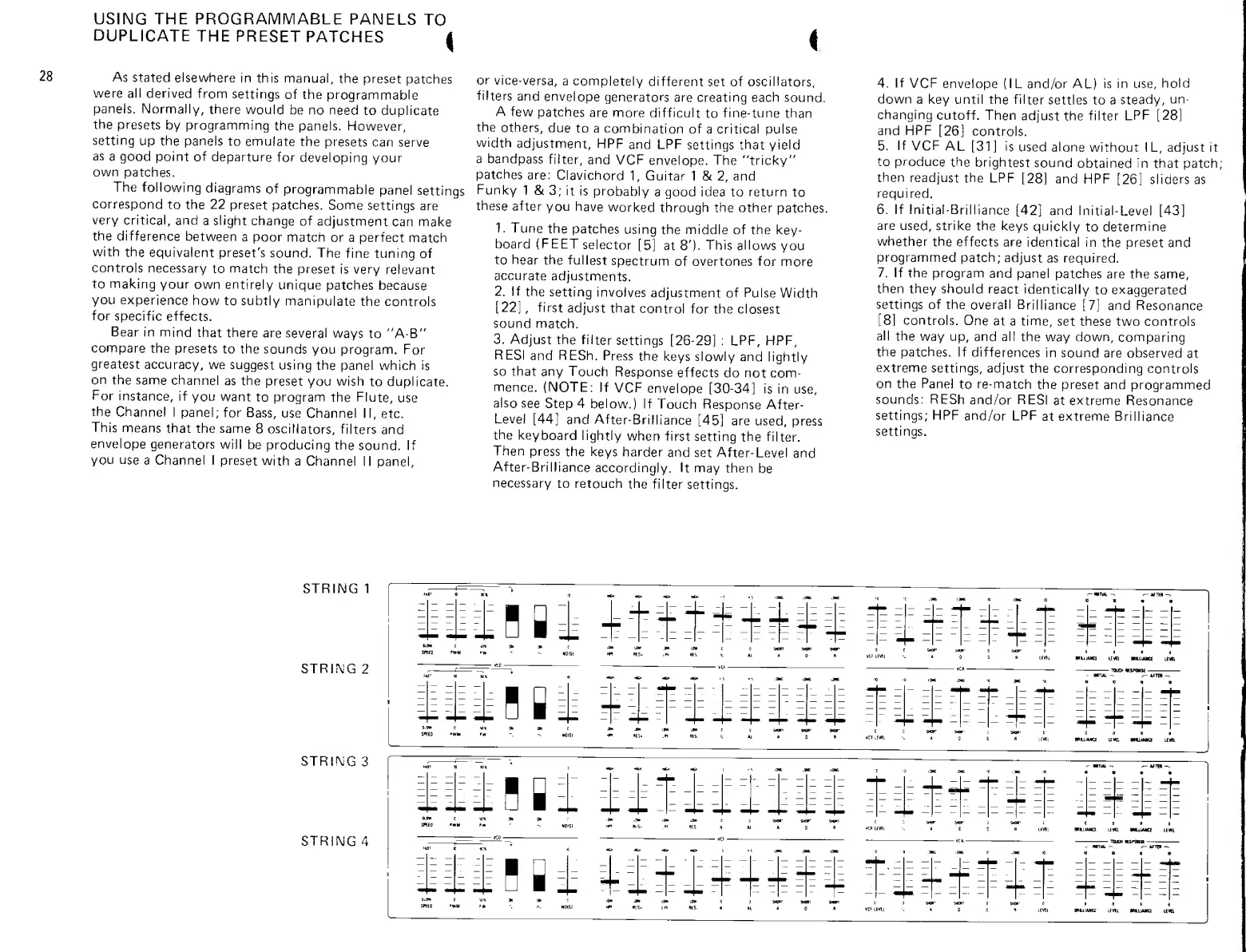
The
following
diagrams
of
programmable
panel
settings
correspond
to the 22
preset
patches. Some
settings
are
very
critical,
and
a slight change
of
adjustment
can
make
the
difference
between
a poor match
or a perfect
match
with
the
equivalent
preset's
sound. The
fine tuning
of
controls
necessary
to
match
the
preset is
very
relevant
to
making
your
own entirely
unique
patches
because
you
experience
how
to subtly
manipulate
the
controls
for
specific
effects.
Bear in
mind
that there
are several
ways
to
"A-B"
compare
the
presets
to the
sounds
you
program.
For
greatest
accuracy,
we
suggest
using
the
panel which
is
on
the same
channel
as
the
preset
you wish
to
duplicate.
For
instance,
if
you
want
to program
the
Flute,
use
the
Channel
I
panel;
for
Bass,
use
Channel
II,
etc.
This
means
that
the
same
8
oscillators,
filters
and
envelope
generators
will be
producing
the
sound.
If
you
use
a Channel I
preset
with
a Channel
1 1 panel.
or
vice-versa,
a
completely
different set of oscillators,
filters
and
envelope
generators
are creating each
sound.
A
few
patches
are
more
difficult
to
fine-tune
than
the
others,
due
to a
combination
of a
critical
pulse
width
adjustment,
HPF
and LPF
settings that
yield
a bandpass
filter,
and
VCF
envelope. The "tricky"
patches
are:
Clavichord
1,
Guitar
1 &
2,
and
Funky
1 &
3;
it is
probably
a good idea to return
to
these
after
you
have
worked
through the
other
patches,
1.
Tune
the
patches
using
the middle
of the
key-
board (FEET
selector
[5]
at
8'),
This
allows
you
to
hear
the
fullest
spectrum
of
overtones
for
more
accurate
adjustments.
2.
If
the
setting
involves
adjustment
of
Pulse
Width
[22]
,
first
adjust
that
control
for the closest
sound
match.
3.
Adjust
the filter
settings [26-29]
:
LPF,
HPF,
RESI
and RESh.
Press
the
keys slowly
and
lightly
so that
any
Touch
Response
effects do
not
com-
mence.
(NOTE:
If
VCF
envelope
[30-34]
is in use,
also
see
Step
4
below.)
If
Touch
Response
After-
Level
[44]
and
After-Brilliance
[45]
are
used,
press
the
keyboard
lightly
when first
setting
the filter.
Then
press
the keys
harder
and set
After-Level
and
After-Brilliance
accordingly.
It may
then
be
necessary
to retouch
the
filter
settings.
4. If
VCF
envelope (IL
and/or AL)
is in use,
hold
down
a key until
the filter
settles to a
steady,
un-
changing
cutoff. Then
adjust
the
filter
LPF
[28]
and HPF
[26]
controls.
5.
If
VCF
AL
[31]
is
used
alone
without IL, adjust it
to produce
the
brightest
sound
obtained
in
that patch;
then
readjust
the
LPF
[28]
and HPF
[26]
sliders
as
required.
6. If
Initial-Brilliance
[42]
and
Initial-Level
[43]
are
used, strike
the
keys
quickly
to
determine
whether
the
effects
are
identical in
the preset and
programmed patch;
adjust
as required.
7. If the
program
and
panel patches
are the
same,
then
they should
react
identically
to exaggerated
settings
of the
overall
Brilliance
[7]
and
Resonance
[8]
controls.
One
at a time,
set these
two controls
all
the
way up,
and all
the
way
down,
comparing
the patches.
If
differences
in sound
are observed
at
extreme
settings, adjust
the corresponding
controls
on the Panel
to
re-match
the
preset and
programmed
sounds: RESh
and/or RESI
at
extreme
Resonance
settings; HPF
and/or
LPF
at
extreme
Brilliance
settings.
STRING 1
STRIMG
2
UUiHB^rr
^WTIAL^
^tiiTBI-,
LEVfi
HrHiUUm
LEA
BOUUCE
L£V&
TTKjt
mimm
iHllBli
;.
-"-
-^ *-
-=
-^
jm
J.6
10 '9
iH
.M
'0
.M -n
S«tD >WM
wuiMci
Liw.
aniMa n*
STRIMG
3
STRING
4
lilHIl
::-
-
J
.W .DW
:
--
z I
iE?=E==
=
<KtV 'MM Hi
tKAiMKi
Liva
muMta
uvs
nLiii
lEVEl
HtLlMHCf
li«t

Other manuals for Yamaha CS-80

Related product manuals