<
f
38
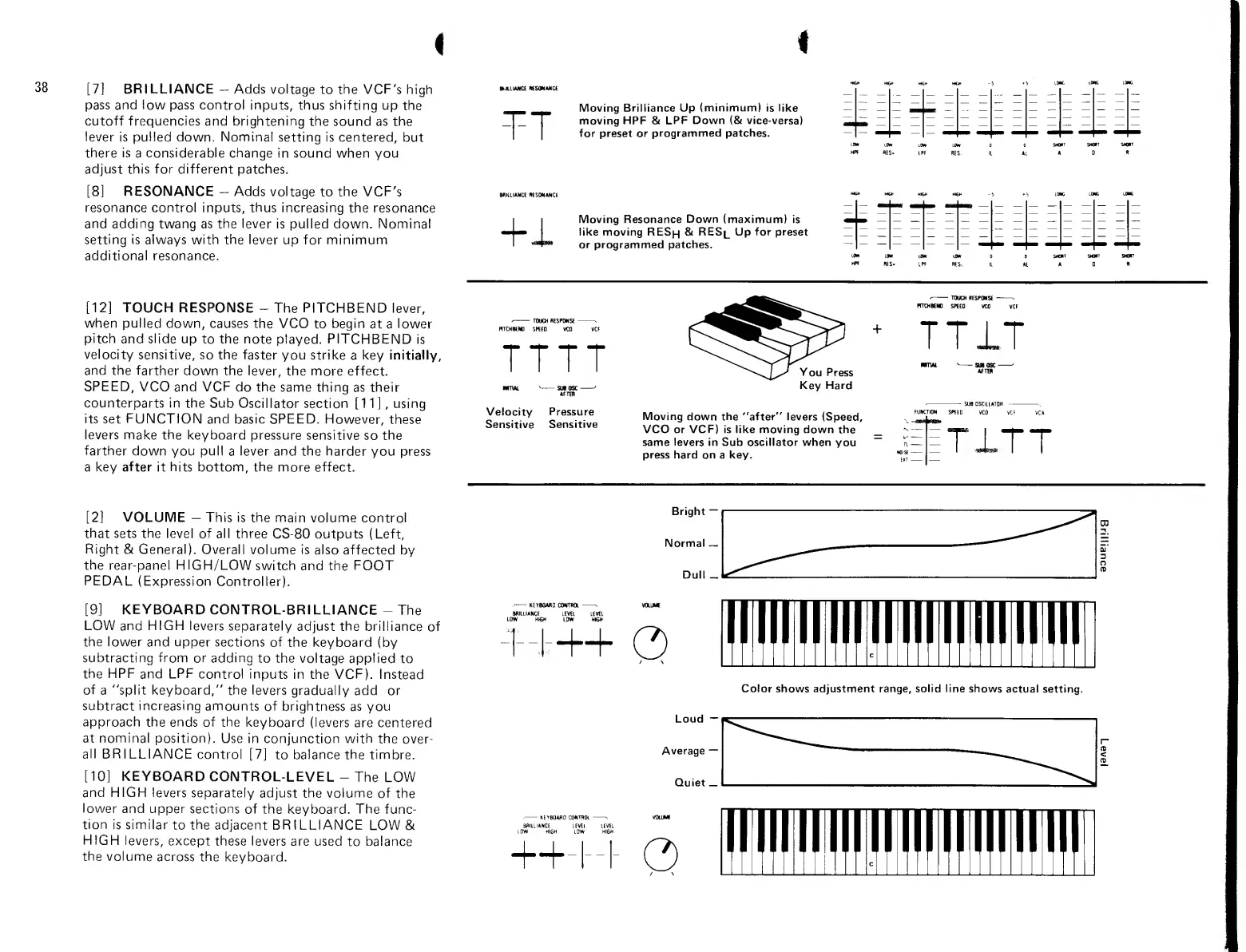
[7]
BRILLIANCE
-
Adds
voltage
to
the VCF's
high
pass and
!ow
pass
control inputs,
thus shifting up
the
cutoff frequencies and brightening
the
sound as
the
lever
is
pulled
down.
Nonninal
setting
Is
centered,
but
there
is
a
considerable change
in sound when
you
adjust this for different
patches.
[8]
RESONANCE
-
Adds
voltage
to
the VCF's
resonance
control inputs,
thus
increasing
the resonance
and adding
twang as
the lever
is pulled down. Nonninat
setting ts always with the lever
up for minimunn
additional
resonance.
BKlLIANa KSONANCf
T-T
BRIUIANCE
nSMANCE
I
«^H^
Moving Brilliance Up
(minimum)
is
like
moving HPF &
LPF Down
(&
vice-versa)
for preset
or
programmed
patches.
Moving Resonance Down (maximum)
is
like moving RES|-| & RES|_ Up for preset
or
programmed patches.
[12]
TOUCH RESPONSE
-
The
PITCHBEND
lever,
when pulled
down, causes the VCO
to
begin
at a
lower
pitch
and slide up
to
the
note
played.
PITCHBEND
is
velocity
sensitive,
so the
faster
you
strike
a
key
initially,
and
the farther
down the
lever, the
more effect.
SPEED,
VCO and VCF
do
the
same thing
as
their
counterparts in
the
Sub Oscillator section
[11],
using
its
set
FUNCTION
and
basic
SPEED.
However,
these
levers
make the
keyboard pressure sensitive
so
the
farther
down
you
pull
a
lever
and the harder
you press
a key
after
it
hits
bottom,
the
more effect.
-
TOOCH B£SPO«SE
-
FTTCHKND
SPEED
TTTT
Velocity
Sensitive
Pressure
Sensitive
^
TTIT
You
Press
Key Hard
Moving
down
the
"after" levers
(Speed,
VCO or VCF) is like moving down
the
same levers in Sub oscillator when
you
press hard
on
a
key.
'
SUB QSCIllATaH
.
FUNCTION
SPEED
VCO VCF
VCA
TITT
[2]
VOLUME
—
This
is the main
volume control
that
sets
the
level
of
all
three
CS-80 outputs (Left,
Right
&
General).
Overall
volume is
also
affected by
the
rear-panel
HIGH/LOW
switch
and the FOOT
PEDAL
(Expression
Controller).
[9]
KEYBOARD
CONTROL-BRILLIANCE
-
The
LOW
and
HIGH
levers
separately
adjust
the
brilliance
of
the lower
and upper sections
of the keyboard
(by
subtracting from
or adding
to the
voltage applied
to
the
HPF
and
LPF
control
Inputs
in the VCF).
Instead
of
a "split keyboard,"
the levers
gradually add
or
subtract increasing
amounts
of brightness
as
you
approach
the ends
of
the
keyboard
(levers
are centered
at nominal
position).
Use in conjunction with
the
over-
all
BRI
LLIANCE
control
[7]
to
balance the timbre.
[10]
KEYBOARD
CONTROL-LEVEL
-
The
LOW
and HIGH
levers
separately adjust
the volume
of the
lower
and upper
sections
of the keyboard.
The
func-
tion
is similar
to
the
adjacent BRILLIANCE
LOW &
HIGH
levers,
except
these levers
are used
to
balance
the volume
across the
keyboard.
-
KEVBOAfiC
COKTftOt
-
o
llllilll
Color shows adjustment range, solid line shows
actual setting.
LOW HIGH
LCrW
HIGH
++-
o
liilMll


 To Next Page