34
DBR10/DBR12/DBR15
Troubleshooting
If you fail, check wire connection and the following parts.
CPU(PCBDSP:IC504-47pin)→LIMITLED
CPU(PCBDSP:IC504-46pin)→SIGNALLED
CPU(PCBDSP:IC504-45pin)→PROTECTIONLED
CPU(PCBDSP:IC504-44pin)→POWERLED
CPU(PCBDSP:IC504-43pin)→D-CONTOURLED
トラブルシューティング
失敗した場合、次の部品及び結線を確認します。
CPU(PCBDSP:IC504-47pin)→LIMITLED
CPU(PCBDSP:IC504-46pin)→SIGNALLED
CPU(PCBDSP:IC504-45pin)→PROTECTIONLED
CPU(PCBDSP:IC504-44pin)→POWERLED
CPU(PCBDSP:IC504-43pin)→D-CONTOURLED
3-5. SWITCH inspection
Inspect On | Off status of D-CONTOUR switch.
Inspect On | Off status of HPF switch.
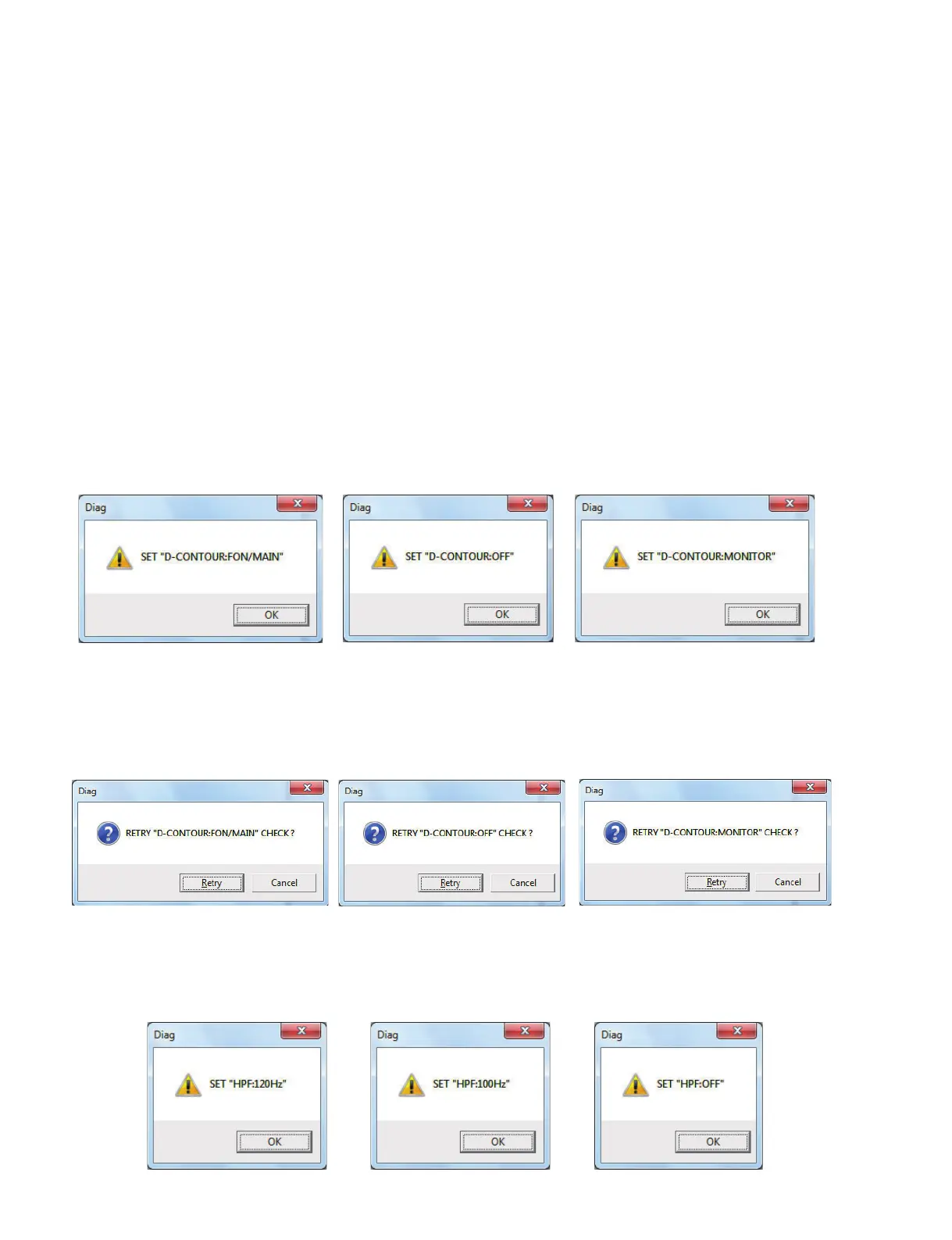
[D-CONTOUR switch inspection]
Following the window below, the state of each switch is
operated. After “OK” button ispressed, the status of switch
is inquired to fi rmware side and judged automatically.
[HPF switch inspection]
Following the window below, the state of each switch is
operated. After “OK” button ispressed, the status of switch
is inquired to fi rmware side and judged automatically.
If status received from fi rmware is not the one intended,
whether or not to performagain the test that status of
switch is the same is confirmed. The test is performed
again with “Retry” button, and not performed again with
“Cancel” button.
3-5. SWITCH検査
D-CONTOURスイッチのON¦OFF状態を検査します。
HPFスイッチの ON¦OFF状態を検査します。
[D-CONTOUR スイッチ検査 ]
下の画面の表示に従い、各スイッチの状態を操作し
ます。「OK」ボタンを押下した後に、ファームウェ
ア側にスイッチの状態を問い合わせて、自動判定し
ます。
[HPF スイッチ検査 ]
下の画面の表示に従い、各スイッチの状態を操作しま
す。「OK」ボタンを押下した後に、ファームウェア側
にスイッチの状態を問い合わせて、自動判定します。
ファームウェアから受信した状態が意図した状態で
ない場合は、同一スイッチ状態のテストを再度実行
するか確認します。「Retry」ボタンで再テストを行
い、「Cancel」ボタンで再テストを行いません。





 To Next Page