Other connections
16 En
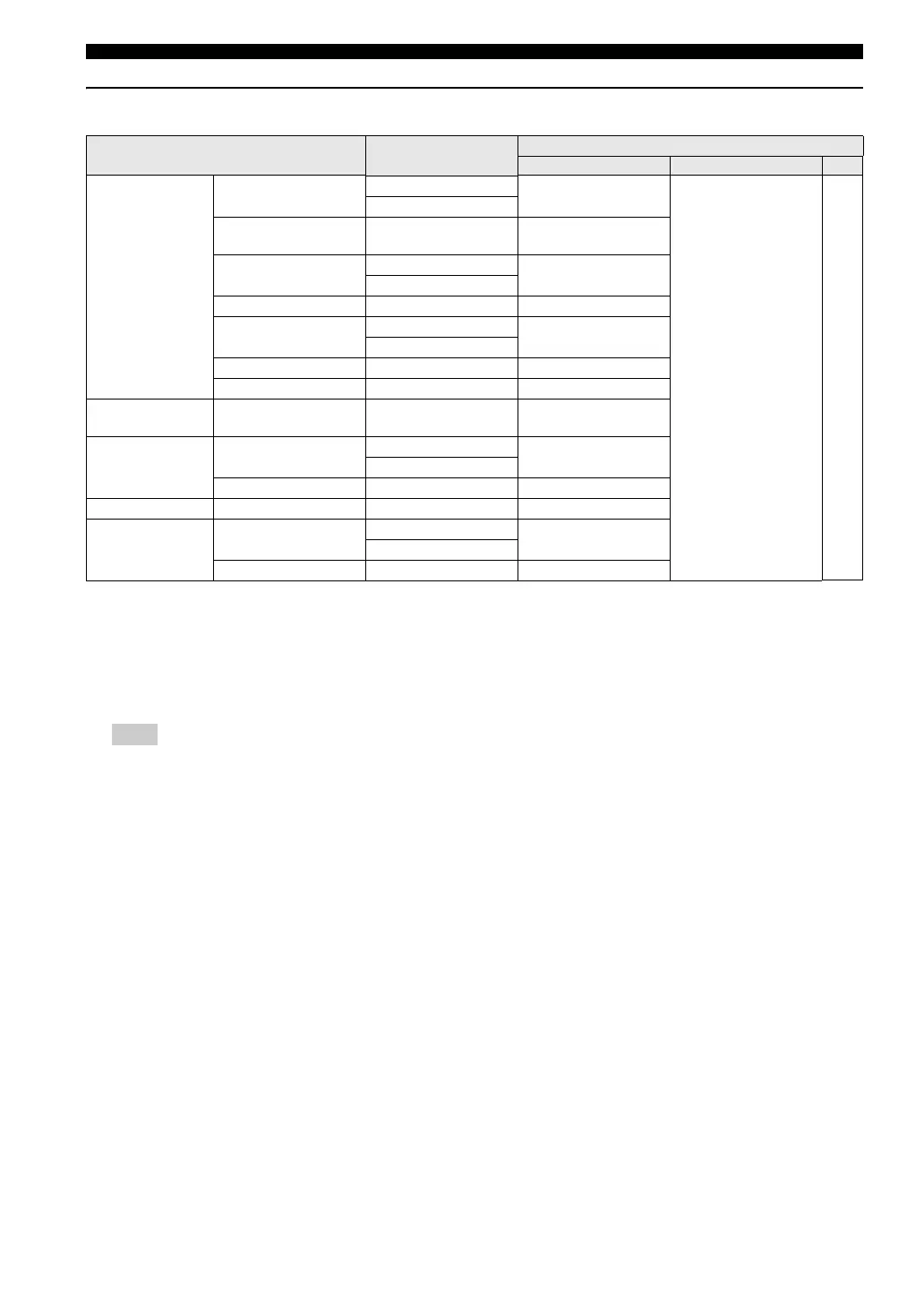
HDMI audio output
*1
The audio output is automatically changed from multi-channel audio signals to downmixed stereo signals.
*2
If the connected HDMI component does not support bitstream signals (Dolby Digital, DTS, and MPEG), the audio output is
automatically changed from bitstream signals to PCM signals.
*3
If the connected HDMI component does not support multi-channel audio signals, the audio output is automatically changed from
PCM multi-channel signals to PCM stereo signals and 48 kHz/16 bits signals or less.
*4
If the connected HDMI component does not support more than 48 kHz, the audio output is automatically changed to 48 kHz/16 bits
signals or less.
You need to set [HDMI AUDIO OUT] (see page 36).
Audio format Analog output
HDMI AUDIO OUT
AUTO PCM OFF
DVD-Video
Dolby Digital Multi-
channel
Multi
*1
Dolby Digital
*2,3
PCM 2-channel Off
Stereo
Dolby Digital
2-channel
Multi
*1
/Stereo Dolby Digital
*2
DTS
Multi-channel
Multi
*1
DTS
*2,3
Stereo
DTS 2-channel Multi
*1
/Stereo DTS
*2
MPEG
Multi-channel
Multi
*1
MPEG
*2,3
Stereo
MPEG 2-channel Multi
*1
/Stereo MPEG
*2
PCM 2-channel
*4
Multi
*1
/Stereo PCM 2-channel
CD/MP3/WMA/
DivX
®
2-channel Multi
*1
/Stereo PCM 2-channel
DTS-CD
Multi-channel
Multi
*1
DTS
*2,3
Stereo
2-channel Multi
*1
/Stereo DTS
*2
VCD 2-channel Multi
*1
/Stereo PCM 2-channel
SVCD
Multi-channel
Multi
*1
MPEG
*2,3
Stereo
2-channel Multi
*1
/Stereo MPEG
*2
Note





 To Next Page