5 En
English
INTRODUCTION
1
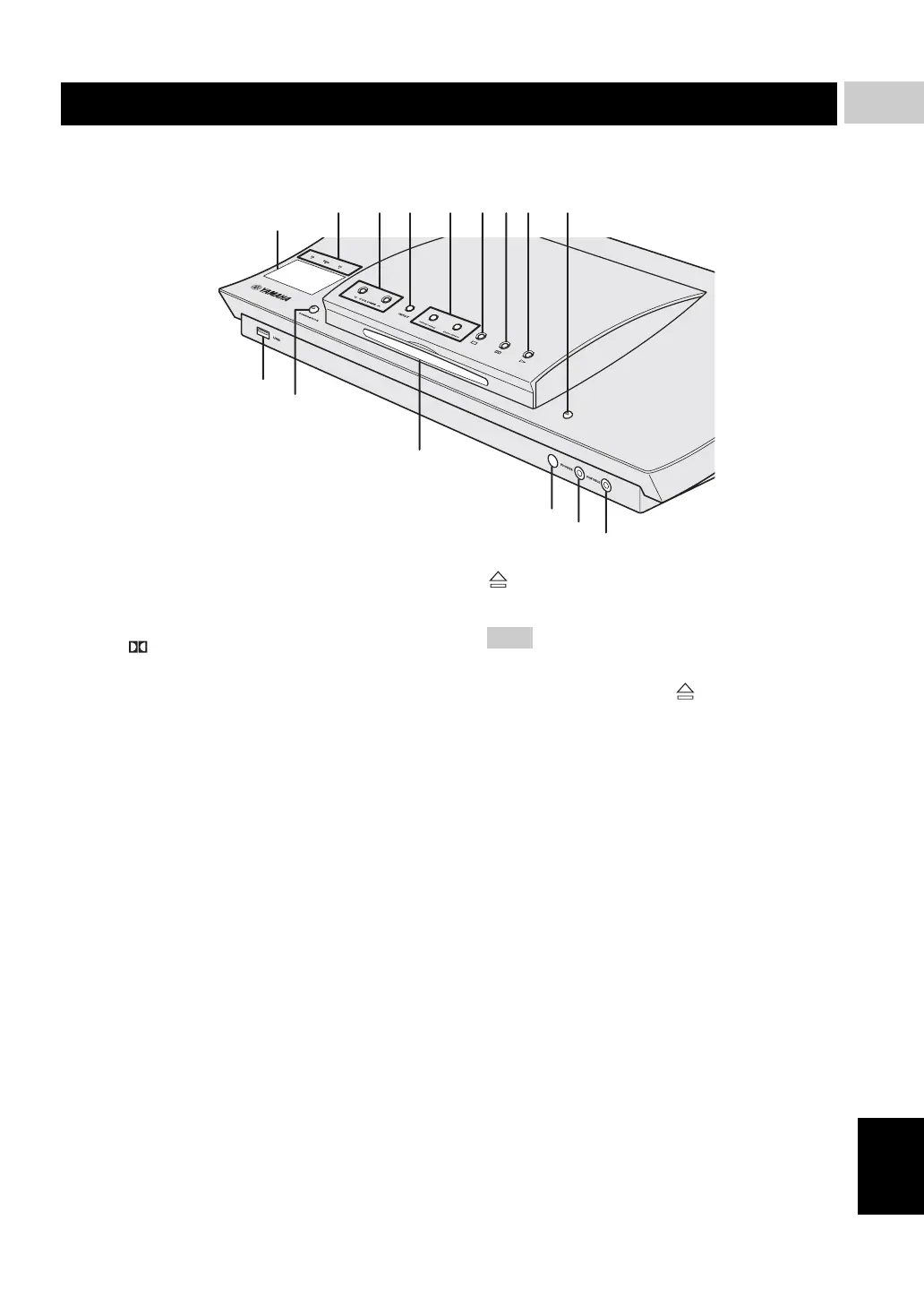
■ Top and front panels (DVR-1000)
1 System display panel
Shows information about the operational status of the
unit.
2 PCM/ Digital/DTS indicator
Indicates the format of the audio being played back.
3 d VOLUME u
Adjusts the volume level.
4 INPUT
Selects input source or sets the priority level for the
audio input signals.
5 b/w, f/a
DVD/CD mode: selects the previous/next track or
chapter. Press and hold to fast forward or fast reverse.
TUNER mode: tunes the radio preset up/down.
USB mode: selects the previous/next track. Press and
hold to fast forward or fast reverse.
6 s
Exits an operation.
DVD/CD mode: stops disc playback.
TUNER mode: erases a preset radio station in Preset
mode if held more than two seconds, or stops preset
radio station installation in Auto Preset mode.
USB mode: stops playback.
7 e
DVD/CD mode: pauses disc playback.
USB mode: pauses playback.
8 h
DVD/CD mode: starts disc playback.
USB mode: starts playback.
9
Ejects a disc in the DVD receiver.
Do not push the ejected disc when reloading it. To
reload the ejected disc, press or h, or remove the
disc from the disc loading slot fully, then insert it to
the disc loading slot once again.
0 USB terminal
Connect to the USB connector of your USB device
(see page 19).
A STANDBY/ON
Turns on the DVD receiver, or sets it to the standby
mode (see “Turning the auto standby function on/off”
on page 35).
B Disc loading slot
Insert a disc to be played.
C Remote control sensor
Point the remote control towards this sensor.
D PHONES jack
Connects headphones.
E PORTABLE jack
Connects a portable audio player.
When this input source is selected, “FRONT IN”
appears on the system display panel.
Functional overview
7 8 965432
E
C
D
B
A
0
1
Note











 To Next Page