37
EAD10 Owner’s Manual
Creating Your Own Scene
Basic Guide
Using Imported Sounds (.wav)
You can import audio files (.wav) into the EAD10 to use as Trigger Sounds.
For more information on importing audio files and settings, refer to the Reference Manual (Advanced) (PDF). (MENU/Job/
Wave)
For more information on using a USB flash drive, see “Using a USB Flash Drive” (page 30).
Saving a Scene Under a New Name
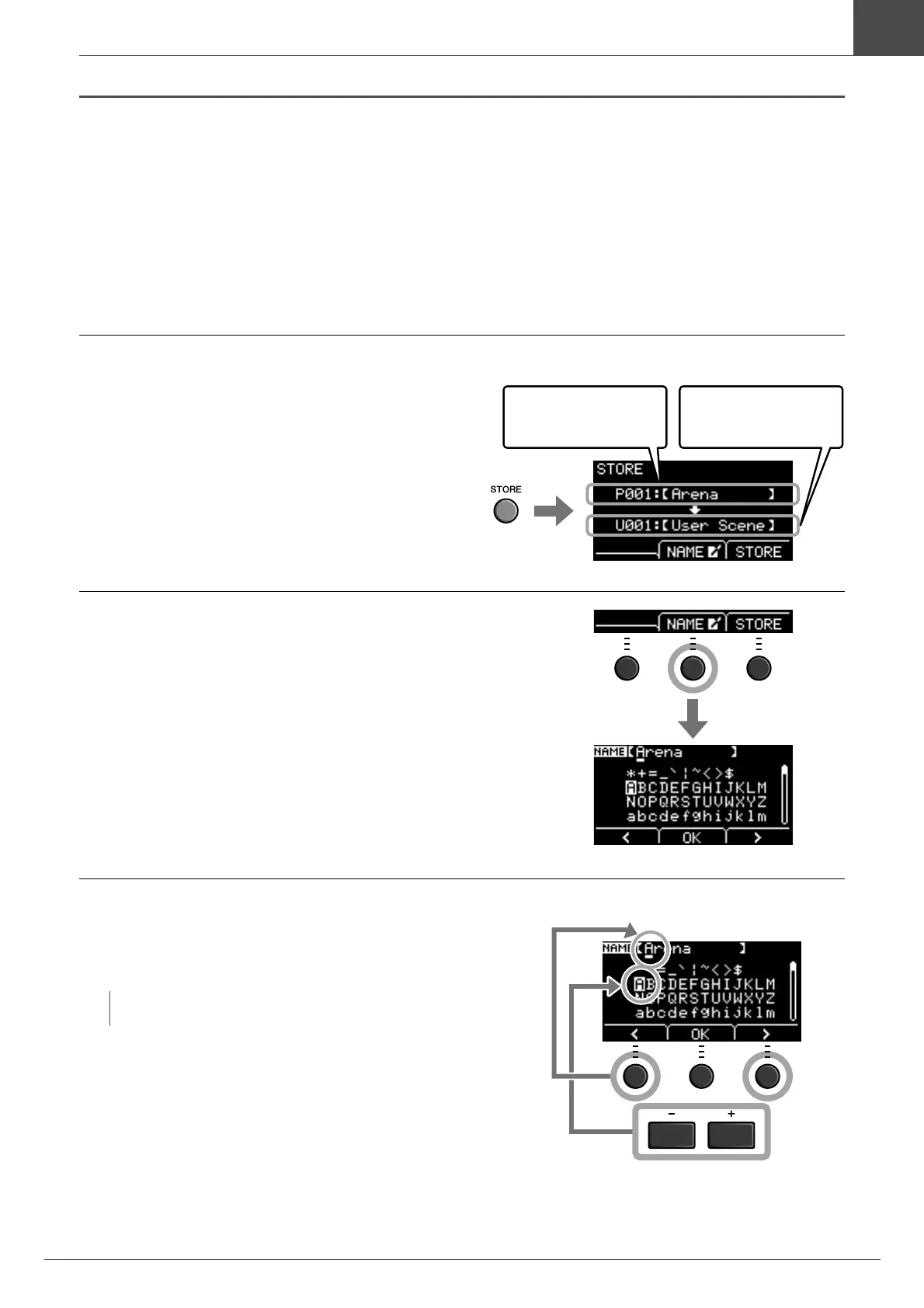
1.
Press the [STORE] button.
The STORE screen opens.
2.
Press the button below “NAME” ([F2)] to
open the NAME screen.
3.
Use the buttons below “<” or “>” ([F1] or
[F3]) to select the character position, then
use the [–] or [+] buttons to select a letter.
A name of up to 10 characters can be set to the Scene.
NOTE
You can also use the [SCENE] knob to select characters.
User Scene number and
User Scene name of the
Scene you are editing.
User Scene number and
User Scene name of the
Store Destination
Character position (cursor)
Character you
want to enter



 To Next Page