38
EAD10 Owner’s Manual
Creating Your Own Scene
Basic Guide
4.
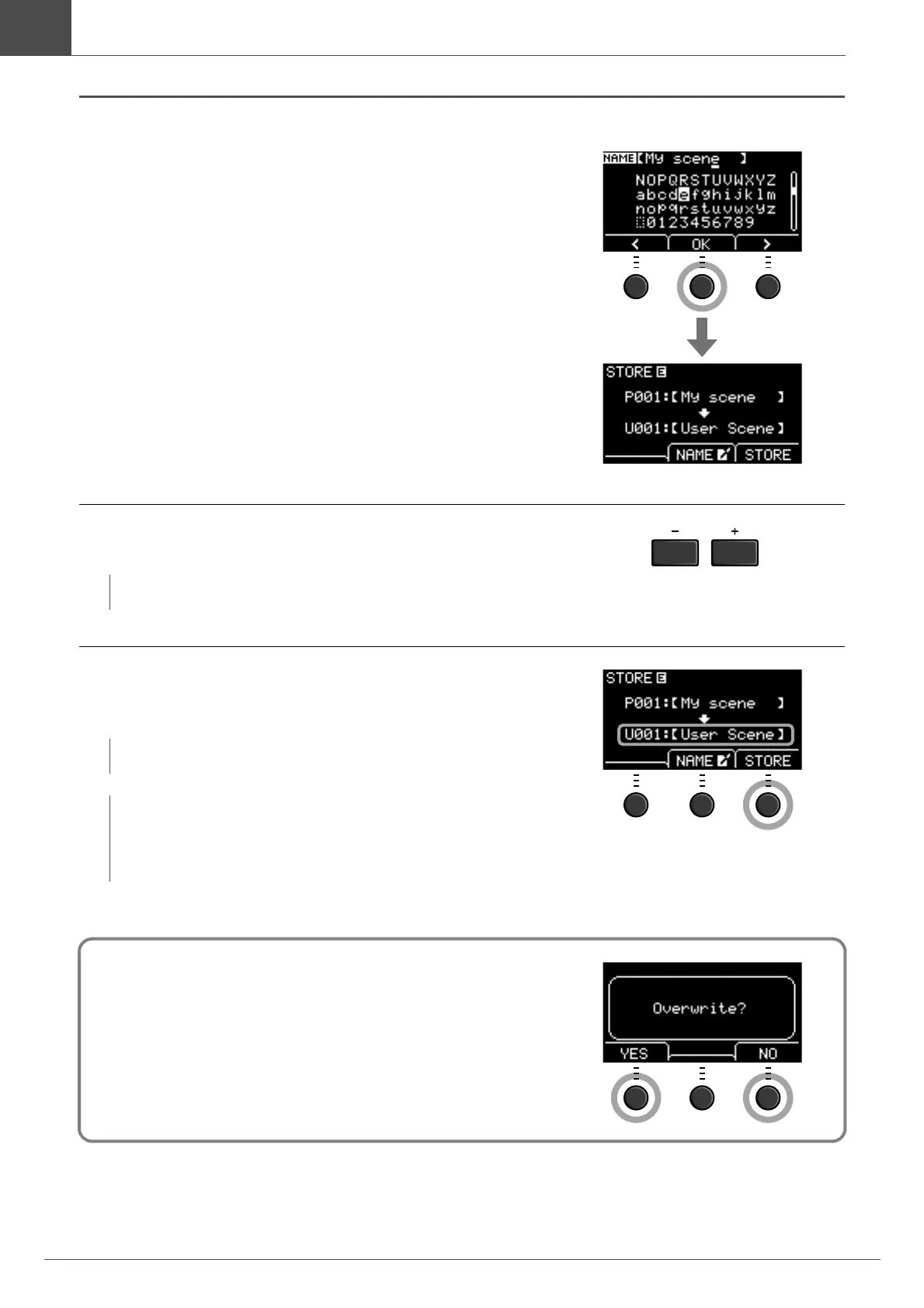
After entering all characters, press the but-
ton below “OK” ([F2]) and return to the
STORE screen.
5.
Use the [–] or [+] buttons to select a User
Scene Number to store your Scene to.
6.
After confirming the new Scene Number and
Scene Name, press the button below
“STORE” ([F3]).
When the Store operation is complete, the display returns to the Scene screen.
NOTE
You can also use the [SCENE] knob to make changes.
NOTE
You cannot save an edited Scene to a Preset Scene.
NOTICE
When overwriting a Scene, the current Scene settings
are replaced with the new settings. Before overwriting a
Scene, ensure that the Scene contains no irreplaceable
settings.
“Overwrite?” appears when the selected Scene Number already con-
tains a Scene.
If you want to overwrite to save the Scene, press the button below
“YES” ([F1]).
If you do not want to overwrite, press the button below “NO” ([F3])
and return to the previous screen where you can select another Scene
number.


 To Next Page