EasyManua.ls Logo

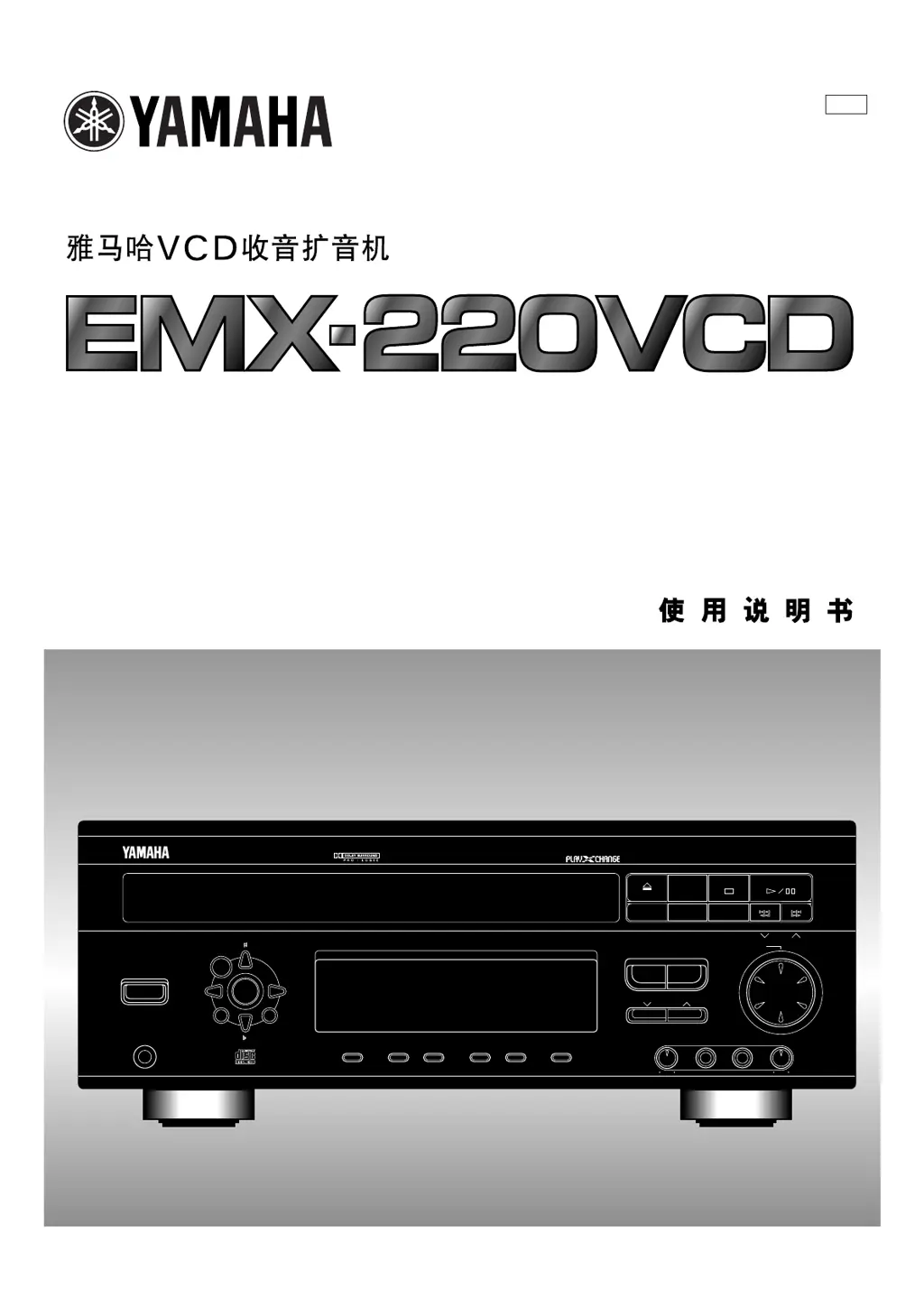
Yamaha EMX-220VCD - User Manual

Yamaha EMX-220VCD
58 pages
Print Icon
To Next Page IconTo Next Page
Loading...
VOLUME
INPUT SELECTOR
VCR• LD/TV• VCD/CD• TAPE/MD• TUNER
VCD/CD TUNER
MIC TONE MIC MIC MIXING
SOFTNORMAL MAXMIN
STANDBY/ON
PHONES
KARAOKE
PROGRAM
ECHO ECHO
MEMORY
MUSIC
DISPLAY MEMORY AUTO/MAN’L REPEAT TIME
TIME ADJ TIMER HOUR MIN
INPUT TRIM
VIDEO CD CHANGER RECEIVER EMX-220VCD
PRESET/TUNING/BAND
A/B/C/D/E
OPEN/CLOSE
DISC 1 DISC 2 DISC 3
DISC
CHANGE
VIDEO CD
Version 2.0
/
Playback Control
VIDEO CD CHANGER RECEIVER
OWNER’S MANUAL
T L

Questions and Answers

  • D
    Dominique IbarraSep 23, 2025
    How to improve AM broadcast sensitivity on Yamaha EMX-220VCD?
    • J
      Jerry SimmonsSep 23, 2025
      If AM broadcast sensitivity is poor on your Yamaha CD Player, properly connect the AM loop antenna. If that doesn't help, try changing the orientation of the AM loop antenna or install an external AM antenna.
  • A
    Alison BlackAug 23, 2025
    How to fix Yamaha CD Player remote control that doesn't work?
    • S
      Stephanie JacksonAug 25, 2025
      If the remote control transmitter for your Yamaha CD Player isn't working, first, replace the batteries. If that doesn't solve the issue, make sure you're within a 6-meter range and 60° radius of the unit. Also, check if direct sunlight or strong lighting is hitting the unit's remote control sensor; if so, reposition the main unit.
  • J
    Jacqueline PetersonAug 25, 2025
    Why Yamaha EMX-220VCD fails to turn on?
    • E
      edwardsjustinAug 26, 2025
      If your Yamaha CD player is not turning on, ensure the AC supply lead is properly plugged in.
  • H
    hguerreroAug 27, 2025
    What to do if Yamaha EMX-220VCD CD Player playback will not begin even if disc is loaded?
    • J
      jacob77Aug 27, 2025
      If your Yamaha CD player isn't playing even with a disc loaded, ensure the disc is placed label side up. If it still doesn't work, the disc might be dirty, so try cleaning it.
  • A
    Angela HernandezAug 27, 2025
    How to reduce static in FM broadcasts on Yamaha CD Player?
    • C
      colelindaAug 27, 2025
      If you're experiencing excessive static during FM broadcasts on your Yamaha CD Player, try positioning the FM antenna as high and as far away from nearby roads as possible, and connect it using a coaxial cable.
  • J
    julie99Sep 15, 2025
    Why sound stops suddenly on Yamaha CD Player?
    • R
      richardsrobertSep 15, 2025
      If the sound stops suddenly at the same spot on your Yamaha CD Player, the disc might be dirty, so try cleaning it. Alternatively, the volume might be set too high, so try lowering it.
  • A
    Angela GriffinSep 12, 2025
    Why volume level cannot be increased on Yamaha EMX-220VCD?
    • A
      Amy BartlettSep 12, 2025
      If the volume level cannot be increased or the sound is distorted on your Yamaha CD Player, check if the component connected to the TAPE/MD OUT or VCR OUT terminals is turned off. If it is, turn it on.
  • M
    Makayla TaylorSep 14, 2025
    Why Yamaha EMX-220VCD a disc cannot be played back normally?
    • A
      Amanda MooreSep 14, 2025
      If a disc cannot be played back normally or there is noise during playback on your Yamaha CD Player, it may be due to playing a nonstandardized disc. Try playing a different disc.
  • B
    bturnerSep 5, 2025
    How to fix noise increasing during stereo broadcasts on Yamaha EMX-220VCD?
    • C
      Chad MaddoxSep 5, 2025
      If your Yamaha CD player is experiencing noise during stereo broadcasts, check the antenna connections. If the antenna input is weak due to obstructions or distance, consider installing a multi-element type FM antenna.
  • R
    Robert GoodwinSep 2, 2025
    How to fix no sound from the center speaker on Yamaha EMX-220VCD CD Player?
    • M
      Mrs. Samantha HughesSep 2, 2025
      If you're not getting any sound from the center speaker on your Yamaha CD player, first, check if the sound output level to the center speaker is set to minimum and increase it. If that's not the issue, ensure the center channel mode is not in PHANTOM mode; select NORMAL mode instead. Also, verify that you've selected an appropriate sound field program.

Summary

Remote Control Transmitter Guide

Control Button Functions

Details the functions of buttons for tuner and VCD player operations.

Speaker Setup and Configuration

Speaker Mounting Procedures

Rear Speaker Mounting (NX-E70)

Instructions for wall mounting rear effect speakers.

Center Speaker Mounting (NX-C70)

Instructions for placing the center speaker on TVs or racks.

Connecting System Components

Speaker Wiring Instructions

Detailed steps for connecting speaker systems.

Critical Operating Precautions

General Safety and Installation Warnings

Covers placement, ventilation, power, and electrical safety.

Important Handling and Environmental Notes

Highlights risks of misuse, damage, and environmental factors.

Detailed Safety Precautions

Laser Product Safety Information

Details on Class 1 laser classification and safety.

Remote Control Operation Guide

Remote Control Button Functions

Lists and describes buttons for tuner and VCD player.

Speaker Setup and Placement Guidelines

Speaker Configuration Modes

Explains 5-speaker and 4-speaker setup options.

Antenna Connection Guide

FM Antenna Setup

Instructions for connecting the supplied FM antenna.

Connecting External Devices

Connecting External Audio;Video Units

How to connect VCRs, LD players, and tape decks.

Getting Started: Unit Operation

Powering On and Standby Mode

Steps to turn the unit on and enter standby mode.

Volume Control Operation

How to adjust the volume using front panel and remote.

Adjusting System Settings

Display Brightness Adjustment

How to change the brightness of the unit's display.

Input Level Adjustment

Procedure for adjusting input levels for various sources.

Speaker Balance Adjustment

Performing Speaker Balance Adjustment

Using the test tone generator to balance speaker levels.

Video CD Player Basic Operation

CD;Video CD Playback Steps

Basic steps for playing Video CDs and CDs.

Video CD Playback Features and Modes

Disc Handling and Playback Modes

Loading discs, disc change, and play mode selection.

Video CD Track Selection Methods

Direct Track Selection

Using number buttons to play specific tracks.

Skip Search Operation

Navigating forward/backward through tracks.

Video CD Search and Navigation

Manual Search Functionality

Rapidly advancing or reversing playback.

Video CD Program Playback

Managing Video CD Programs

Video CD Repeat Playback Modes

Advanced Video CD Playback Features

Video CD Playback Control (PBC)

PBC Features and Menus

Selecting content via screen menus for enhanced playback.

Playback Control Basic Operations

Basic Control Functions in PBC

Using SELECT, NEXT, PREV buttons in PBC mode.

Playback Control Menu Navigation

Stopping PBC and Returning Through Menus

How to stop PBC mode and navigate menus.

Tuner Operation Guide

Tuner Preset Station Management

Automatic Tuner Preset Tuning

Operating External Audio;Video Units

Graphic Equalizer Usage

Graphic Equalizer Customization

Storing and Recalling EQ Patterns

Sound Field Processor Features

Applying Sound Field Effects

Adjusting Sound Field Levels

Center Level Adjustment

Adjusting the output level of the center speaker.

Rear Level Adjustment

Adjusting the output level of the rear speakers.

Adjusting Sound Field Delay Time

Delay Time Settings

Adjusting the time difference for rear speaker effects.

Karaoke Operation Basics

Adjusting Karaoke Effects

Recording Karaoke Vocals

Built-in Timer Operation

Managing Timer Play Settings

Sleep Timer Functionality

Troubleshooting System Issues

Troubleshooting Component Issues

Yamaha EMX-220VCD Specifications

General IconGeneral
BrandYamaha
ModelEMX-220VCD
Supported Disc TypesCD, CD-R, CD-RW
Frequency Response20Hz - 20kHz
Signal-to-Noise Ratio>90dB
Dynamic Range>90dB
Power SupplyAC 120V, 60Hz

Related product manuals