Why is there no sound from the effect speakers on my Yamaha HTR-5590?
- Ccheryl02Sep 23, 2025
If you're not getting any sound from the effect speakers on your Yamaha Receiver, the sound effect might be turned off. Press STEREO/EFFECT to turn it on.
Why is there no sound from the effect speakers on my Yamaha HTR-5590?
If you're not getting any sound from the effect speakers on your Yamaha Receiver, the sound effect might be turned off. Press STEREO/EFFECT to turn it on.
What to do if my Yamaha HTR-5590 Receiver has no sound and/or picture?
If your Yamaha Receiver isn't producing sound or picture, there are several potential causes. First, ensure the input or output cables are correctly connected, and if the problem continues, consider that the cables may be defective. Then, verify that you've selected the appropriate input source using the INPUT or 6CH (INPUT) buttons. Check that the speaker connections are secure and the correct main speakers are selected with SPEAKERS A and/or B. Also, make sure the volume isn't turned down or muted by pressing the MUTE button. Finally, confirm you're playing a source that the receiver can reproduce and that the video input and output jacks are of the same type.
How to fix a Yamaha HTR-5590 Receiver that fails to turn on?
If your Yamaha Receiver fails to turn on or enters standby mode shortly after being turned on, check these potential causes: Ensure the power cord is firmly connected. If there is an IMPEDANCE SELECTOR switch on the rear panel, make sure it's fully set to the left or right position while the unit is in standby mode. Also, verify that all speaker wire connections are secure and not touching anything other than their respective connections, as the protection circuitry might have been activated. If the unit has been exposed to a strong electric shock, put it in standby mode, unplug it for 30 seconds, and then plug it back in.
What to do if the sound suddenly goes off on my Yamaha HTR-5590 Receiver?
If the sound on your Yamaha Receiver suddenly cuts off, it could be due to a few reasons. The protection circuit may have been activated due to a short circuit, so check that the IMPEDANCE SELECTOR switch is set correctly, and then turn the unit back on. Alternatively, the sleep timer may have activated; if so, turn the power back on and play the source again. Lastly, the sound might be muted, so press the MUTE button or any operation button to cancel the mute and adjust the volume.
Why is my Yamaha Receiver subwoofer not working?
If you're not getting any sound from your subwoofer with your Yamaha Receiver, check these settings: If you're playing a Dolby Digital or DTS signal, ensure that “1E LFE/BASS OUT” on the SET MENU isn't set to MAIN; if it is, select SWFR or BOTH. Alternatively, if you're playing a 2-channel source, make sure “1E LFE/BASS OUT” isn't set to SWFR or MAIN; if it is, select BOTH.
How do I stop noise interference from my Yamaha HTR-5590?
If you're experiencing noise interference from digital or high-frequency equipment with your Yamaha Receiver, it's likely because the unit is too close to that equipment. Move the receiver further away from such equipment.
Why is my Yamaha Receiver making buzzing and whining noises?
If your Yamaha Receiver is producing buzzing and whining noises, particularly in the evening, it could be due to interference from a nearby TV set. Try moving the unit away from the TV.
Why is the sound degraded when using headphones with my Yamaha HTR-5590 Receiver?
If the sound quality is degraded when listening with headphones connected to a tape deck or CD player that's connected to your Yamaha Receiver, it could be because the unit is in standby mode. Turn on the power of the unit to resolve this.
Why won't my Yamaha HTR-5590 play Dolby Digital or DTS sources?
If your Yamaha Receiver isn't playing Dolby Digital or DTS sources and the corresponding indicator isn't lighting up, ensure that “Digital output” and “Dolby Digital” or “DTS” are selected on the connected components. You may need to make the appropriate setting following the operation instructions for your component.
How do I fix a Yamaha HTR-5590 on-screen display that doesn't appear?
If the on-screen display (OSD) is not appearing on your Yamaha Receiver, there are a couple of things to check. First, ensure that the setting for the on-screen display isn't set to “DISPLAY OFF”; if it is, select the full display or short display mode. Also, verify that the GRAY BACK setting under “13 DISPLAY SET” on the SET MENU isn't set to OFF, especially if no video signal is being input to the unit; if it is, set GRAY BACK to AUTO to always show the OSD.
Explains symbols used for safety warnings within the manual.
Lists all items included in the product package for user verification.
Step-by-step guide for inserting batteries into the remote control.
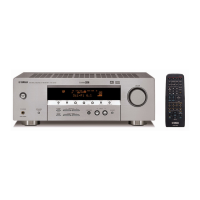
Details the buttons and indicators located on the front of the AV receiver.
Instructions on how to open and close the front panel door for access to controls.
Explains the functions and layout of the remote control unit.
Guidance on operating the unit effectively with the remote control.
Precautions and advice for proper care and maintenance of the remote control.
Explains the various indicators and their meanings on the front panel display.
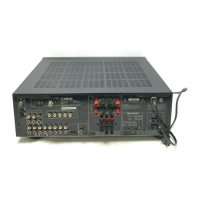
Illustrates and describes all the input and output jacks on the rear of the unit.
Advice on selecting and placing speakers for optimal sound performance.
Visual guides for optimal positioning of main, center, and surround speakers.
Instructions on how to properly connect speaker wires to the unit's terminals.
How to set the impedance selector for speaker compatibility and amplifier protection.
Essential steps and cautions before connecting components to the unit.
Details on connecting video sources using composite, S-Video, and component video.
Information on using the front panel VIDEO AUX jacks for external sources.
Guidance for connecting various audio sources to the unit's inputs.
Specific instructions for connecting turntables and CD players with various outputs.
How to connect MD, tape decks, and CD recorders for recording and playback.
Instructions for connecting AM and FM antennas for radio reception.
Detailed steps for setting up and connecting the AM loop antenna.
How to connect the indoor FM antenna to the unit.
Guides for connecting subwoofers and external 6-channel decoders.
Information on connecting power cords and using the unit's AC outlets.
Steps to power on the unit and connected video monitor after all connections are made.
How to choose between full, short, or off display modes for on-screen information.
Guide to balancing speaker output levels using the built-in test tone.
How to choose and apply DSP sound field programs for enhanced audio.
Using the background video function and muting the audio output.
Steps to take when you are finished operating the unit.
Setting input signal priority and understanding mode indicators.
How to choose and apply DSP sound field programs for enhanced audio.
Guides for decoding 2-channel sources into surround sound formats.
Using advanced surround sound decoders and virtual speaker effects.
Enjoying DSP sound fields through headphones for private listening.
How to disable DSP effects for standard stereo playback.
Viewing details about the currently selected input signal.
Explains the concept of sound fields and how DSP recreates them.
Details on DSP programs for recreating concert hall and opera house acoustics.
How CINEMA-DSP enhances movie soundtracks using DSP and surround technologies.
Using built-in decoders without applying DSP effects for original sound.
How MOVIE THEATER programs recreate cinema sound quality.
Descriptions of various DSP programs for music and audio-video sources.
Using timers for playback/recording and understanding memory backup functions.
Explains the different control areas on the remote for the unit and other components.
Procedures for programming the remote to control other AV devices.
How to teach the remote control new functions from other remotes.
Detailed steps for using the remote's learning capability.
How to erase programmed functions from the remote control.
Customizing the names shown in the remote's display window.
Erasing learned functions, renamed names, or resetting manufacturer codes.
Operating specific components like DVD players and VCRs using the remote.
Specific button functions for controlling DVD players and VCRs.
Functions for controlling TVs, LD players, and cable/satellite boxes.
How to control CD players, recorders, and MD recorders.
Controlling tape decks and radio tuners with the remote.
Using the 'A' area of the remote for controlling an additional component.
Guide to navigating and modifying settings within the unit's setup menu.
Setting up speaker modes (size, presence) for optimal audio output.
Configuring settings for main, rear left/right speakers based on size and presence.
Adjusting rear center speaker modes and LFE/bass output to subwoofer or main speakers.
Adjusting main speaker levels, defining speaker B connections, and using low-frequency test tone.
Adjusting audio balance, headphone tone, and center speaker EQ.
Customizing input names and assigning jacks for connected components.
Configuring optical/coaxial inputs and setting the initial input mode.
Resetting DSP parameters, adjusting LFE level, and controlling dynamic range.
Adjusting delay times for center and surround speakers based on distance.
Configuring display options, protecting settings, and setting 6CH input direction.
How to set the unit to automatically enter standby mode after a specified time.
Guidance on setting up a multi-room audio system using Zone 2 capabilities.
How to use the remote control to operate components in the second room.
Explains the concept of sound fields and how DSP recreates them.
Overview of adjustable parameters for customizing sound field effects.
How to adjust individual sound field parameters to suit listening preferences.
Returning sound field parameters to their default settings.
Descriptions of DSP LEVEL and INIT. DLY parameters for sound field adjustment.
Explanations for ROOM SIZE, Surround Delay, and Liveness parameters.
Details on REV. TIME, REV. DELAY, and REV. LEVEL parameters for sound field effects.
Explains parameters for 6ch Stereo, PRO LOGIC II Music, and DTS Neo: 6 Music modes.
Solutions for common problems like power issues, display problems, and no sound.
Troubleshooting steps for tuner reception problems and remote control malfunctions.
Explains terms like Dolby Surround, Dolby Digital, DTS, and CINEMA DSP.
Defines terms like Virtual CINEMA DSP, S VIDEO, Component Video, PCM, and I/O assignment.
Explains symbols used for safety warnings within the manual.
Lists all items included in the product package for user verification.
Step-by-step guide for inserting batteries into the remote control.
Details the buttons and indicators located on the front of the AV receiver.
Instructions on how to open and close the front panel door for access to controls.
Explains the functions and layout of the remote control unit.
Guidance on operating the unit effectively with the remote control.
Precautions and advice for proper care and maintenance of the remote control.
Explains the various indicators and their meanings on the front panel display.
Illustrates and describes all the input and output jacks on the rear of the unit.
Advice on selecting and placing speakers for optimal sound performance.
Visual guides for optimal positioning of main, center, and surround speakers.
Instructions on how to properly connect speaker wires to the unit's terminals.
How to set the impedance selector for speaker compatibility and amplifier protection.
Essential steps and cautions before connecting components to the unit.
Details on connecting video sources using composite, S-Video, and component video.
Information on using the front panel VIDEO AUX jacks for external sources.
Guidance for connecting various audio sources to the unit's inputs.
Specific instructions for connecting turntables and CD players with various outputs.
How to connect MD, tape decks, and CD recorders for recording and playback.
Instructions for connecting AM and FM antennas for radio reception.
Detailed steps for setting up and connecting the AM loop antenna.
How to connect the indoor FM antenna to the unit.
Guides for connecting subwoofers and external 6-channel decoders.
Information on connecting power cords and using the unit's AC outlets.
Steps to power on the unit and connected video monitor after all connections are made.
How to choose between full, short, or off display modes for on-screen information.
Guide to balancing speaker output levels using the built-in test tone.
How to choose and apply DSP sound field programs for enhanced audio.
Using the background video function and muting the audio output.
Steps to take when you are finished operating the unit.
Setting input signal priority and understanding mode indicators.
How to choose and apply DSP sound field programs for enhanced audio.
Guides for decoding 2-channel sources into surround sound formats.
Using advanced surround sound decoders and virtual speaker effects.
Enjoying DSP sound fields through headphones for private listening.
How to disable DSP effects for standard stereo playback.
Viewing details about the currently selected input signal.
Explains the concept of sound fields and how DSP recreates them.
Details on DSP programs for recreating concert hall and opera house acoustics.
How CINEMA-DSP enhances movie soundtracks using DSP and surround technologies.
Using built-in decoders without applying DSP effects for original sound.
How MOVIE THEATER programs recreate cinema sound quality.
Descriptions of various DSP programs for music and audio-video sources.
Using timers for playback/recording and understanding memory backup functions.
Explains the different control areas on the remote for the unit and other components.
Procedures for programming the remote to control other AV devices.
How to teach the remote control new functions from other remotes.
Detailed steps for using the remote's learning capability.
How to erase programmed functions from the remote control.
Customizing the names shown in the remote's display window.
Erasing learned functions, renamed names, or resetting manufacturer codes.
Operating specific components like DVD players and VCRs using the remote.
Specific button functions for controlling DVD players and VCRs.
Functions for controlling TVs, LD players, and cable/satellite boxes.
How to control CD players, recorders, and MD recorders.
Controlling tape decks and radio tuners with the remote.
Using the 'A' area of the remote for controlling an additional component.
Guide to navigating and modifying settings within the unit's setup menu.
Setting up speaker modes (size, presence) for optimal audio output.
Configuring settings for main, rear left/right speakers based on size and presence.
Adjusting rear center speaker modes and LFE/bass output to subwoofer or main speakers.
Adjusting main speaker levels, defining speaker B connections, and using low-frequency test tone.
Adjusting audio balance, headphone tone, and center speaker EQ.
Customizing input names and assigning jacks for connected components.
Configuring optical/coaxial inputs and setting the initial input mode.
Resetting DSP parameters, adjusting LFE level, and controlling dynamic range.
Adjusting delay times for center and surround speakers based on distance.
Configuring display options, protecting settings, and setting 6CH input direction.
How to set the unit to automatically enter standby mode after a specified time.
Guidance on setting up a multi-room audio system using Zone 2 capabilities.
How to use the remote control to operate components in the second room.
Explains the concept of sound fields and how DSP recreates them.
Overview of adjustable parameters for customizing sound field effects.
How to adjust individual sound field parameters to suit listening preferences.
Returning sound field parameters to their default settings.
Descriptions of DSP LEVEL and INIT. DLY parameters for sound field adjustment.
Explanations for ROOM SIZE, Surround Delay, and Liveness parameters.
Details on REV. TIME, REV. DELAY, and REV. LEVEL parameters for sound field effects.
Explains parameters for 6ch Stereo, PRO LOGIC II Music, and DTS Neo: 6 Music modes.
Solutions for common problems like power issues, display problems, and no sound.
Troubleshooting steps for tuner reception problems and remote control malfunctions.
Explains terms like Dolby Surround, Dolby Digital, DTS, and CINEMA DSP.
Defines terms like Virtual CINEMA DSP, S VIDEO, Component Video, PCM, and I/O assignment.
| Audio Channels | 6.1 |
|---|---|
| Total Harmonic Distortion (THD) | 0.06% |
| Signal-To-Noise Ratio | 100 dB |
| Input Impedance | 47 k ohms |
| Input Sensitivity | 200 mV |
| Surround Sound Effects | Yes |
| Digital Sound Processor (DSP) | Yes |
| Tuner Bands | AM/FM |
| Tuning Range | FM: 87.5 - 108 MHz, AM: 530 - 1710 kHz |
| Preset Station Qty | 40 |
| Surround Sound | Yes |
| Built-in Decoders | Dolby Digital, DTS |
| Digital Audio Inputs | 3 Optical, 2 Coaxial |
| Width | 435 mm |
| Power Output | 100 W per channel (8 ohms) |
| Audio D/A Converter | 24-bit/192 kHz |
| Height | 6.3 in (160 mm) |
| Depth | 15.4 in |


Loading...