4
SYSTEM
CONNECTOR
IN
L
B
OUT
R
A
FM ANT
75Ω UNBAL.
IN
IN
IN
IN
OUT
OUT
6Ω MIN./SPEAKER
SPEAKERS
SUBWOOFER
OUT
SYSTEM
CONNECTOR
GND
AM
ANT
TAPE
CD
AUX
MD
R
L
R L
+
–
A
B
E
C
D
ANALOG DIGITAL
OPTICAL
SYSTEM
CONNECTOR
L
OUT
OUT
R
E
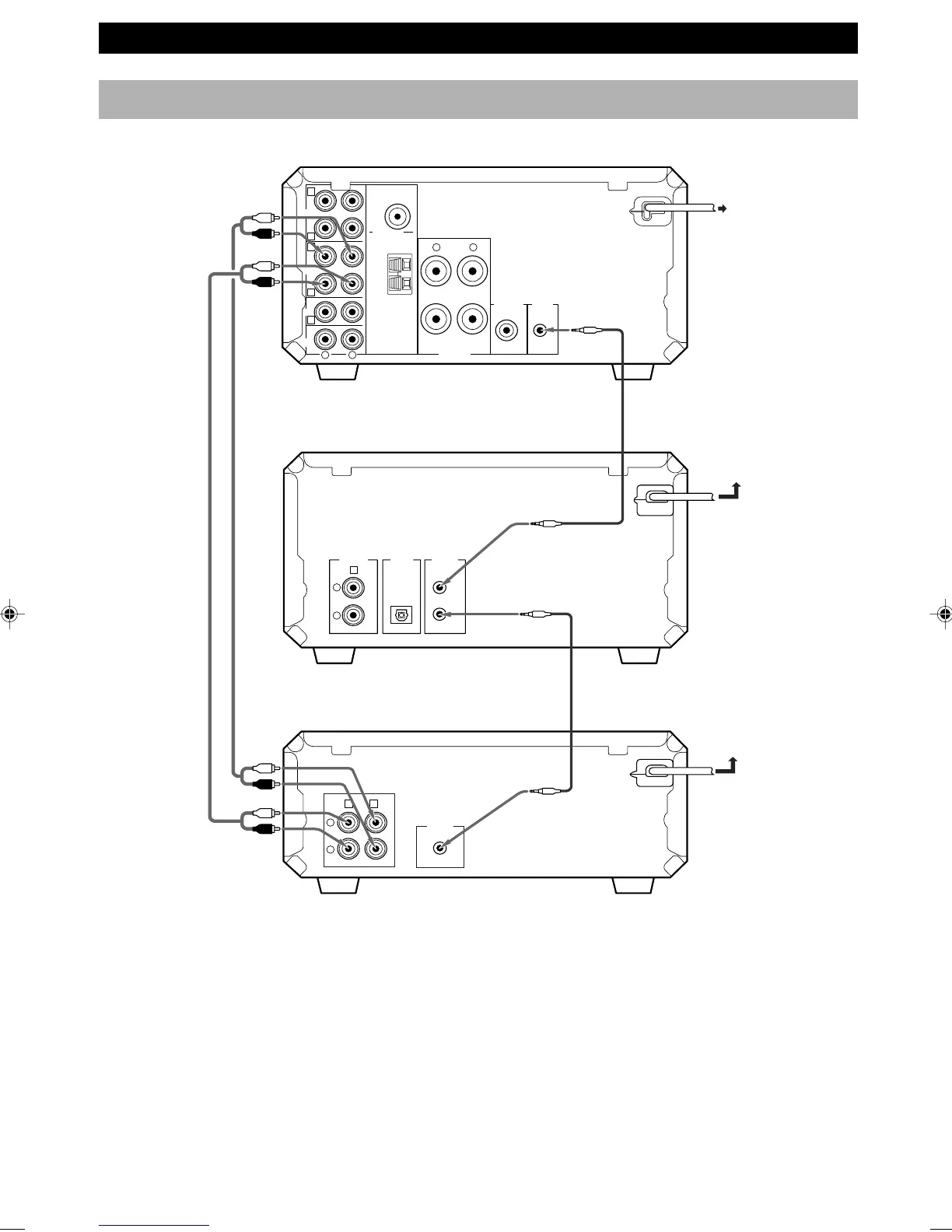
CONNECTIONS
Connecting RX-E400 and CDX-E400 (CDC-E500)
To wall outlet
This unit (KX-E300)
CD player (CDX-E400) or
CD changer (CDC-E500)
Receiver (RX-E400)
To RX-E400 or
wall outlet
To RX-E400
System control cable
(included)
Audio pin
cables
(included)
System control cable
(not included)
• The analog OUT jacks on this unit are marked Å and the analog IN jacks are marked ı. When connecting this unit to
RX-E400 whose jacks are marked Å, ı, Ç, Î and ‰, connect this unit’s analog OUT jacks to the input jacks marked
Å and connect this unit’s analog IN jacks to the output jacks marked ı on the rear panel of RX-E400.
• The SYSTEM CONNECTOR jack should be connected to the SYSTEM CONNECTOR jack on CDX-E400 or
CDC-E500.
• To reduce the standby power consumption, connect the AC power cord of this unit to the switched AC outlet on
RX-E400 (except for the U.K. model).
• If you add MDX-E300 (not available in some areas) to your system, you can connect the system connector jack to the
SYSTEM CONNECTOR jack on MDX-E300. Also, you can connect the power cord to the AC OUTLET on MDX-E300
(except for the U.K. model).
0103KXE300(UB).1-4.E 02.5.21, 2:29 PM4


 To Next Page