Mobile Music Sequencer Owner’s Manual 14
VOICE SETUP
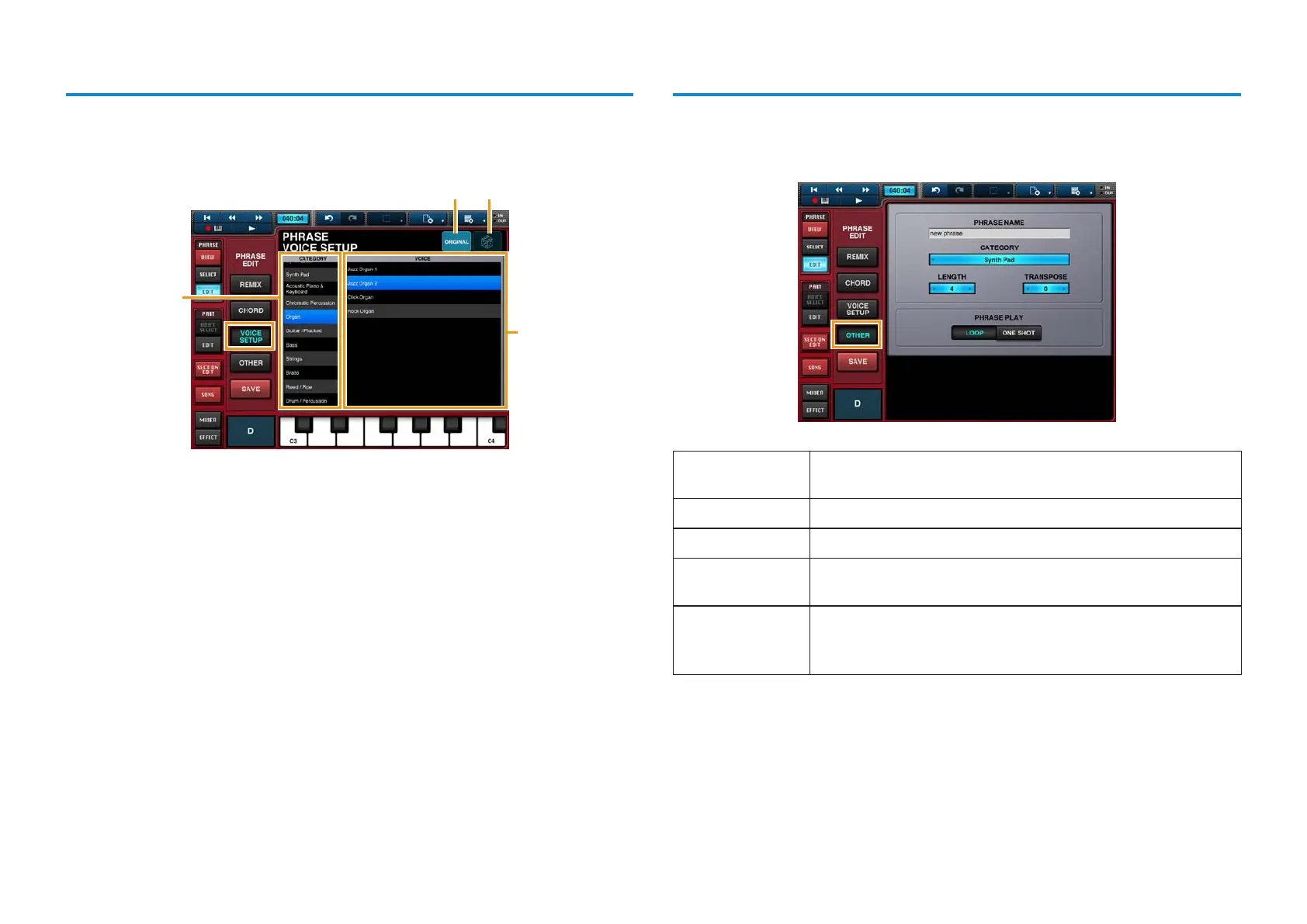
The Phrase Voice Setup Editor is used to select a voice for the phrase.
It can be opened by tapping [VOICE SETUP] in Step 4 above.
2
1
3 4
Area 1 is used to select the voice category; Area 2 the desired voice.
Area 3 is used to restore the original voice.
Area 4 is used to randomize the voice selection in Area 2.
OTHER
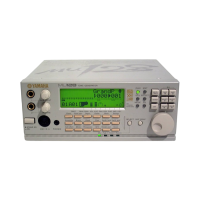
The Other Setting Editor is used to set a name and category for the phrase.
It can be opened by tapping [OTHER] in Step 4 above.
PHRASE NAME
Tap in the name field to bring up the keyboard and then enter a
name for the phrase.
CATEGORY
Use this to select a category for the phrase.
LENGTH
Use this value to set the length of the phrase in measures.
TRANSPOSE
If you need to transpose the phrase, you can set the required
number of semitones here.
PHRASE PLAY
LOOP: The phrase will start again from the beginning after it has
played to the end.
ONE SHOT: The phrase plays once to the end and then stops.



 To Next Page