Mobile Music Sequencer Owner’s Manual 20
AUDIO LIBRARY
1
&
2
3
4
5
6
7
8
9
!) @ # $ % ^
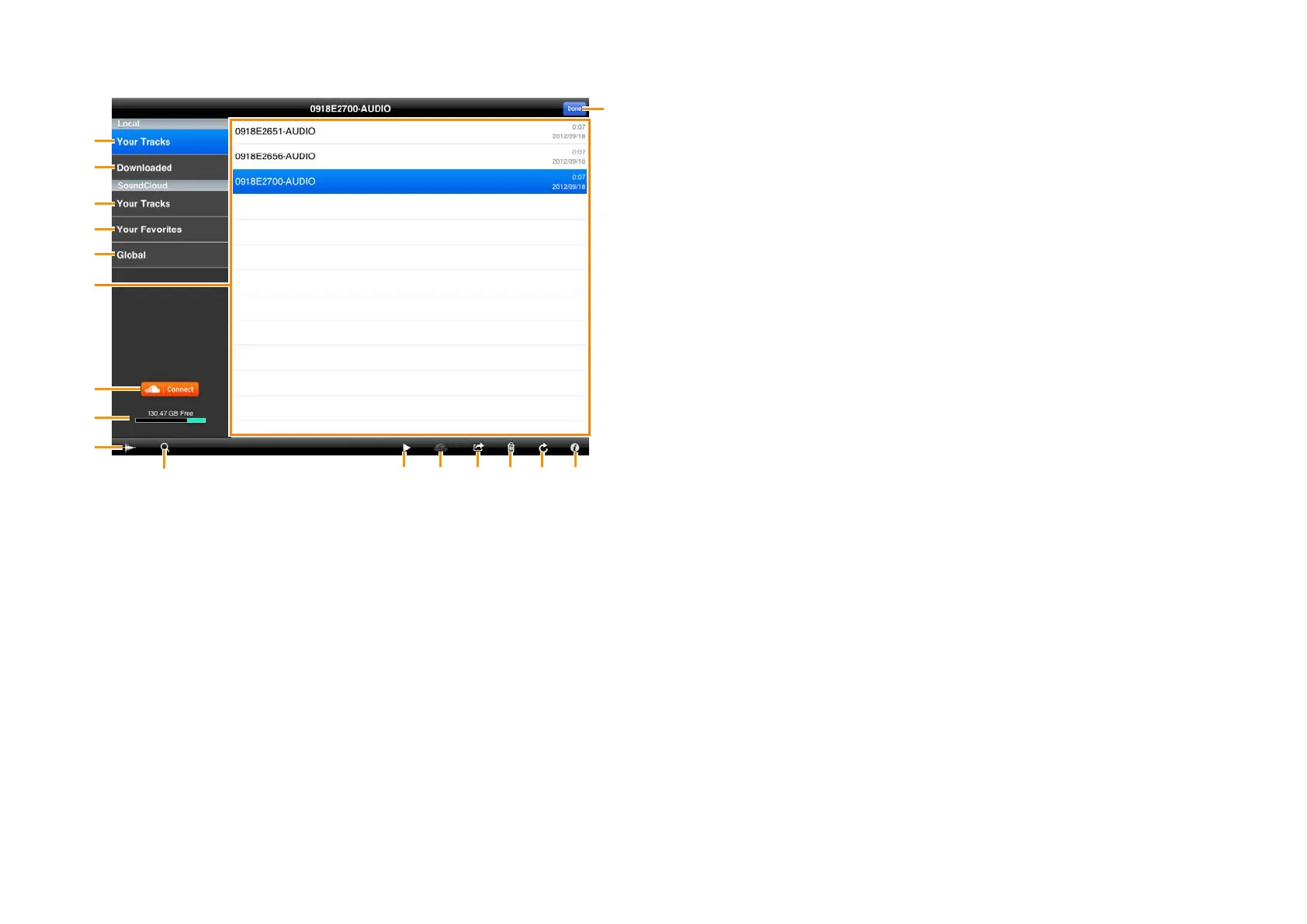
1 Shows the list of recorded sound data in your iPad.
2 Shows the list of sound data files which have been downloaded from
SoundCloud.
3 Shows the list of recorded sound data files which have been uploaded to
SoundCloud.
4 Shows the list of your favorite sound data files.
5 Shows all the uploaded sound data files for which Sharing has been set to
“public.”
6 Sound data list displaying available data files for selection.
7 For connecting to SoundCloud.
8 Shows the available recording capacity.
9 Calls up the waveform of the currently selected sound data.
) Calls up the keyboard, letting you search for the desired sound data. When
sound files on SoundCloud are listed, you can use Tags and Genre in your
search.
! Plays back the sound data files selected in the list. When playing back sound
data directly from SoundCloud, the playback sound is output only from the
iPad.
@ When the Library window is displaying the data les of Local: Opens
the SoundCloud Upload window.
When the Library window is displaying the data les of SoundCloud:
Downloads the selected file.
# When the Library window is displaying the data les of Local: Copies
the sound data selected in the list to the Clipboard. The sound data can be
copied to other iPhone/iPad applications via the Clipboard.
When the Library window is displaying the data les of SoundCloud:
Registers the currently selected sound data to Your Favorites or cancels the
registration.
$ Deletes the selected sound data file.
% Updates the window. The sound data list on the SoundCloud is updated to
the latest settings.
^ Calls up the information related to the currently selected sound data. If your
original data is selected, you can edit the information with the keyboard.
& Closes the Library window.



 To Next Page