Instrument and control functions
4-7
4
To reset a tripmeter, change the dis-
play to the tripmeter you want to reset,
and while the digits are flashing, push
the “INFO” switch until it is reset.
The tripmeters will reset and continue
counting after 9999.9 is reached.
EAU92231
Fuel reserve tripmeter
If the last segment of the fuel meter
starts flashing, the display automati-
cally changes to the fuel reserve trip-
meter “TRIP F” and starts counting the
distance traveled from that point.
To reset the fuel reserve tripmeter,
change the display to the fuel reserve
tripmeter, and while the digits are
flashing, push the “INFO” switch until it
is reset.
If you do not reset the fuel reserve trip-
meter manually, it will reset automati-
cally and disappear from the display
after refueling and traveling 5 km (3 mi).
EAU92430
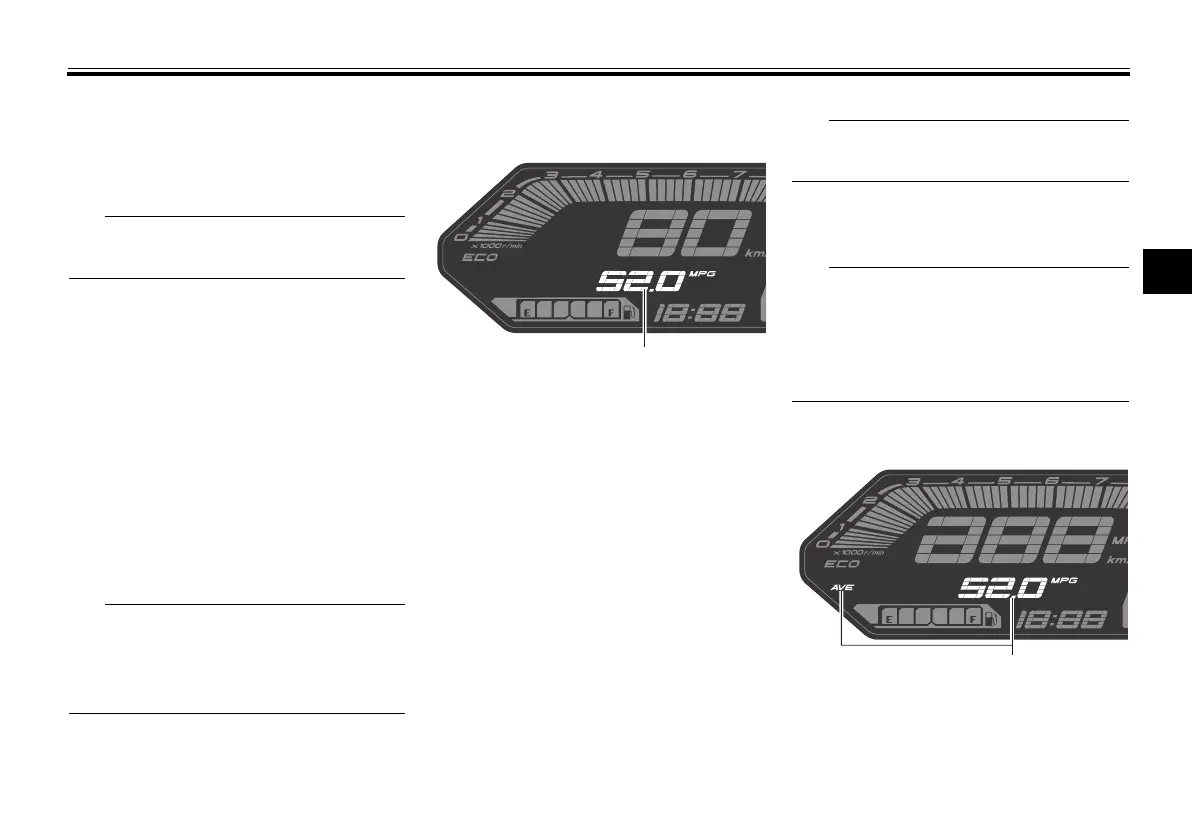
Instantaneous fuel consumption
display
This display shows the fuel consump-
tion under the current riding condi-
tions. It can be set to either “km/L” or
“L/100 km”, or “MPG” when using
miles. To switch the fuel consumption
measurement units, push the “TRIP”
switch until the measurement units
change.
“km/L”: the distance that can be
traveled on 1.0 L of fuel.
“L/100 km”: the amount of fuel
necessary to travel 100 km.
“MPG”: the distance that can be
traveled on 1.0 US gal of fuel.
When traveling under 10 km/h (6 mi/h),
“_ _._” is displayed.
EAU87790
The instantaneous fuel consumption
function should be used for general
reference only. Do not use this figure to
estimate the distance that can be trav-
eled on the current tank of fuel.
EAU92440
Average fuel consumption display
This display shows the average fuel
consumption since it was last reset.
The average fuel consumption display
1. Instantaneous fuel consumption display
1. Average fuel consumption display
UBAT10E0.book Page 7 Friday, November 6, 2020 6:08 PM



 To Next Page