Periodic maintenance and adjustment
6-37
1
2
3
4
5
6
7
8
9
10
11
12
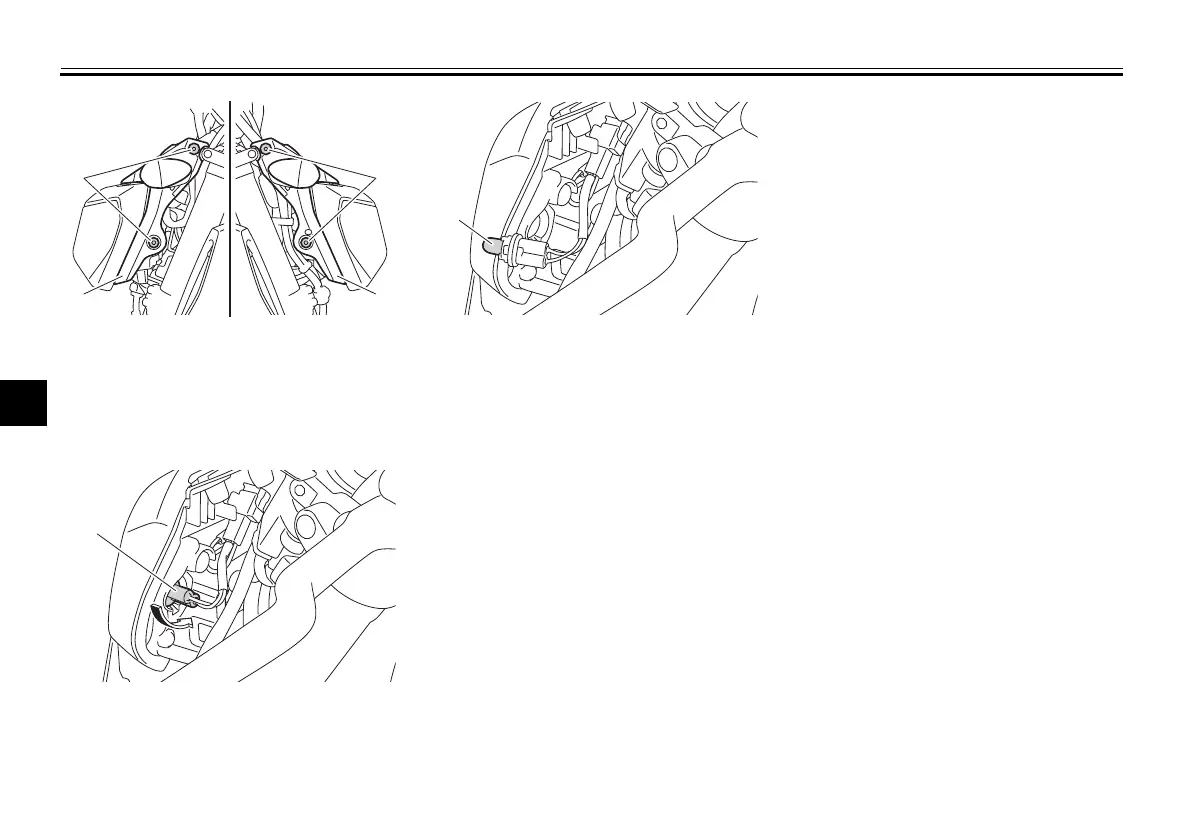
2. Remove the auxiliary light bulb
socket (together with the bulb) by
turning it counterclockwise.
3. Remove the burnt-out bulb by pull-
ing it out.
4. Insert a new bulb into the socket.
5. Install the socket (together with the
bulb) by turning it clockwise.
6. Place the headlight unit side cov-
ers in their original position, and
then install the bolts.
EAU70540
Brake/tail light
This model is equipped with an
LED-type brake/tail light.
If the brake/tail light does not come on,
have a Yamaha dealer check it.
1. Bolt
2. Headlight unit side cover
1. Auxiliary light bulb socket
1. Auxiliary light bulb
B87-9-E0_1.book 37 ページ 2015年12月16日 水曜日 午前10時21分




 To Next Page