EasyManua.ls Logo

Yamaha MT3X - Mixer Input Channels

Yamaha MT3X
92 pages
Print Icon
To Next Page IconTo Next Page
To Previous Page IconTo Previous Page
Loading...
CHANNELS
AND
TRACKS
The
terms
“channei”
and
“track”
are
used
in
this
operation
manual
to
differentiate
be¬
tween
the
MT3X
mixer
section’s
six
“channels"
and
the
recorder
section’s
four
’Iracks.”
“Track”
is
also
used
when
referring
to
the
four
Tracks”
actually
recorded
on
the
tape.
MIXER
INPUT
CHANNELS
O
Input
Jacks
1—6
These
six
input
jacks
(MIC/LINE
1,
MIC/LINE
2
and
LINE
3
through
LINE
6)
accept
signals
from
any
line-level
source
such
as
an
electronic
musical
in¬
strument
or
a
tape
player.
MIC/LINE
jacks
1
and
2
also
accept
signals
from
electric
musical
instru¬
ments
such
as
electric
guitars
and
basses,
or
mi¬
crophones.
Inputs
1
through
6
are
standard
monaural
1/4"
phone
jacks.
When
a
source
is
plugged
into
one
of
these
jacks,
its
signal
is
sent
to
the
corresponding
channel
of
the
MT3X’s
mixer.
0
MIC/LINE
Trim
Controls
(Channels
1
and
2
only)
The
trim
controls
adjust
the
sensitivity
of
the
chan¬
nel-1
and
channel-2
inputs
to
accept
a
wide
range
of
signal
levels
from
line
to
microphone.
The
trim
controls
are
used
in
conjunction
with
the
channel-1
and
channel-2
faders
to
set
the
optimum
recording
level
with
a
wide
range
of
sources
(see
“SETTING
RECORDING
LEVELS”
on
page
17).
0
TAPE-OFF-MIC/LINE
(TAPE-OFF-LINE)
Se¬
lector
(Channels
1
through
4
only)
These
selectors
determine
whether
the
input
to
the
corresponding
mixer
channel
is
the
output
from
the
correspondingly
numbered
track
of
the
MT3X
re¬
corder
section,
or
the
channel
MIC/LINE
or
LINE
input.
The
OFF
position
turns
the
input
to
that
channel
OFF.
Channels
5
and
6
accept
line-level
input
only.
O
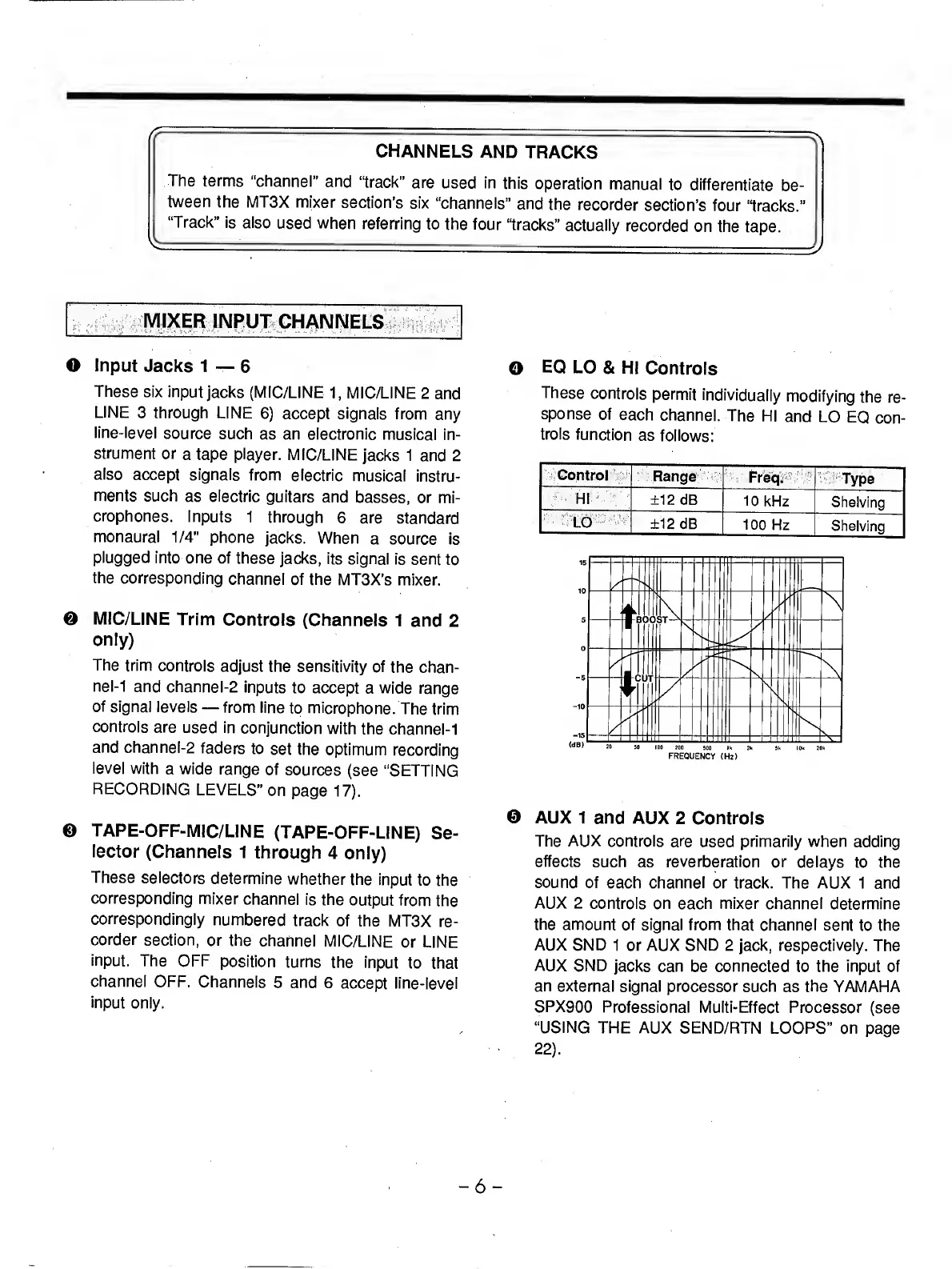
EQ
LO
&
HI
Controls
These
controls
permit
individually
modifying
the
re¬
sponse
of
each
channel.
The
HI
and
LO
EQ
con¬
trols
function
as
follows:
FREQUENCY
(Hr)
0
AUX
1
and
AUX
2
Controls
The
AUX
controls
are
used
primarily
when
adding
effects
such
as
reverberation
or
delays
to
the
sound
of
each
channel
or
track.
The
AUX
1
and
AUX
2
controls
on
each
mixer
channel
determine
the
amount
of
signal
from
that
channel
sent
to
the
AUX
SND
1
or
AUX
SND
2
jack,
respectively.
The
AUX
SND
jacks
can
be
connected
to
the
input
of
an
external
signal
processor
such
as
the
YAMAHA
SPX900
Professional
Multi-Effect
Processor
(see
“USING
THE
AUX
SEND/RTN
LOOPS”
on
page
22
).
-
6
-

Related product manuals