EasyManua.ls Logo

Yamaha NU1 - User Manual

Yamaha NU1
40 pages
Print Icon
To Next Page IconTo Next Page
Loading...
ENGLISHDEUTSCH
FRANÇAIS
ESPAÑOL
ES
FR
DE
EN
Owners Manual
Bedienungsanleitung
Mode d'emploi
Manual de instrucciones
NU1
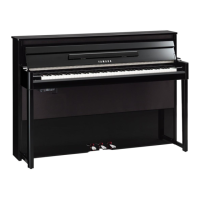
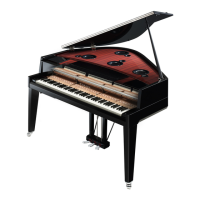
Hybrid Piano
Before using this instrument, be sure to read
“PRECAUTIONS” on pages 6 – 7.
Achten Sie darauf, vor Einsatz dieses Instruments die
„VORSICHTSMASSNAHMEN“ auf Seiten 6-7 durchzulesen.
Avant d'utiliser cet instrument, lisez attentivement la section
« PRÉCAUTIONS D'USAGE » aux pages 6-7.
Antes de utilizar el instrumento, lea la sección
“PRECAUCIONES”, en las páginas 6-7.

Other manuals for Yamaha NU1

Questions and Answers

  • A
    Angela VelazquezAug 12, 2025
    What to do if my Yamaha NU1 Musical Instrument does not turn on?
    • A
      audrey49Aug 13, 2025
      If your Yamaha Musical Instrument isn't turning on, make sure that the power cord is correctly inserted into the instrument's socket and that the plug is connected to a functioning AC outlet.
  • B
    benjaminwhiteAug 16, 2025
    Why is the overall volume low or no sound is heard from my Yamaha Musical Instrument?
    • J
      Jamie KelleyAug 17, 2025
      There are several reasons why the overall volume might be low or no sound is heard from your Yamaha Musical Instrument: * The volume may be set too low. Adjust the volume to an appropriate level using the [MASTER VOLUME] control. * Headphones might be connected. Ensure headphones are not plugged into the headphones jack. * Local Control might be off. Check that Local Control is turned on.
  • B
    brent90Aug 20, 2025
    Why is there noise heard from the speakers or headphones of my Yamaha NU1 Musical Instrument?
    • M
      Michael VargasAug 20, 2025
      The noise you're hearing from the speakers or headphones of your Yamaha Musical Instrument could be due to interference from a mobile phone nearby. Try turning off the mobile phone or moving it further away from the instrument.
  • J
    jefferyjohnsonAug 25, 2025
    What to do if the USB flash memory has hung up (stopped) on my Yamaha Musical Instrument?
    • T
      Terry CastilloAug 25, 2025
      If the USB flash memory has stopped working on your Yamaha Musical Instrument, try disconnecting it and then reconnecting it to the instrument. Also, ensure that the USB flash memory you are using is compatible with the instrument; only use USB flash memory confirmed by Yamaha to be compatible.
  • V
    vevansAug 27, 2025
    What to do if sound input to the AUX IN jacks is interrupted on my Yamaha NU1?
    • B
      Brenda LamAug 28, 2025
      If the sound input to the AUX IN jacks is being interrupted on your Yamaha Musical Instrument, first, increase the output volume of the external device connected to the instrument. Second, ensure that the Noise Gate feature is turned off.
  • T
    Timothy BrownAug 31, 2025
    What to do if no sound is heard on a particular key of my Yamaha NU1 Musical Instrument?
    • M
      Matthew RichmondAug 31, 2025
      If you're not hearing sound from a specific key on your Yamaha Musical Instrument, it might be because the key was pressed when the power was turned on. Turn off the power and then turn it back on to reset the function. Avoid touching any keys while the power is turning on.
  • S
    Susan WallaceSep 4, 2025
    Why does my Yamaha Musical Instrument make mechanical noise during performance?
    • G
      Gary DanielsSep 4, 2025
      Mechanical noise during performance is normal, similar to what you might hear on a piano.
  • R
    russelldurhamSep 7, 2025
    Why does a sound louder than expected might very occasionally occur when playing the same key repeatedly and quickly or playing a trill continuously for a long time on my Yamaha NU1 Musical Instrument?
    • L
      lopezamySep 8, 2025
      The occasional louder sound when repeatedly playing a key quickly or playing a trill for a long time on your Yamaha Musical Instrument may be caused by the mechanical structure of the keys and the action. This is normal, but it should only happen very rarely.

Summary

Special Message Section

Product Safety Markings

Explains safety labels and symbols found on the instrument's enclosure.

Important Safety Instructions

General Safety Guidelines

Lists 14 essential safety instructions for operating the instrument safely.

Main Features

Panel Controls and Terminals

Overview of Controls

Identifies and explains the main buttons and controls on the instrument's panel.

Playing the Keyboard

Power Supply Setup and Operation

Instructions for connecting and using the power supply, turning the instrument on/off.

Using the Pedals

Pedal Functions and Operation

Explains the function and operation of the damper, sostenuto, and soft pedals.

Basic Operations and More

Using the Metronome

Instructions on activating, adjusting tempo, beat, and volume of the metronome.

Playing Back Songs

Selecting and Playing Songs

Steps for selecting and playing back songs from internal memory or USB flash drive.

Recording Your Performance

Recording Methods (MIDI and Audio)

Explains the two methods for recording performances as MIDI or Audio Songs.

Using USB Flash Memory

Connecting and Preparing USB Flash Memory

Instructions for connecting, compatibility, and preparing USB flash drives.

Connections

Connecting External Devices

Explains how to connect USB, MIDI, and AUX IN/OUT devices to the instrument.

About MIDI

Troubleshooting

Common Problems and Solutions

Lists common issues and their possible causes and solutions.

Maintenance

Yamaha NU1 Specifications

General IconGeneral
TypeHybrid Piano
Touch SensitivityHard/Medium/Soft/Fixed
Polyphony256
FinishPolished Ebony
Sound SourceYamaha CFX & Bösendorfer Imperial
Dimensions1, 501mm x 463mm x 1, 024mm (59-1/8" x 18-1/4" x 40-5/16")
HeadphonesYes
MIDIIN/OUT
ConnectionsUSB TO HOST

Related product manuals