Basic Operations and More
16 NU1 Owner’s Manual
Transposing the Pitch in semitones
You can shift the pitch of the entire keyboard up or down in semitones to facilitate playing in difficult key signatures
and match the pitch of the keyboard to the range of a singer or other instruments. For example, if “+5” is selected,
playing the key C produces a pitch of F, letting you play a song of F major as though it were in C major.
To transpose the pitch down:
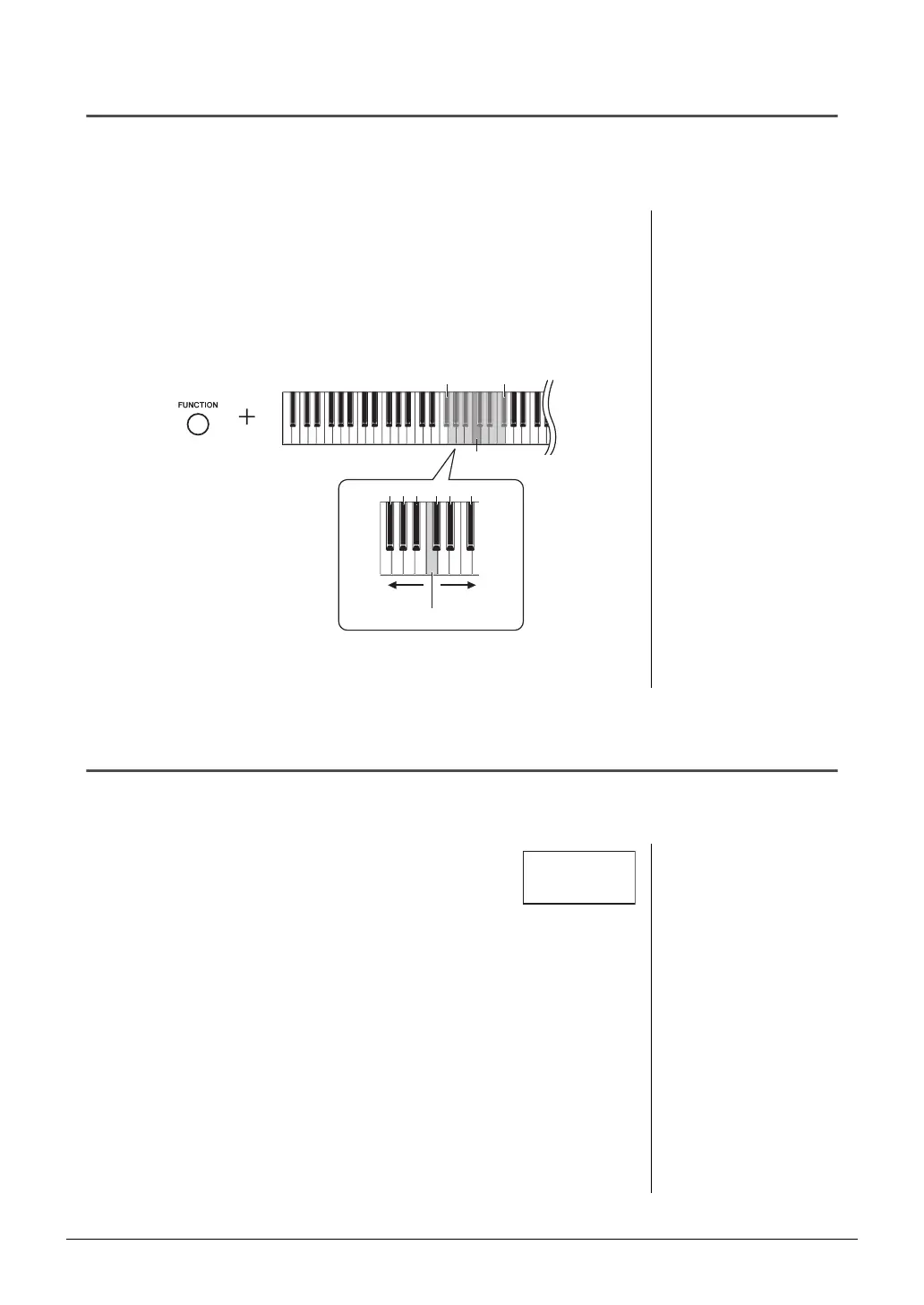
While holding down [FUNCTION], press a key between F#2 (-6) and B2 (-1).
To transpose the pitch up:
While holding down [FUNCTION], press a key between C#3 (+1) and F#3 (+6).
To restore the original pitch:
While holding down [FUNCTION], press the C3 key.
The specified value is shown on the display.
Fine tuning the Pitch
You can fine-tune the pitch of the entire instrument. This function is useful when you play this instrument along with
other instruments or recorded music.
During the operation described below, you can check the Pitch
value shown on the display.
To tune up (in roughly 0.2Hz steps):
While holding down [FUNCTION], press [+]. Holding down
both buttons shows the current pitch setting (Hz).
To tune down (in roughly 0.2Hz steps):
While holding down [FUNCTION], press [-]. Holding down both buttons shows the
current pitch setting (Hz).
To restore standard pitch:
While holding down [FUNCTION], press [+] and [-] simultaneously. Holding down
all three buttons shows the current pitch setting (Hz).
Default setting: 0 (Normal pitch)
Setting range: -6 – 6
NOTE
The Transpose value is restored to the
default setting when the power is turned off.
C3
F#3F#2
0-1
-2 +1 +3-4
-3-5 +2+4+5
-6 +6
Transpose up.
Transpose down.
Normal pitch
NOTE
The tuning value is retained even when the
power is turned off.
Hz (Hertz):
This unit of measurement refers to the fre-
quency of a sound and represents the num-
ber of times a sound wave vibrates in a
second.
Setting range: 414.8–466.8Hz (=A3)
Default setting: 440.0Hz (=A3)
42.0






 To Next Page