EasyManua.ls Logo

Yamaha PF15 - Stereo Chorus; Tone Select

Yamaha PF15
8 pages
Print Icon
To Next Page IconTo Next Page
To Previous Page IconTo Previous Page
Loading...
OPERATION/BASIC
CONTROLS
After
you
have
made
all
the
necessary
connections
and
checked
out
the
basic
operation
of
the
instrument,
experiment
with
the
following
controls
while
playing
the
keyboard.
©
©
©
U
|
Ga
B
D
EF
DOO
2
PIANO
1
2
HARPSICHORD
KEY
TRANSPOSE
1
2
aB
E.PIANO
VIBE
ĊLAV
CHORUS
VOLUME
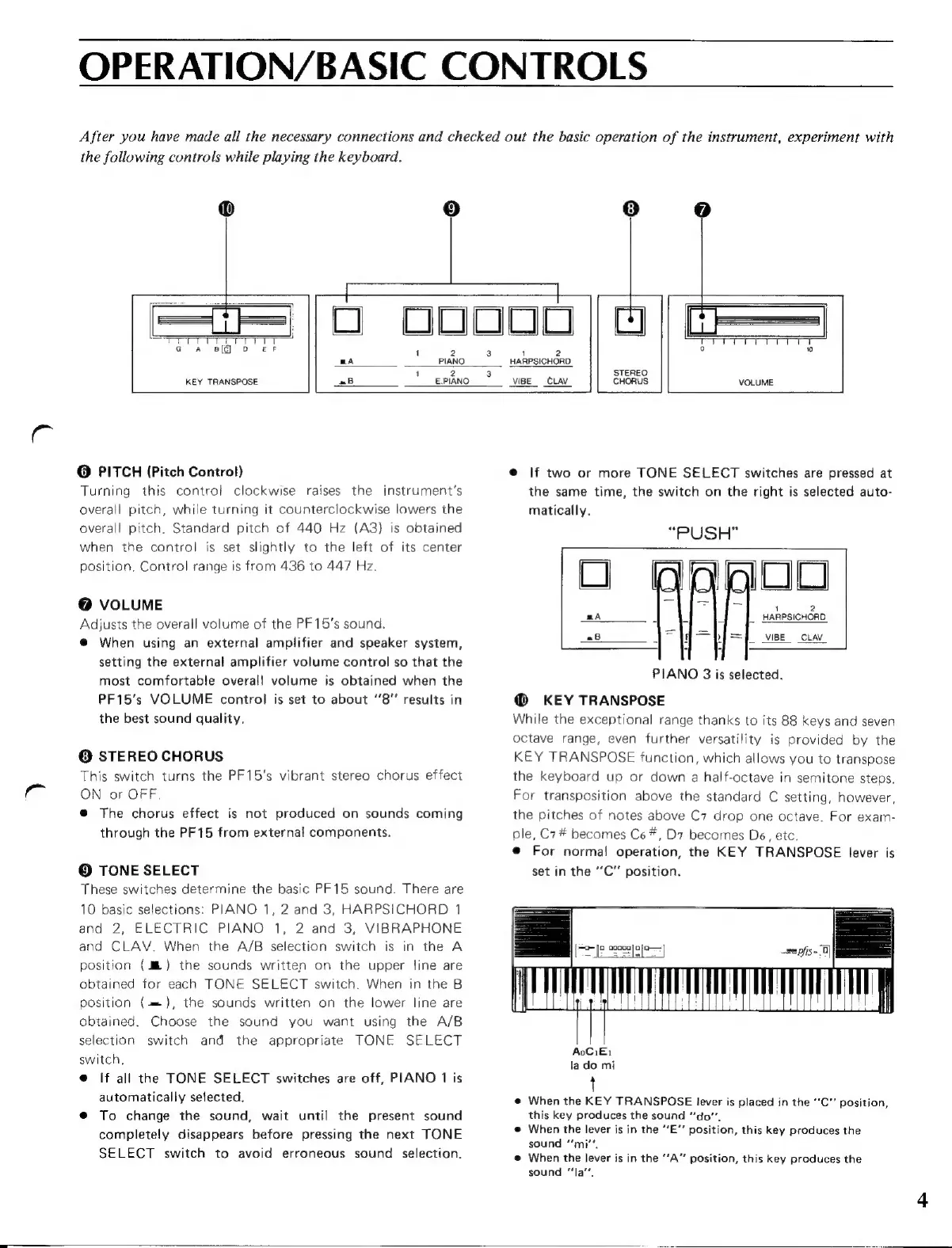
6
PITCH
(Pitch
Control)
Turning
this
control
clockwise
raises
the
instrument's
overall
pitch,
while
turning
it
counterclockwise
lowers
the
overall
pitch.
Standard
pitch
of
440
Hz
(A3)
is
obtained
when
the
control
is
set
slightly
to
the
left
of
its
center
position.
Control
range
is
from
436
to
447
Hz.
@
VOLUME
Adjusts
the
overall
volume
of
the
PF15's
sound.
@
When
using
an
external
amplifier
and
speaker
system,
setting
the
external
amplifier
volume
control
so
that
the
most
comfortable
overall
volume
is
obtained
when
the
PF15’s
VOLUME
control
is
set
to
about
“8”
results
in
the
best
sound
quality,
0
STEREO
CHORUS
This
switch
turns
the
PF15's
vibrant
stereo
chorus
effect
ON
or
OFF.
@
The
chorus
effect
is
not
produced
on
sounds
coming
through
the
PF15
from
external
components.
©
TONE
SELECT
These
switches
determine
the
basic
PF15
sound.
There
are
10
basic
selections:
PIANO
1,
2
and
3,
HARPSICHORD
1
and
2,
ELECTRIC
PIANO
1,
2
and
3,
VIBRAPHONE
and
CLAV.
When
the
A/B
selection
switch
is
in
the
A
position
(JE)
the
sounds
written
on
the
upper
line
are
obtained
for
each
TONE
SELECT
switch.
When
in
the
B
position
{=
),
the
sounds
written
on
the
lower
line
are
obtained.
Choose
the
sound
you
want
using
the
A/B
selection
switch
and
the
appropriate
TONE
SELECT
switch.
e
If
all
the
TONE
SELECT
switches
are
off,
PIANO
1
is
automatically
selected.
@
To
change
the
sound,
wait
until
the
present
sound
completely
disappears
before
pressing
the
next
TONE
SELECT
switch
to
avoid
erroneous
sound
selection.
e
If
two
or
more
TONE
SELECT
switches
are
pressed
at
the
same
time,
the
switch
on
the
right
is
selected
auto-
matically.
“PUSH”
1
2
|.
HARPSICHORD
aB
|,
VIBE
CLAV
PIANO
3
is
selected.
@
KEY
TRANSPOSE
While
the
exceptional
range
thanks
to
its
88
keys
and
seven
octave
range,
even
further
versatility
is
provided
by
the
KEY
TRANSPOSE
function,
which
allows
you
to
transpose
the
keyboard
up
or
down
a
half-octave
in
semitone
steps.
For
transposition
above
the
standard
C
setting,
however,
the
pitches
of
notes
above
C7
drop
one
octave.
For
exam-
ple,
C7#
becomes
Ce
#,
D7
becomes
De,
etc.
e
For
normal
operation,
the
KEY
TRANSPOSE
lever
is
set
in
the
“C”
position.
|=
ee
AoCiti
la
do
mi
t
@
When
the
KEY
TRANSPOSE
lever
is
placed
in
the
''C''
position,
this
key
produces
the
sound
“do”.
®
When
the
lever
is
in
the
“E”
position,
this
key
produces
the
sound
“mi”,
@
When
the
lever
is
in
the
“A”
position,
this
key
produces
the
sound
“Ia”,