Playing Songs
PSR-E373, PSR-EW310, YPT-370 Owner’s Manual
33
Reference
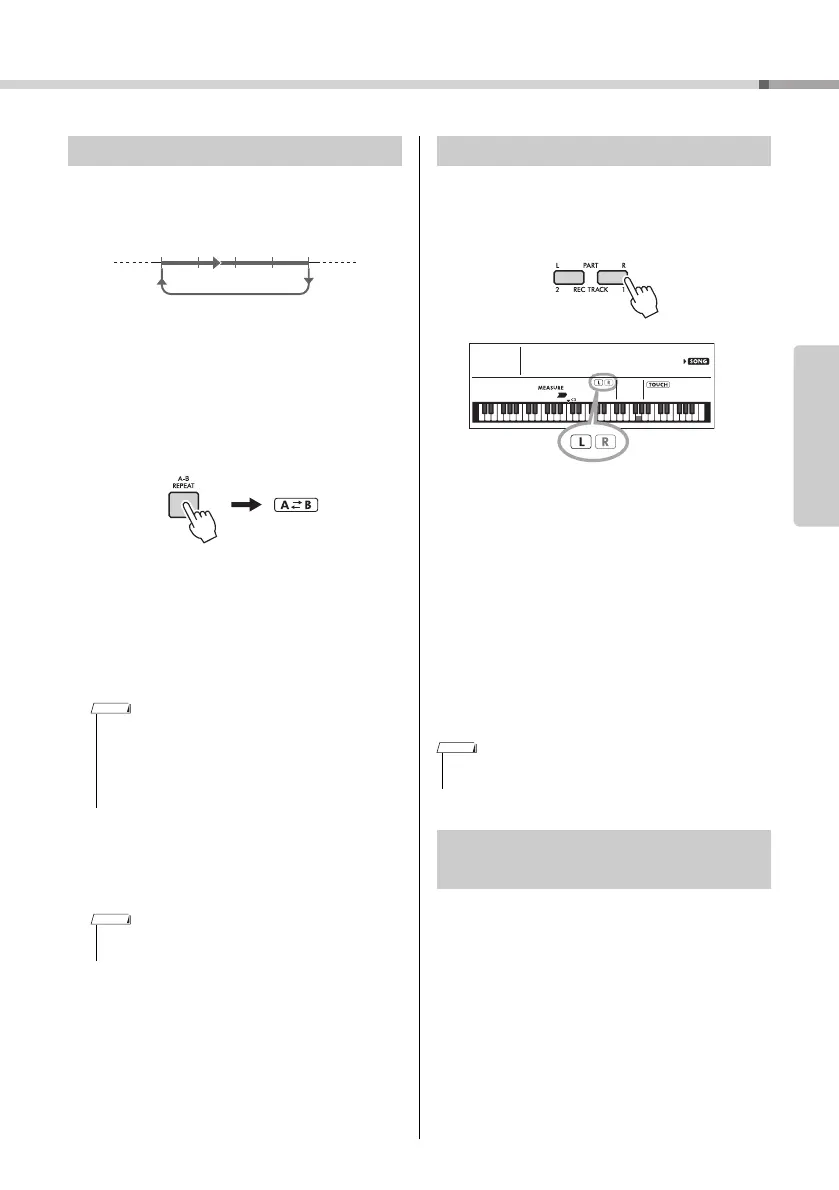
You can play back only a specific section of a Song
repeatedly by setting the A point (start point) and B
point (end point) in one-measure increments.
1
Start playback of the Song (page 31).
2
When playback reaches to the point you
want to specify as the start point, press
the [A-B REPEAT] button to set the A
point.
3
When playback reaches to the point you
want to specify as the end point, press
the [A-B REPEAT] button again to set the
B point.
The specified A-B section of the song will now
play repeatedly.
4
To cancel repeat playback, press the
[A-B REPEAT] button.
To stop playback, press the [START/STOP] but-
ton.
As indicated above the panel buttons (shown below),
Songs other than Song numbers 125 to 154 consist
of two Parts, which can be turned on or off individu-
ally by pressing the corresponding button, L or R.
When a User Song (number 155-159; page
43) is selected
The L and R indicators light when the tracks contain
data, and are unlit when a track is muted or contains
no data.
When songs other than a User Song is
selected
The L and R indicators always light regardless of
whether a track contains data or not.
By turning the left- and right-hand parts on or off dur-
ing playback, you can listen to the Part (that is turned
on), or practice the other part (that is turned off) on
the keyboard.
By using a USB cable to connect the [USB TO
HOST] terminal of this instrument to a computer, you
can load song files from the computer.
For details, refer to the “Using with a Computer or
Smart Device” on page 50.
A-B Repeat
• You can also set the A-B Repeat function when the Song is
stopped. Simply use the [REW] and [FF] buttons to select
the desired measures, pressing the [A-B REPEAT] button
for each point, then start playback.
• If you want to set the start point “A” at the top of the Song,
press the [A-B REPEAT] button before starting playback.
• The A-B Repeat function will be canceled when you select
another Song.
Repeat playback of this section
Appears when the
[A-B REPEAT] button
is pressed.
Turning Each Part On/Off
• Selecting another Song will cancel the on/off status of the
Parts.
Playing songs loaded from a
computer to this instrument
010
FrereJac
020



 To Next Page