Using the Song Lesson Feature
PSR-E373, PSR-EW310, YPT-370 Owner’s Manual
37
Reference
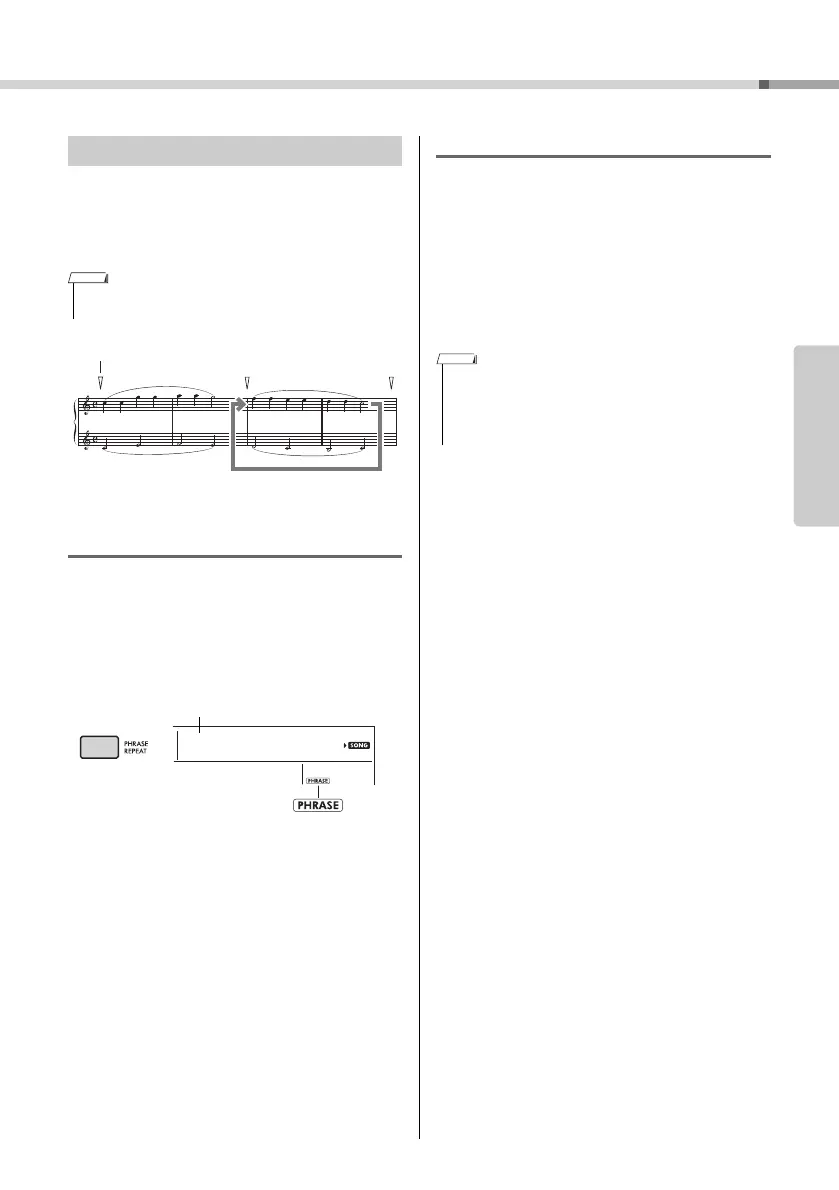
You can practice a difficult phrase repeatedly by
selecting a specific number of the Phrase Marks pre-
programmed in the Preset Songs (excepting the
Song numbers 001–003, 103–154). You can confirm
the Phrase Mark location in the Song Book (page 8).
Practicing only a single Phrase
During Song playback, press the [PHRASE REPEAT]
button at the phrase you want to practice. The corre-
sponding Phrase number will appear in the display
and, after a lead-in, repeat playback will start. Turn
off the L or R part (page 33), then practice the
phrase which is turned off repeatedly until you are
satisfied.
Even during repeat playback, you can select any
other phrase number via the [+/YES] or [-/NO] but-
ton, and you can return to normal playback by press-
ing the [PHRASE REPEAT] button again.
Practicing two or more Phrases
By setting Phrase A (as the start point) and Phrase B
(as the end point), you can practice two or more
Phrases repeatedly. During Phrase Repeat playback,
press the [A-B REPEAT] button to assign the current
Phrase to Phrase A. When playback reaches to the
desired Phrase, press the [A-B REPEAT] button
again to assign Phrase B. “A-B Rep” appears on the
display, and Repeat playback between Phrases A
and B starts. To cancel this setting, press the [A-B
REPEAT] button again.
Phrase Repeat
• Phrase Mark is a pre-programmed marker in certain Song
data, which indicates a specific location in the Song.
Phrase mark
Repeat playback of this
section
Appears when the Phrase
Repeat function is on
Phrase number
• You can set Phrases A and B also when playback is stopped
by selecting the Phrase number via the [+/YES] and [-/NO]
buttons.
• Specifying only Point A results in repeat playback between
Point A and the end of the Song.



 To Next Page