EasyManua.ls Logo

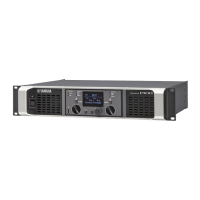
Yamaha PX5 - User Manual

Yamaha PX5
2 pages
Print Icon
To Next Page IconTo Next Page
Loading...
1
Thank you for your purchase of the Yamaha PX10, PX8, PX5 or PX3 power amplifier. Please read through
this manual carefully before using for the first time, in order to take full advantage of your PX power ampli-
fier’s superlative features and enjoy trouble-free operation for years to come.
After you have read the manual, keep it in a safe, convenient place for reference when needed.
Please read the PRECAUTIONS on the reverse side of this manual before use.
The illustrations as shown in this manual are for instructional purposes only.
The company names and product names used in this manual are the trademarks or registered trademarks
of their respective companies.
In this manual, the PX10, PX8, PX5 and PX3 power amplifier models are referred to collectively as “PX
amplifier.
Unless specified otherwise, the example illustrations used in this manual are taken from the PX10.
The PX amplifier provides two setting methods: Basic mode and Advanced mode. This manual explains
operations in the Basic mode. Operate in the Advanced mode for detailed settings. For information on the
Advanced mode, refer to the PX10/PX8/ PX5/PX3 Reference Manual.
Features
Maximum output of 1,000W out of lightweight chassis (PX10)
Yamaha’s proprietary Class-D and processing technologies provide superb sound quality and high reliability
Speaker presets that allow you to get the best possible performance from Yamaha speakers
A wide variety of DSP functions, including D-CONTOUR processing
CONFIG WIZARD that provides the optimal configuration for any speaker
Broad range of input/output connectors
Included accessories
•AC power cord
Owner’s Manual (this leaflet)
Technical Specifications (English)
AC plug clamp
•USB cap
The PX amplifier can be used as a normal amplifier by simply setting the volume knobs properly. The fol-
lowing settings enhance the performance of speakers.
The PX10/PX8/ PX5/PX3 Reference Manual is an electronic file in PDF format. You can read this book
on a computer. Use Adobe
®
Reader
®
to read this book on screen, search for words very quickly, print
specific pages, or click links to display sections of special interest. The ability to search for words, or to
follow links directly to relevant sections in the document, are helpful attributes of this electronic file for-
mat. We encourage you to take advantage of these benefits. You can download the latest Adobe Reader
application from the website listed below.
http://www.adobe.com/
In this manual, methods of operations are explained with the following marks.
[(item name)]: Rotate the main knob to select [(item name)].
: Press the Main knob.
: Press the [MENU] key.
: Press the [ ] (back) key.
: Operate A, and then operate B.
A solid arrow ( ) between steps indicates a basic operation procedure, and a dotted arrow ( ) indi-
cates an operation returning to the previous screen.
EN
ZQ41390
Owners Manual
CAUTION
Please keep the USB cap out of reach of children,
to keep them from accidentally swallowing it.
Setup
Pre-installation
Mount PX amplifiers in a rack as required.
Make sure that the power is turned off, and
turn both the two volume knobs all the way
to the left.
CAUTION
Please carry out “Pre-installation” surely. Do not connect any cables while the power is on.
Stereo connection (using two full-range speakers)
Mixer
Full-range speaker
for R channel
Full-range speaker
for L channel
R channel
L channel
1. Connect the full-range speaker for L channel to the
[SPEAKERS] A terminal and the full-range speaker for
R channel to the [SPEAKERS] B terminal.
2. Connect the output from sources (such as a mixer) to
the [INPUT] A/B connectors. Connect the L channel
source to the [INPUT] A connector, and the R channel
source to the [INPUT] B connector.
3. Connect the AC power cord and turn on. First connect the
AC power cord to the connector on the unit, and then plug
it into an appropriate AC power outlet.
4. Secure the AC power cord with the AC plug clamp to pre-
vent accidental disconnection from the connector. Refer to
the “Rear panel” section on the reverse side for instructions on installation.
NOTE
Refer to the “Wiring” section on the reverse
side for instructions on making connections.
AC IN connector
AC power cord
To outlet
HOME screen
MENU screen (top screen)
SP TYPE screen
Speaker selection
Select a speaker to be connected from the shown list.
If the speaker is not in the list, select “GENERIC.
HPF screen
Select a cutoff frequency of the high pass filter. If
the high pass filter is not used, select “OFF.
CONFIRMATION screen
[CONFIG WIZARD]
[FULL+FULL]
[(Speaker name)]
[(Cutoff frequency)]
[APPLY]
(Applies the set value)
Go on to the “Tone control” instructions.
CAUTION
Please carry out “Pre-installation” surely. Do not connect any cables while the power is on.
Cross-over connection (using a full-range speaker and a subwoofer)
Mixer
Full-range
speaker
Subwoofer
1. Connect the subwoofer to the [SPEAKERS] A terminal
and the full-range speaker to the [SPEAKERS] B ter-
minal.
2. Connect the output from source (such as mixer) to the
[INPUT] A connector.
3. Connect the AC power cord and turn on. First connect
the AC power cord to the connector on the unit, and then
plug it into an appropriate AC power outlet.
4. Secure the AC power cord with the AC plug clamp to pre-
vent accidental disconnection from the connector. Refer to
“Rear panel” section on the reverse side for instructions on the installation.
NOTE
Refer to “Wiring” section on the reverse side
for instructions on making connections.
AC IN connector
AC power cord
To outlet
HOME screen
MENU screen (top screen)
[CONFIG WIZARD]
SP TYPE screen
[FULL+SUB]
Speaker selection (A)
Select a subwoofer to be connected from the shown
list. If the subwoofer is not in the list, select
“GENERIC.
[(Speaker name)]
HPF screen
Select a cutoff frequency of the high pass filter of
the subwoofer. If the high pass filter is not used,
select “OFF.
[(Cutoff frequency)]
Speaker selection (B)
Select a full-range speaker to be connected from the
shown list. If the speaker is not in the list, select
“GENERIC.
[(Speaker name)]
X-OVER screen
Select a crossover frequency.
[(Crossover frequency)]
CONFIRMATION screen
[APPLY]
(Applies the set value)
Go on to the “Tone control” instructions.
NOTE
To mute channel A, push the [A] key and the main knob simulta-
neously. To cancel muting, push the [A] key and the main knob
simultaneously again.
To mute channel B, push the [B] key and the main knob simulta-
neously. To cancel muting, push the [B] key and the main knob
simultaneously again.
Tone Control
Input signal from the source, confirm that the sound is
being output from the speakers, and adjust the volume
appropriately.
MENU screen (top screen)
[TUNING]
TUNING screen
[D-CONTOUR]
D-CONTOUR screen
[MODE]
MODE Selection screen
Select one of the following three modes.
OFF: Turns off D-CONTOUR.
FOH/MAIN: Boosts the high and low frequency compo-
nents so that the frequency response is suitable for main
speaker use.
MONITOR: Reduces the low frequency range, which could
otherwise tend to be boomy if the speaker is set directly on
the floor. This enables you to hear mid and high frequency
ranges clearly when using as a floor monitor.
[(MODE)]
D-CONTOUR screen
[DEPTH]
DEPTH Selection screen
Set over a range from 1 to 10.
The larger the value, the deeper the effect.
MENU screen (top screen)
HOME screen


Other manuals for Yamaha PX5

Questions and Answers

  • C
    cmooreAug 19, 2025
    What to do if [PROTECT] indicator lights and an “OUTPUT CURRENT OVER” message appears on Yamaha Amplifier display?
    • D
      daniel61Aug 19, 2025
      If the [PROTECT] indicator lights up and an “OUTPUT CURRENT OVER” message appears, it indicates that circuit protection has been engaged. This may be due to a short at the speaker terminal, amplifier terminal, or wire, or because the impedance of the connected speaker is excessively low, overloading the amplifier. To resolve this, turn the power off and check for any shorts in the speaker terminal, amplifier, or wiring. Also, verify that the speaker is not damaged and that the total impedance is not excessively low. Then, review the speaker connection and turn the power back on.
  • K
    Karen DavisAug 21, 2025
    What to do if my Yamaha PX5 power does not turn on?
    • J
      Jesse MccallAug 21, 2025
      If the Yamaha Amplifier power does not turn on, or it turns off suddenly, even when turning it on again, several factors could be at play. First, check the source voltage to ensure the power supply connected outlet matches the rated range. If the internal temperature is too high, allow the amplifier to cool down by improving ventilation. Also, lower the output level. If the issue persists after checking these, and after disconnecting the speakers and lowering the volume completely, there may be a device malfunction. In that case, contact your Yamaha dealer.
  • J
    jamiewilsonAug 23, 2025
    What to do if [PROTECT] indicator lights and “AMP TEMP TOO HIGH” message appears on Yamaha PX5 Amplifier display?
    • A
      Andrea WrightAug 23, 2025
      If the [PROTECT] indicator lights up and an “AMP TEMP TOO HIGH” message appears on the Yamaha Amplifier display, it means the internal temperature is too high, and thermal protection has been engaged. Check the amplifier ventilation conditions and take measures to improve airflow around it. Leave the amplifier off until the internal temperature goes down, and then turn it on again.
  • D
    David JordanAug 26, 2025
    How to fix distorted sound from Yamaha Amplifier speakers?
    • A
      amber44Aug 27, 2025
      If the sound from your speakers is distorted, the input level may be exceeding the input sensitivity setting. To fix this, adjust the input sensitivity on the CONFIG WIZARD screen to match the input level.
  • S
    strongheatherAug 28, 2025
    How to troubleshoot no sound from Yamaha speakers?
    • M
      Madison WatsonAug 28, 2025
      If there is no sound from the speakers, first, ensure that all cables are correctly connected to the input jacks and output terminals. At the output side, make sure that terminals outputting signals are connected. If the meter does not rise when raising the volume knob, the connectivity at the input side may be faulty. If the meter rises, there may be problems at the output side. Also, check the mixer outputs connected to the input jacks and raise the output of the mixer if it is lowered. Ensure the volume knob is properly adjusted, and the mute is off. If the protection circuit is engaged, identify and resolve the cause. If you are using Power Boost mode (PX5 and PX3 only), audio signals are not output from channel B, so cancel Power Boost mode or reconnect the cables.
  • E
    Elizabeth LarsenAug 30, 2025
    Why does the display automatically turn off on my Yamaha PX Amplifier?
    • J
      Jaime DelacruzAug 31, 2025
      The display on your Yamaha PX amplifier automatically turns off for protection purposes. If the amplifier hasn't been operated for 20 minutes, the display will turn off. To turn it back on, press any key on the front panel or rotate the main knob. Also, if the Black-out mode is enabled, the backlight turns off after about 10 seconds of inactivity. Press any key on the front panel to turn the backlight on again. To prevent this, disable Black-out mode.
  • C
    cfischerSep 2, 2025
    What does it mean if [CLIP/LIMIT] indicator lights on Yamaha PX5?
    • E
      Elizabeth WashingtonSep 2, 2025
      If the [CLIP/LIMIT] indicator lights are illuminated, it signifies that the input signal is too high, or the output exceeds the rated voltage. As a result, the signal is being clipped, or the limiter has been engaged to protect the circuit. To resolve this, lower the output level of the device connected to the input connector or reduce the volume of the amplifier.
  • H
    helen58Sep 4, 2025
    How do I fix a Yamaha PX5 with muffled sound and no high-frequency sound?
    • R
      Ryan ShawSep 4, 2025
      If the sound is muffled or lacks high-frequency components, it indicates that the sound is being filtered. To correct this, go to the MENU screen (TUNING screen) and change the settings of the filters. You can check the current filter status on the HOME screen.
  • A
    Anita LongSep 6, 2025
    Why is the level of channel B low on my Yamaha PX5?
    • B
      Brett MasseySep 6, 2025
      If “ROUTING” is set to something other than “DUAL,” and the level of channel B is low, the volume knob of channel B, which adjusts the output balance to channel A, may have been lowered. To fix this, raise the volume knob of channel B.
  • P
    Patrick MeadowsSep 9, 2025
    How to operate panel controls on Yamaha Amplifier if they cannot be operated?
    • K
      Kim SullivanSep 9, 2025
      If the panel controls cannot be operated, the panel lock may be turned on. To resolve this, turn off the panel lock.

Summary

Stereo Connection

Speaker and Input Connection

Connect full-range speakers to the [SPEAKERS] terminals and audio sources to the [INPUT] connectors.

Configuration Wizard Steps

Navigate through SP TYPE, HPF, and CONFIRMATION screens for optimal settings.

Cross-over Connection

Subwoofer and Speaker Connection

Connect a subwoofer to [SPEAKERS] A and a full-range speaker to [SPEAKERS] B, linking source output to [INPUT] A.

Crossover Configuration

Set speaker types, subwoofer HPF cutoff frequency, and crossover frequency via on-screen menus.

Tone Control

Tuning and EQ Adjustment

Adjust input signal, speaker output, and volume. Access tuning and EQ settings via the menu.

D-CONTOUR Settings

Configure D-CONTOUR modes (OFF, FOH/MAIN, MONITOR) and depth for enhanced frequency response.

Features and Accessories

Product Highlights

Key features include high output, Class-D technology, DSP functions, and CONFIG WIZARD.

Included Accessories

Items provided with the amplifier, such as AC power cord, manual, and AC plug clamp.

Setup

Pre-installation and Installation

Mount the amplifier in a rack, ensuring power is off and volume knobs are at their lowest setting.

Yamaha PX5 Specifications

General IconGeneral
Amplifier class-
Frequency range20 - 20000 Hz
Audio output channels- channels
Peak power per channel- W
Signal-to-Noise Ratio (SNR)100 dB
Total Harmonic Distortion (THD)0.1 %
RMS power output per channel (2 Ohm)500 W
RMS power output per channel (4 Ohm)800 W
XLR inYes
USB 2.0 ports quantity1
Speakers connectivity typeXLR / NL4
AC input voltage220 - 240 V
AC input frequency50 - 60 Hz
Power consumption (typical)230 W
Storage temperature (T-T)-20 - 60 °C
Operating temperature (T-T)0 - 40 °C
PurposeHome
Gain adjustmentRotary
Connectivity technologyWired
Weight and Dimensions IconWeight and Dimensions
Depth388 mm
Width480 mm
Height88 mm
Weight6900 g

Related product manuals