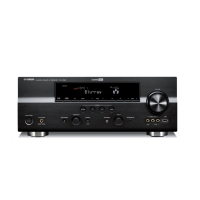
How to stop humming sound from Yamaha Receiver?
- CcalvintorresSep 16, 2025
To stop a humming sound from your Yamaha Receiver, ensure the audio cables are firmly connected. If the problem continues, the cables may be defective and need replacement.
How to stop humming sound from Yamaha Receiver?
To stop a humming sound from your Yamaha Receiver, ensure the audio cables are firmly connected. If the problem continues, the cables may be defective and need replacement.
What to do if my Yamaha Receiver has no sound?
If your Yamaha Receiver has no sound, here are a few things to check: * Ensure the input or output cables are correctly connected and not defective. * Verify that the audio input jack select is set to “AUTO”. * If set to “ANALOG”, select an appropriate input source using the CINPUT selector on the front panel or the input selector buttons on the remote. * Make sure the volume isn't turned down or muted; adjust the volume and press DMUTE or BVOLUME +/- on the remote. * Confirm that the source signals can be reproduced by the unit.
Why does my Yamaha RX-V1800 turn on then immediately go to standby?
Your Yamaha Receiver might be entering standby mode soon after being turned on due to several reasons: the power cable may not be fully connected (connect it firmly), the speaker impedance setting might be incorrect (set it to match your speakers), the protection circuitry may have been activated (ensure all speaker wire connections are secure and not touching anything else), or the unit may have been exposed to a strong external electric shock (turn off the unit, disconnect the power cable, plug it back in after 30 seconds, and then use it normally).
How to fix no sound on my Yamaha RX-V1800 Receiver?
If there is no sound coming from your Yamaha Receiver, here are a few things to check: * Ensure the input or output cables are correctly connected; if the problem persists, the cables may be defective. * Verify that the audio input jack select is set to 'AUTO'. * If set to 'ANALOG', and your input source outputs digital audio, select the appropriate input source using the input selector on the front panel or remote. * Make sure the volume isn't turned down, and the sound isn't muted (press MUTE or VOLUME +/- on the remote). * Confirm that the source signals can be reproduced by the receiver.
Why is sound only coming from one side of my Yamaha RX-V1800?
If sound is only coming from one side of your Yamaha Receiver, it could be due to incorrect cable connections (connect the cables properly; if the problem persists, the cables may be defective), incorrect settings in 'SPEAKER LEVEL' (adjust the 'SPEAKER LEVEL' settings), 'CENTER SP' in 'SET MENU' is set to 'NONE' (set 'CENTER SP' to 'SMALL' or 'LARGE'), one of the HiFi DSP programs (except for '7ch Stereo') has been selected (try another sound field program), the sound field programs are turned off (press OSTRAIGHT to turn them on), or 'SUR. L/R SP' in 'SET MENU' is set to 'NONE' (set 'SUR. L/R SP' to 'SMALL' or 'LARGE'), speakers are connected to the SURROUND BACK speaker terminals (connect the surround speakers to the SURROUND BACK speaker terminals).
How to fix Yamaha RX-V1800 sound only coming from one side?
If sound is only coming from one side of your Yamaha Receiver, several factors could be the cause: * The sleep timer might have turned off the unit. * There may be incorrect cable connections. * Incorrect settings in “SPEAKER LEVEL”. * “CENTER SP” in “SET MENU” may be set to “NONE”. * One of the HiFi DSP programs (except for “7ch Stereo”) may have been selected. * The sound field programs might be turned off. * “SUR. L/R SP” in “SET MENU” may be set to “NONE”. * Speakers may be connected to the SURROUND BACK speaker terminals. To resolve this, turn the unit back on, ensure cables are properly connected, adjust the “SPEAKER LEVEL” settings, set “CENTER SP” to “SMALL” or “LARGE”, try another sound field program, turn on the sound field programs by pressing OSTRAIGHT, and co...
What causes buzzing and whining noises in my Yamaha Receiver and how do I fix it?
If you are hearing buzzing and whining noises from your Yamaha Receiver, it might be due to a TV set being used nearby. Moving the unit away from the TV set may resolve the issue.
How to fix Yamaha RX-V1800 Receiver that does not operate properly?
If your Yamaha Receiver is not operating properly, the internal microcomputer may have been frozen by an external electric shock or a power supply with low voltage. Disconnect the power cable from the AC wall outlet and then plug it in again after about 30 seconds.
Why is there no sound from the surround back speakers on my Yamaha RX-V1800 Receiver?
If you're not hearing sound from the surround back speakers on your Yamaha Receiver, it might be because “SUR. L/R SP” in “SET MENU” is set to “NONE,” which automatically sets “SUR.B L/R SP” to “NONE.” Alternatively, “SUR.B L/R SP” in “SET MENU” might be set to “NONE.” To fix this, set “SUR.B L/R SP” to a setting other than “NONE.”
Why is FM stereo reception noisy on my Yamaha RX-V1800?
Noisy FM stereo reception on your Yamaha Receiver can be due to the transmitter being too far away, poor antenna input, multi-path interference, or a weak signal. Check the antenna connections, adjust the antenna position to eliminate multi-path interference, or use a high-quality directional FM antenna.
Setting the voltage selector on the rear panel for Asia and General models.
Place your speakers in the room and connect them to this unit.
Connect your DVD player and other components to the unit.
Turn on the video monitor and the unit, then start playback.
Utilizes YPAO technology for automatic speaker and system adjustments.
Customize sound field parameters to suit input source or listening room.
Manually adjust basic speaker settings like LFE/BASS OUT and speaker size.
Adjust audio parameters including Equalizer, LFE LEVEL, and Dynamic Range.
Save favorite system settings to memory buttons or SET MENU.
Set operation mode selector to control the unit, TV, or other components.
Set appropriate remote control codes for each input area.
Connect source components to analog audio jacks for Zone 2 or Zone 3 playback.
| Channels | 7.1 |
|---|---|
| Power Output | 130 W per channel (8 ohms, 20 Hz-20 kHz, 0.04% THD) |
| Total Harmonic Distortion (THD) | 0.04% |
| Frequency Response | 10 Hz - 100 kHz |
| HDMI Inputs | 4 |
| HDMI Outputs | 1 |
| Video Formats Supported | 1080p |
| Network Capability | No |
| Signal-To-Noise Ratio | 100 dB |
| Input Impedance | 47 kOhm |
| Input Sensitivity | 200 mV |
| Audio D/A Converter | 192 kHz/24-bit |
| Digital Sound Processor (DSP) | Yes |
| DSP Preset Qty | 17 |
| Tuner Type | AM/FM |
| Preset Station Qty | 40 |
| HDMI Switching | Yes |
| HDMI Version | 1.3a |
| Audio Formats Supported | Dolby Digital, DTS, Dolby Pro Logic IIx, DTS-ES, DTS 96/24, DTS Neo:6 |
| Response Bandwidth | 10 Hz-100 kHz |
| DSP Presets | Concert Hall, Jazz Club |
| Additional Features | iPod compatibility, XM Radio ready |
| Video Conversion | Up to 1080p |
| Video Inputs/Outputs | Component |
| Audio Inputs/Outputs | Analog, Digital Coaxial, Digital Optical |
| Tuning Display | Fluorescent display |