EasyManua.ls Logo

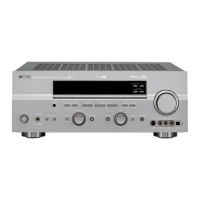
Yamaha RX-V640 - User Manual

Yamaha RX-V640
68 pages
Print Icon
To Next Page IconTo Next Page
Loading...
OWNER’S MANUAL
RX-V640
U
AV Receiver
0100RX-V640-cv1_EN-U.p65 03.1.10, 6:49 PM1

Table of Contents

Other manuals for Yamaha RX-V640

Questions and Answers

  • Y
    youngjasmineSep 10, 2025
    How to stop humming sound on Yamaha RX-V640 Receiver?
    • A
      Annette ButlerSep 10, 2025
      If you notice a humming sound coming from your Yamaha Receiver, it may be due to incorrect cable connections. Ensure that all audio plugs are firmly connected. If the problem continues, the cables themselves might be defective and require replacement.
  • M
    Mario LivingstonAug 25, 2025
    Why is my Yamaha Receiver remote control not working?
    • A
      aaronmacdonaldAug 25, 2025
      If the remote control for your Yamaha receiver isn't working correctly, consider these potential causes and solutions: * Ensure you are within the remote's operational range, which is a maximum of 6 meters (20 feet) and no more than 30 degrees off-axis from the front panel. * Check if direct sunlight or lighting (especially from inverter-type fluorescent lamps) is interfering with the remote control sensor on the unit. If so, reposition the unit. * Replace all the batteries in the remote control with new ones. * Verify that the manufacture code is correctly set. If not, set the code correctly.
  • K
    Karen ChenAug 26, 2025
    What to do if the sound suddenly goes off on my Yamaha RX-V640 Receiver?
    • J
      Jacqueline AllenAug 27, 2025
      If the sound from your Yamaha Receiver suddenly cuts off, here's what might be happening and how to address it: * The protection circuit may have been activated due to a short circuit. Check that the IMPEDANCE SELECTOR switch is set to the appropriate position, then turn the unit back on. * The sleep timer may have turned the unit off. Turn the power back on and restart the source. * The sound might be muted. Press the MUTE button or any operation buttons on the unit to cancel the mute function and adjust the volume.
  • B
    Breanna FranklinAug 27, 2025
    How to fix Yamaha Receiver when only one speaker works?
    • A
      ann06Aug 27, 2025
      If you only hear sound from one speaker connected to your Yamaha Receiver, the issue is likely due to incorrect cable connections. Ensure that all cables are properly connected. If the problem persists, the cables themselves may be defective and need to be replaced.
  • R
    Rhonda CowanAug 29, 2025
    Why is there no sound from the subwoofer on my Yamaha Receiver?
    • T
      Teresa ThomasAug 29, 2025
      If you're not getting any sound from the subwoofer connected to your Yamaha Receiver, here's what to check: * If you're playing a Dolby Digital or DTS signal, ensure that “SOUND 1E BASS” on the set menu is set to SWFR or BOTH. * If you're playing a 2-channel source, make sure that “SOUND 1E BASS” on the set menu is set to BOTH.
  • S
    smithrebeccaNov 22, 2025
    Why is there no sound coming from my Yamaha RX-V640 Receiver?
    • R
      Rachel WoodNov 22, 2025
      If you are experiencing a complete lack of sound from your Yamaha Receiver, consider the following possible causes and solutions: * Ensure all input and output cables are correctly and securely connected. If the issue persists, the cables themselves may be defective and need replacing. * Verify that you have selected the appropriate input source using the INPUT or 6CH INPUT (or the input selector buttons) on your receiver. * Check that all speaker connections are secure. * Confirm that the main speakers are properly selected using SPEAKERS A and/or B. * Make sure the volume isn't turned down too low; increase it to an audible level. * Ensure the sound is not muted by pressing the MUTE button or any other operation buttons on the unit, then adjust the volume as needed. * If u...
  • N
    Natalie WolfeSep 18, 2025
    How to fix AM tuning on Yamaha RX-V640?
    • C
      Cameron MaySep 18, 2025
      If the desired station cannot be tuned in with the automatic tuning method (AM) on your Yamaha Receiver, it may be because the signal is weak or the antenna connections are loose. Tighten the AM loop antenna connections and orient it for best reception. If there are continuous crackling and hissing noises, use an outdoor antenna and a ground wire.
  • A
    Alex GambleSep 22, 2025
    What to do if manufacture code has not correctly set on Yamaha Receiver?
    • S
      stephenoconnorSep 22, 2025
      Try setting another code of the same manufacturer.
  • D
    Donna FisherSep 8, 2025
    How to improve bass on Yamaha Receiver?
    • N
      Noah Haynes DVMSep 8, 2025
      If you're experiencing poor bass reproduction with your Yamaha Receiver, here are a couple of things to check: * If “SOUND 1E BASS” on the set menu is set to SWFR or BOTH, but your system doesn't have a subwoofer, change the setting to MAIN. * Ensure that the speaker mode settings (main, center, rear, or rear center) on the set menu match your actual speaker configuration. Adjust the position for each speaker based on its size.
  • M
    Mario MooreSep 5, 2025
    What to do if my Yamaha RX-V640 does not operate properly?
    • G
      garciachristineSep 5, 2025
      If your Yamaha Receiver is not operating properly, it's possible that the internal microcomputer has frozen due to an external electric shock (like lightning or excessive static electricity) or a power supply with low voltage. To resolve this, disconnect the AC power cord from the outlet and then plug it back in again after about 30 seconds.

Summary

Safety and Precautions

Important Safety Instructions

General safety, electrical hazards, and warnings for product usage.

Operating Precautions

Cautions for proper operation, environment, and maintenance.

Product Overview

Unit Features

Details amplifier, DSP, tuner, and other key capabilities.

Getting Started

Lists supplied accessories and guides battery installation.

Controls and Functions

Front Panel Controls and Display

Explains front panel buttons, selectors, and display.

Remote Control Operation

Details remote control layout, functions, and features.

System Setup and Connections

Connecting Components and Speakers

Guides on wiring sources, antennas, speakers, and power.

Basic System Settings

Configuration for room size, speaker levels, initial adjustments.

Operation

Playback and Sound Field Selection

Covers input modes, volume, BGV, muting, DSP programs.

Advanced Operation Menus

Details Set Menu, Remote Control setup, parameter editing.

Troubleshooting and Reference

Troubleshooting Common Problems

Addresses issues with sound, tuner, remote, and unit.

Glossary and Specifications

Defines technical terms and lists unit specifications.

Yamaha RX-V640 Specifications

General IconGeneral
TypeAV Receiver
Channels6.1
Total Harmonic Distortion0.06%
Signal-To-Noise Ratio100 dB
HDMINo
USBNo
BluetoothNo
Wi-FiNo
Frequency Response10 Hz - 100 kHz
Input Sensitivity200 mV
Input Impedance47k ohms
Surround SoundDolby Pro Logic II, DTS

Related product manuals