EasyManua.ls Logo

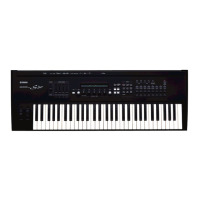
Yamaha S30 - User Manual

Yamaha S30
156 pages
Print Icon
To Next Page IconTo Next Page
Loading...
OWNER’S MANUAL
MUSIC SYNTHESIZER
OWNER’S MANUAL
MUSIC SYNTHESIZER

Table of Contents

Other manuals for Yamaha S30

Questions and Answers

  • K
    Karen GutierrezSep 13, 2025
    Why Card Filer for Macintosh does not work correctly with Yamaha Synthesizer?
    • J
      Jessica ConwaySep 13, 2025
      If you are a Macintosh user and Card Filer is not working correctly with your Yamaha Synthesizer, check if you are using MIDI Time Piece. Card Filer is not compatible with MIDI Time Piece, so you need to disable the use of MIDI Time Piece on the Macintosh.
  • E
    eric63Sep 15, 2025
    Why Plug-in Voices cannot be read into PLG Memory on Yamaha Synthesizer?
    • J
      James KirkSep 15, 2025
      The S30 Yamaha Synthesizer can read CS6x/CS6R/S80 Plug-in Voice data. The Plug-in Voices for the PLG150-AN/DX/PF/VL Plug-in Boards are in MIDI File format. Use Card Filer to send voice data to Memory Card, then start playback on the sequencer to read the data into PLG Memory. Of the two types of file (PLG1 and PLG2), play back the PLG2 type.
  • M
    Mary Estrada MDNov 17, 2025
    How to troubleshoot no sound on my Yamaha Synthesizer?
    • D
      Dennis SmithNov 18, 2025
      If your Yamaha Synthesizer isn't producing sound, consider these potential solutions: * Ensure the volume is appropriately set. * If using an S30 with a foot controller connected, check if it's fully depressed. * Verify the 'Vol' parameter in the QED Level screen of Voice Edit Common is sufficiently high. * Confirm the WaveNumber parameter in the OSC Wave screen of Voice Edit Element isn't set to 000 (off). * Check the Level parameter of the OSC Out screen in Voice Edit Element to ensure it's sufficiently high. * Verify the note range/velocity range of the ZONE, OSC screen in Voice Edit is appropriately set. * Ensure none of the Elements are muted. * Check if the Element filters have been set to cut almost all the sound. * Confirm the effects parameters are appropriately...

Yamaha S30 Specifications

General IconGeneral
Polyphony64 voices
Multitimbral16 parts
Wave Memory16 MB
ArpeggiatorYes
MIDIIn/Out/Thru
Display240 x 64 dot LCD
Synthesis TypeAWM2 (Advanced Wave Memory 2)
OscillatorsAWM2
Keyboard61 keys
EffectsReverb, Chorus, Variation
TypeDigital Synthesizer
ControllersPitch Bend, Modulation Wheel
OutputsL/R (Stereo) 1/4" Phone, Headphones
InputsFoot Controller, Foot Switch
FiltersDigital Filters
Memory128 Performances
StorageSmartMedia
ConnectionsMIDI, Foot Controller, Foot Switch

Related product manuals