Connecting to a Device Already Paired
Here’s how to connect to a Bluetooth device to which this product has already been paired.
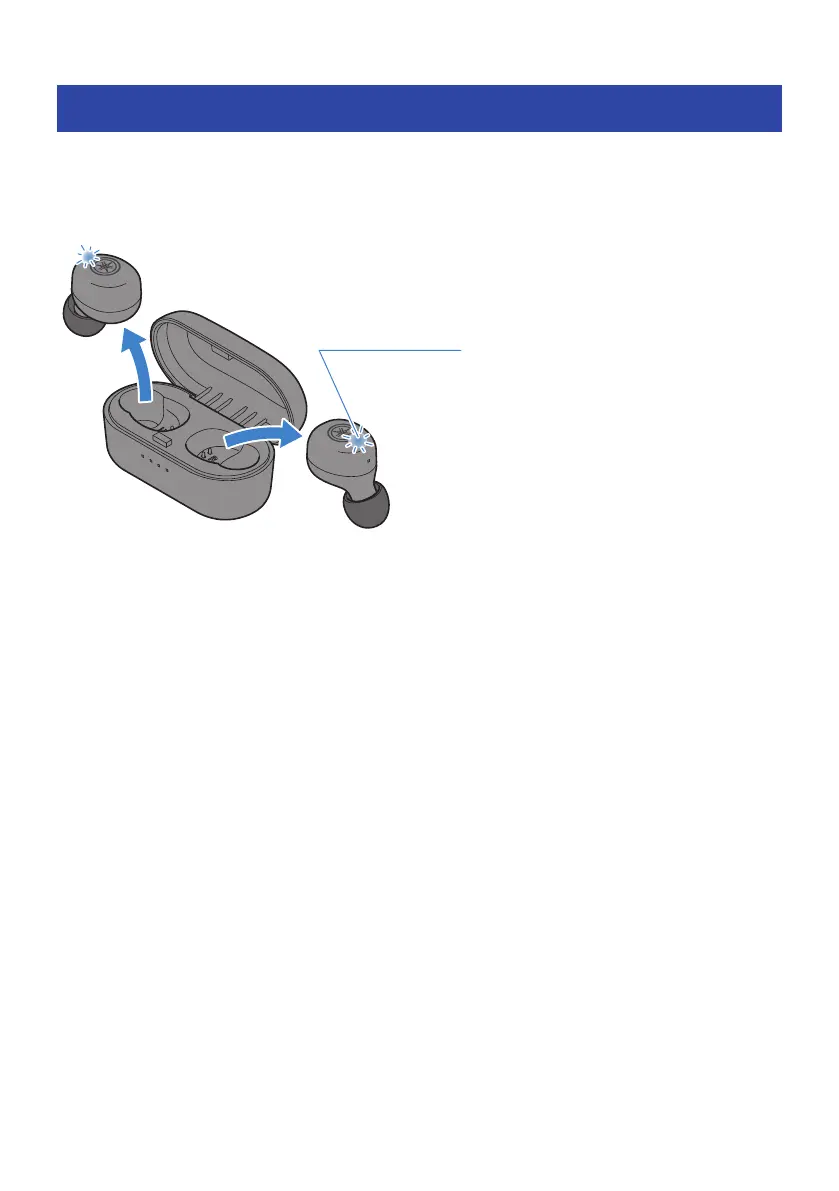
When you remove the earphones from the charging case, they will turn on and connect automatically with
the last Bluetooth device to which they were connected. If successfully connected, you will hear the
“Connected” audio message in the earphones. The indicator will display as shown below.
If the earphones do not automatically connect to a Bluetooth device, they are waiting for a connection or are
in pairing standby mode. Make the connection to the earphones from your Bluetooth device.
NOTE
(
One of the earphones (L or R) will be the primary earphone when connecting, according to their remaining battery power. The
earphones will appear in the list shown on the Bluetooth device as shown below.
(
Earphone (L): Yamaha TW-E3B L
(
Earphone (R): Yamaha TW-E3B R
(
The other earphone may be listed as “Headset,” depending on the Bluetooth device.
(
This product does not support multi-point connectivity (connection to multiple devices at the same time).
Related links
(
“Pairing for the First Time”(p.15)
(
“Pairing with a Different Device”(p.18)
21
Bluetooth® Connectivity > Connecting to a Device Already Paired



 To Next Page