–3–
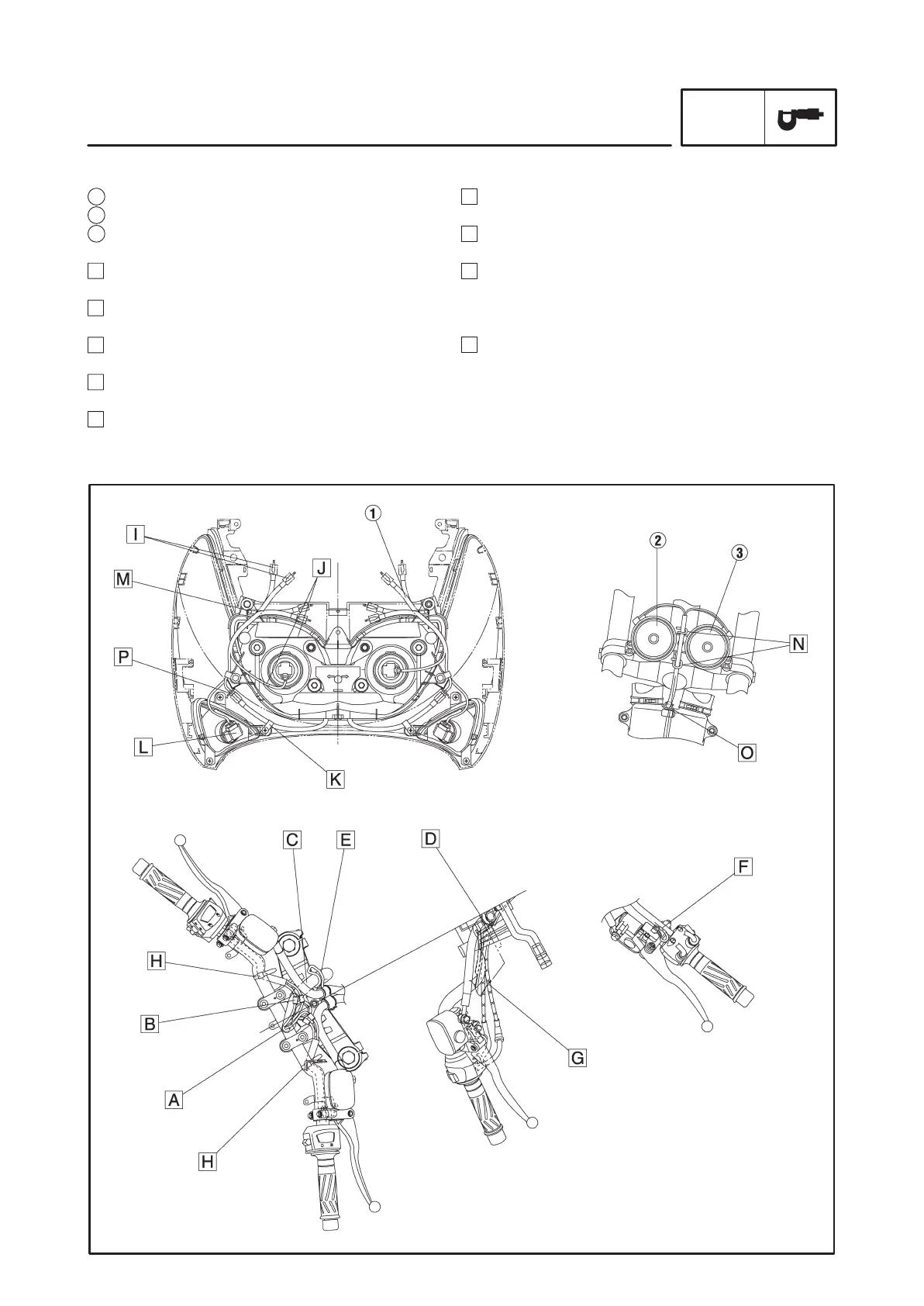
F Connect the brake light switch lead through the
handlebar switch side.
G Route the throttle cables through the hole of the
handle under cover.
H Fasten the handlebar switch lead to the handlebar
using a plastic clamp.
The fastening location is the bend area on the bot-
tom of the handlebar.
I Connect the headlight sub-harness to the wirehar-
ness on top of the stay (left and right)
After making the connection, push the coupler be-
tween the front cowling and the air filter case.
1 Headlight sub-harness
2 Horn
3 Horn (H mark on the back of the horn).
A Attach the wireharness clamp (protector terminal)
to the T stud.
B Install the wireharness to the top of the steering
after each coupler connection.
C Route the wireharness between brake hose and
upper bracket.
D Route the throttle cables between handle under
cover and upper bracket.
E Install a wireharness guide to hold down the wire-
harness.
CABLE ROUTING
SPEC
CABLE ROUTING



 To Next Page