8-19
8. OPERATE THE TRACTOR
SA221/324/424 Operation Manual
5. Rotation of Swivel Seat Bracket
(Option)
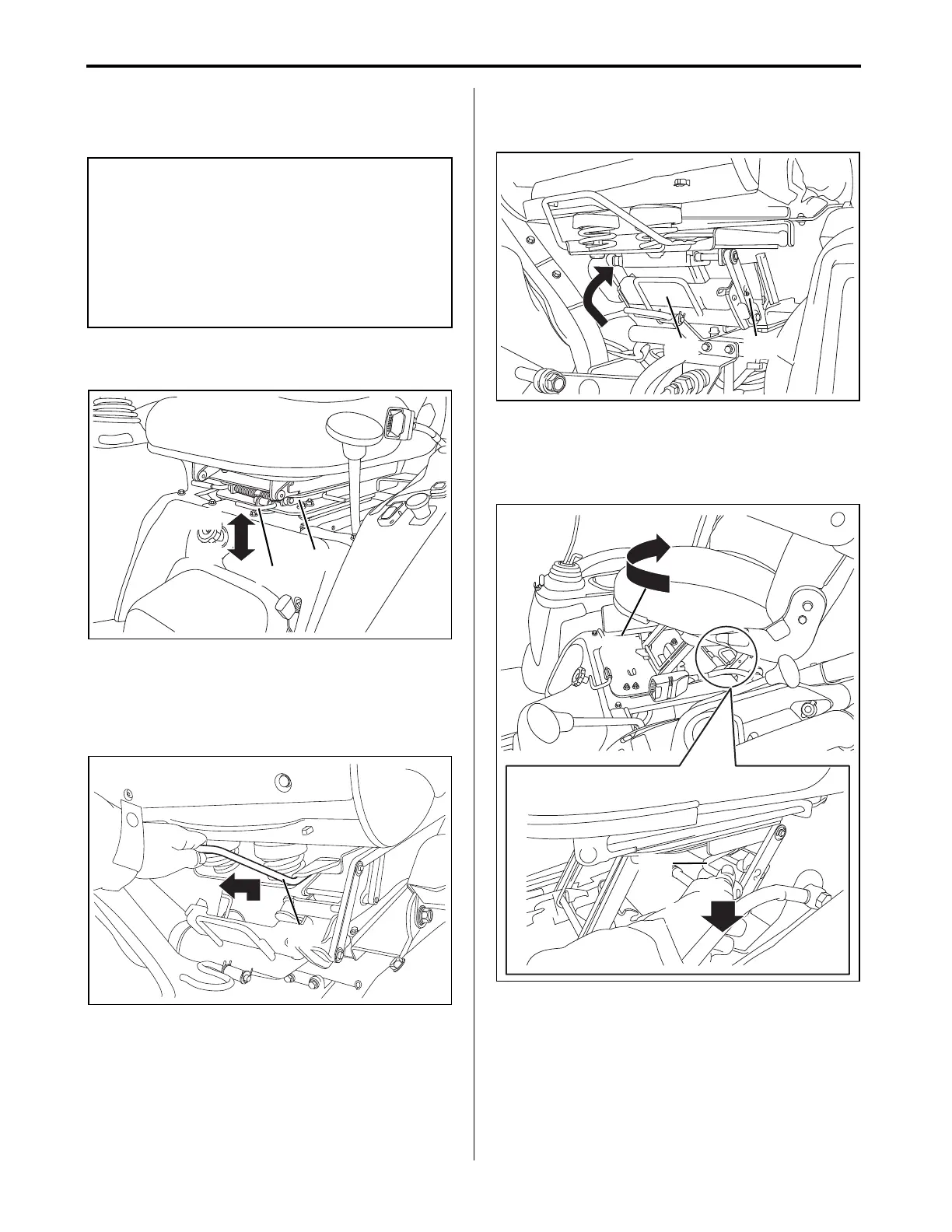
1. Pull up the lock release lever of the swivel seat
bracket upward to unlock.
(A) Lock release lever of swivel seat bracket
(B) Swivel seat bracket
(a) Upward: Unlock the swivel seat bracket
(b) Downward: Lock the swivel seat bracket
2. Pull up the rear handle of the swivel seat bracket.
(A) Rear handle of the swivel seat bracket
3. Make sure the rear latch of the swivel seat
bracket is locked onto the swivel seat bracket
stay.
(A) Rear latch of the swivel seat bracket
(B) Swivel seat bracket stay
4. Push down and hold the swivel release handle
and rotate the seat clockwise.
(A) Swivel Release Handle of the swivel seat
bracket
(a) Operator seat can be rotated as indicated by
arrow. Refer to figure.
(b) Downward: Unlock the swivel seat bracket
rotation.
IMPORTANT
●Swivel seat bracket has already been installed if
the backhoe is mounted from the factory.
●Exit the tractor when rotating the swivel seat
bracket.
●Operator must rotate the operator seat with swivel
seat bracket to opposite side when operating the
backhoe.
SA221_324_424_OperatorsManual.book 19 ページ 2018年6月4日 月曜日 午後5時19分



 To Next Page