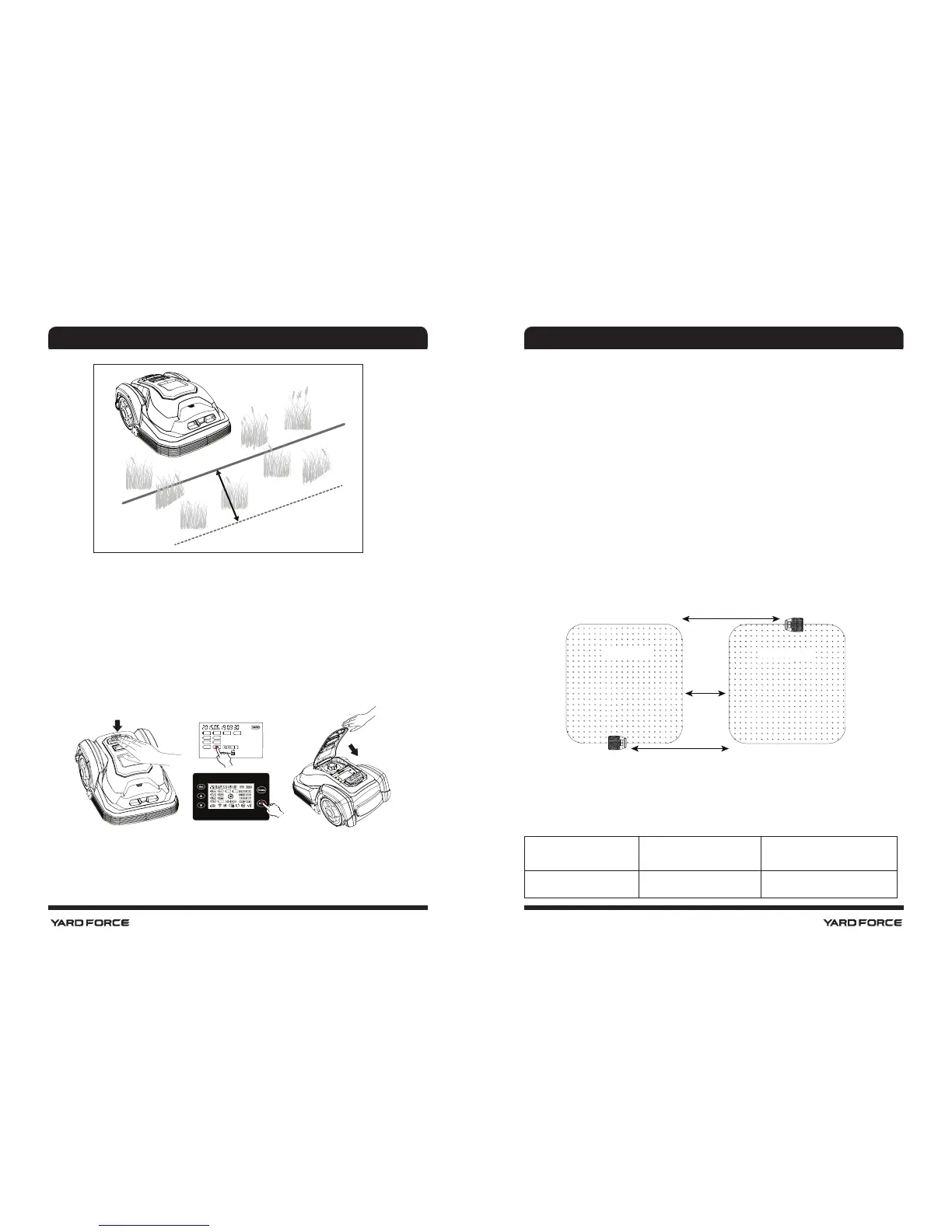
24 25
10-20 cm
Starting and stopping while mowing
• If you want to stop the Robomower at any time during
cutting, please press the STOP button (2). Pressing the
STOP button will also open the top cover, providing
access to the control interface. The Robomower will not
start working again until you have closed the top cover.
> 0,5 m
> 10 m
> 10 m
S1 S2
Own land Neighbour
Robomower mowing limitations
• Out of the box, the Robomower is set to work 7 days a
week. You can adjust the daily working time to match
your garden.
• In case a neighbor is using the same Robomower, you
need keep a 0.5 m distance between your and your
neighbour's bo undary wires. Otherwise, the two devices
might interfere with each-other. Additionally, keep
your charging station more than 10 m away from your
neighbour's boundary wires. Last not least, ensure that
the adjacent boundary wires use different signals. Please
refer to section "Signal setting" in order to select signal
S1 or S2 for your installation.
Below is a table showing the signal distances for each
Robomower. Please note your model and use this
information as your guide when designing the boundary
layout.
Model Max field Max. distance to wire
SA600H 600 m
2
12 m
SAFETY PRECAUTIONS SAFETY PRECAUTIONS





 To Next Page