42 43
MAINTENANCE
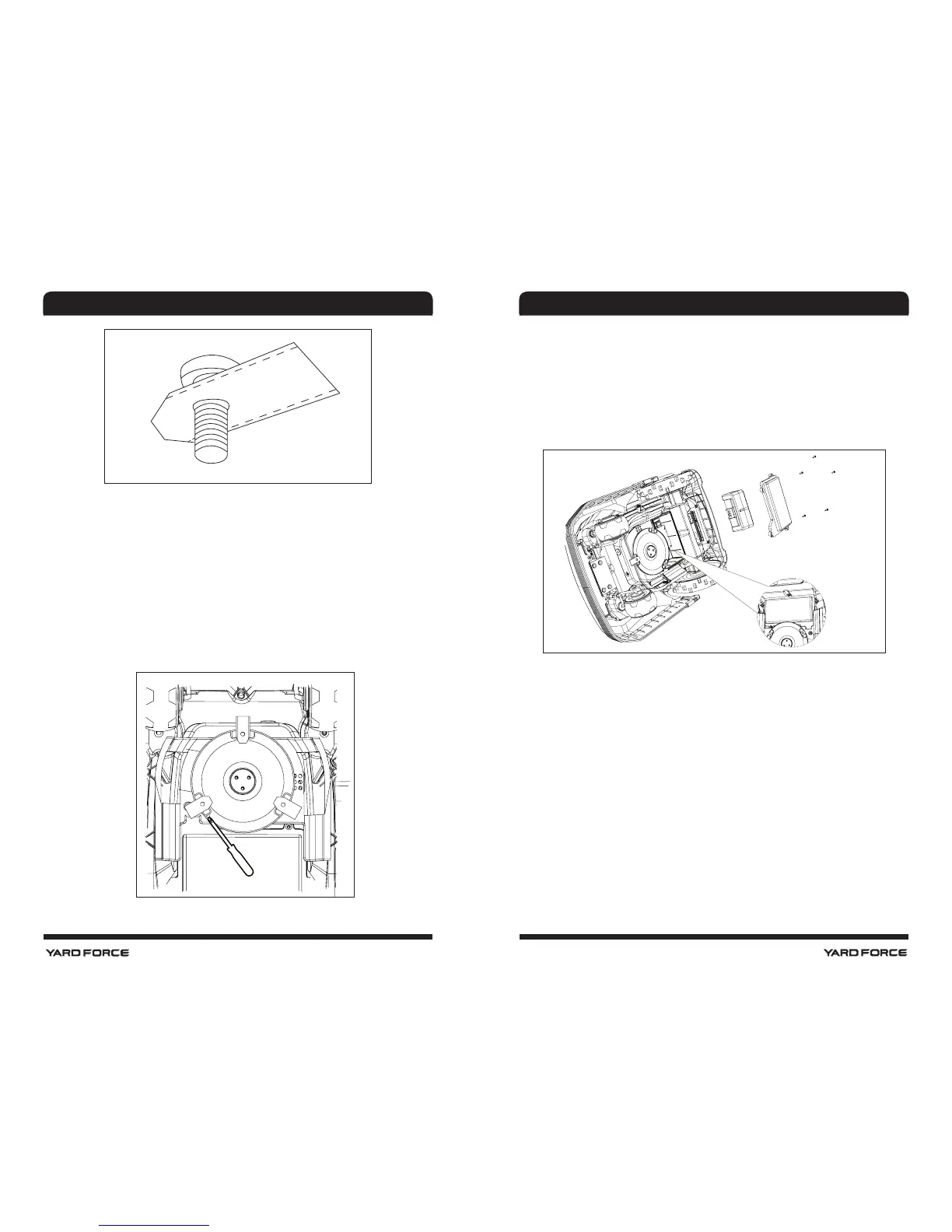
8.4.4. Reversing the blades
There are two cutting edges on each blade and so before blades need to be replaced the
blades can be turned to double cutting life. This is easily carried out by undoing mounting
screw on each, removing and then re-assembling after reversing. Please ensure that all
three blades are changed together. Please check periodically that blades have not become
damaged or blunt.
8.4.5. Replace the blades
To replace or rotate the blades the Main Isolated switch must be in off position and protec-
tive gloves are worn then turn over your YARD FORCE Robotic Lawnmower, use a athead
or Philips Head screwdriver to remove each of the mounting screws and blades. Then
replace blade and rmly re-assemble using same screws. Please make sure your new as-
sembled blades can spin freely.
MAINTENANCE
8.4.6. Replacing the battery
The battery life depends on the working duty but normally life is from 1 year to 5 years,
however it can be replaced by removing the battery cover screws shown, removing the
battery pack cover and disconnecting.
1) Adjust the cutting blade holder to the lowest working height.
2) Disassemble 5 xing screws from the bottom. (One of the screw hole to be reached ac-
cessable hole from the blade protector)
3) Plug out the battery by pulling.











 To Next Page