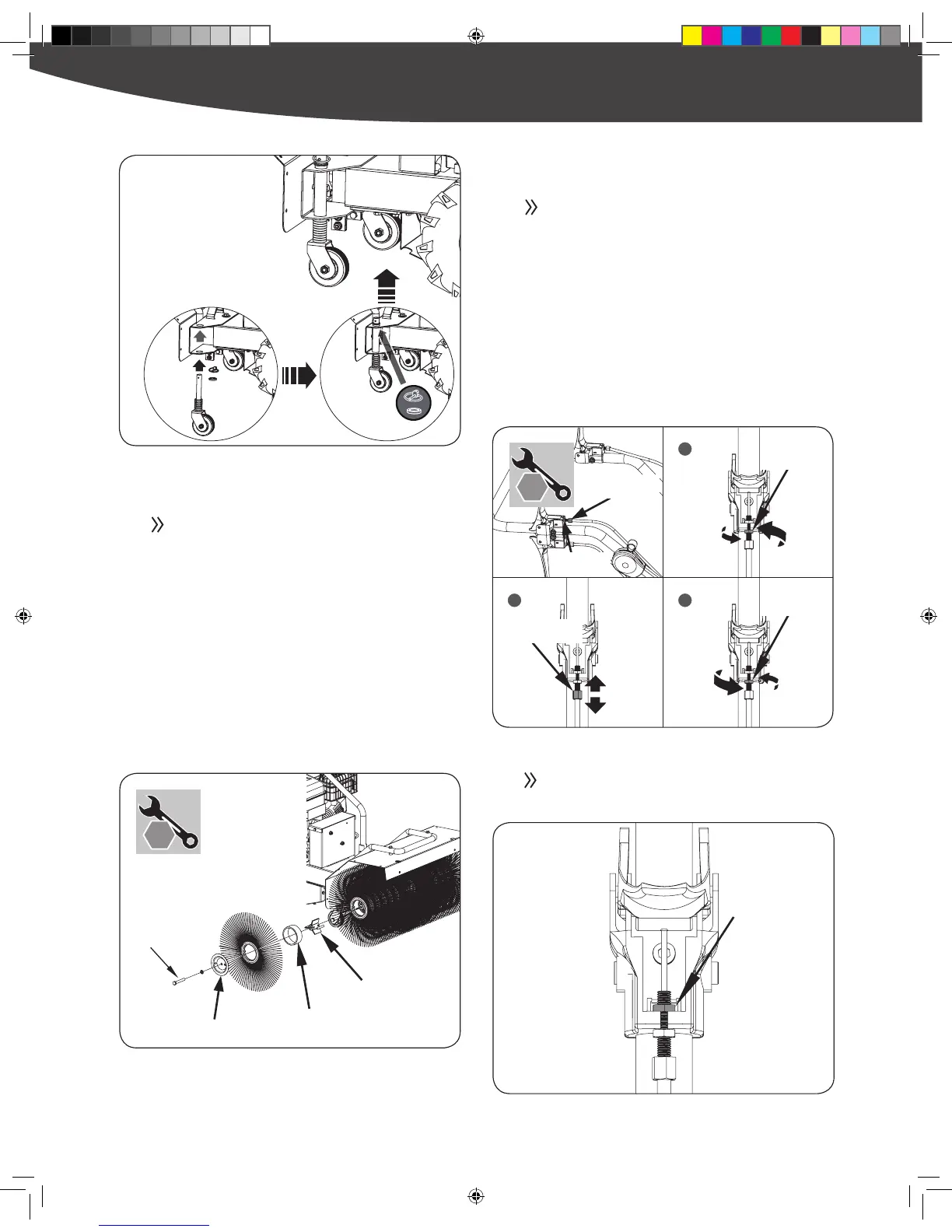
If your cable can not be drawn tight enough to engage
the transmission or brush, please remove the handle
cover to ensure the lock nut has not slipped out of its
holding sleeve.
TIRE PRESSURE ADJUSTMENT
Only use a hand pump to inflate your tires. Use of
an air compressor could result in over inflation and
popping of the tube. Refer to the tire side wall for
maximum tire pressure rating.
HOW TO REPLACE YOUR BRUSH
To remove the brushes, you will need to remove the
two M10x70 screws and brush guard on the right and
left side.
Remove the brush bushing and brushes. Once the
rst brush bushing and brushes are removed, proceed
to remove the rest of the brush bushings and brushes
on the brush shaft. (Note: The last brush removed is
beveled out. Be sure to install replacement brush with
the beveled end out.)
Reassemble in reverse order.
ADJUSTING LEVERS/CABLES
As the engagement lever cables stretch you will need
to tighten them to ensure comfortable operation of
the levers and full engagement of the transmission &
brush.
Standing behind the machine, loosen the jam nut by
turning it counter clockwise with 10mm wrench.
Tighten or loosen the cable by turning the cable
adjustment nut clockwise or counter clockwise with
10mm wrench until you have reached your required
tightness.
Once tightness is set, return the jam nut against the
handle to hold the cable in place.


 To Next Page