EasyManua.ls Logo

Yashica 8T2 - User Manual

Yashica 8T2
25 pages
Print Icon
To Next Page IconTo Next Page
Loading...
Disclaimer
The information contained in this Adobe PDF file is for general information
purposes only. Due to the age of the information and the difficulty in
converting it to computer formats it may not be up to date or correct, we
make no representations or warranties of any kind, express or implied,
about the completeness, accuracy, reliability, suitability or availability with
respect to the Adobe PDF or the information, products, services, or related
graphics contained in the Adobe PDF document for any purpose. Any
reliance you place on such information is therefore strictly at your own risk.
In no event will we be liable for any loss or damage including without
limitation, indirect or consequential loss or damage, or any loss or damage
whatsoever arising from loss of data or profits arising out of, or in
connection with, the use of this Adobe PDF.
This document is available free from cineinformation.org.
Question and Answer IconNeed help?

Do you have a question about the Yashica 8T2 and is the answer not in the manual?

Overview

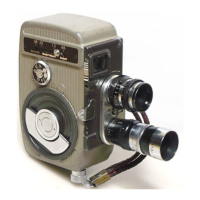
The Yashica 8T2 is a movie camera designed for both amateur and advanced cameramen, offering ease of handling alongside a full range of features. It uses standard double-8 film, which comes in a 25-foot length on a light-tight spool. This film is 16mm wide and is run through the camera twice: first, one half-width is exposed, then the spool is inverted, and the other half-width is exposed. After processing, the film is split into two 8mm strips and spliced end-to-end to create a continuous 50-foot reel, providing just over four minutes of projection at the standard speed of 16 frames-per-second. Multiple reels can be spliced together for longer, uninterrupted runs.

Technical Specifications and Components:

The camera features a comprehensive set of controls and components:

  • Zoom View-finder (1): Allows adjustment of the viewing field to match the lens in use. It "zooms" from 6.5mm wide-angle to 13mm normal, 25mm telephoto, and 38mm telephoto viewing fields. The upper numbers on the scale represent these four viewing fields.
  • Yashica-Scope Mask Frame (2): Used with the wide-screen (anamorphic) lens attachment.
  • Single Exposure Release Socket (3): For tripping the shutter one frame at a time using a standard cable release.
  • Telephoto Lens (4): One of the interchangeable lenses.
  • Normal Lens (5): One of the interchangeable lenses.
  • Safety-lock Dial (6): Prevents accidental shutter release. Set to "L" to lock the run-button, and "R" to enable it. For continuous exposure, depress the run-button and push the Safety-lock to "L".
  • Zoom View-finder Scale (7): Indicates the current zoom setting.
  • Zoom View-finder Adjustment Knob (8): Used to adjust the zoom view-finder.
  • Yashica-Scope Finder Scale (9): For matching the viewfinder to the viewing field of the conventional lens when using the Yashica Scope mask.
  • Shutter Speed (10): The camera is equipped with 7 shutter speeds.
  • Two-lens Turret (11): Enables two lenses to be ready for use at all times. The upper position is the "taking" position, and the bottom is the standby position. To switch, grasp both lenses and rotate the turret until the standby lens snaps into "taking" position.
  • Run Button (12): Activates the camera.
  • Winding Crank ratchet type (13): For winding the spring motor.
  • View-finder Peep-window (14): For viewing through the viewfinder.
  • Footage Indicator (15): Shows the number of feet of film used. It automatically returns to "S" (start) when loaded and should be run until "O" appears before filming. At the end of 25 feet, the motor should be run until the double-circle mark appears before opening the film loading door.
  • Film loading door Lock (16): Secures the film loading door.
  • Exposure Guide (17): Provides guidance on exposure settings.
  • Feed (upper) Spindle (18): Holds the loaded film spool.
  • Film Guide Roller (19): Guides the film.
  • Film Pressure Plate (20): Holds the film flat.
  • Take-up (lower) Spindle (21): Winds the exposed film.
  • Film Pressure Plate Lock (22): Secures the film pressure plate.
  • Footage Indicator Reset Shaft (23): Resets the footage indicator.

Lenses:

The Yashica Movie camera is equipped with YASHINON ultra high-speed lenses, which are color-corrected anastigmats and coated. The lens mount is of the D mount type, allowing any D-mount lens to be attached. Each lens has two adjustment rings:

  • Aperture Ring: Controls exposure (f: stop). The largest f: stop is f:1.4, and the smallest is f:16.
  • Focusing Ring: Focuses the lens to the subject's distance. A focus rule of thumb suggests setting the focusing ring to 4 for nearby subjects and 20 for distant subjects. A depth-of-field table is provided to understand the zone of sharpness at various apertures and distances.

Available YASHINON Lenses (standard D mounts):

  • Yashinon 6.5mm f:1.9 (wide)
  • Yashinon 38mm f:1.9 (tele)
  • Yashinon 6.5mm f:1.4 (wide)
  • Yashinon 38mm f:1.4 (tele)
  • Yashica-Scope 1:1.5 (anamorphic)

Usage Features:

  • Film Loading: Always load the camera in subdued light. Wind the motor, lift the film loading door lock, turn it counter-clockwise, and open the door. Remove the empty spool, then remove the tape and rubber band from the film container. Insert the film end into the slot of the empty spool (marked "1" facing up). Guide the film along the white arrow-line path. Place the loaded spool on the upper spindle and the empty spool on the lower spindle, slipping the film into the film gate (dull emulsion side facing the lens). Run the camera for 2 seconds to test film movement, then close the door and turn the lock clockwise. Run the camera until "0" appears on the footage counter.
  • Winding the Motor: The spring motor provides about 6 feet of film (30 seconds at 16 frames-per-second) on a full wind. Wind the motor back-and-forth like a watch until forward motion stops, without forcing it. Always keep the motor fully wound, especially when loading the camera, and wind it after every shot.
  • Filming Procedure: Wind the camera motor. Set the running speed to 16 frames-per-second (standard). Match the zoom-finder to the lens in use. Set the aperture ring to the recommended f/stop from the film's exposure guide. For color film, an exposure guide is on the camera itself. Set the focusing ring to 4 for nearby subjects or 20 for distant ones. Frame the scene through the viewfinder, hold the camera still, and press the run-button.
  • Single Frame Exposure: Insert a standard cable release into the socket marked "1" to expose one frame at a time. This allows for animated cartoon movies, time-lapse movies (e.g., flower opening), or even snapshots for enlargement.
  • Continuous Exposure: Depress the run-button and push the Safety lock to "L". This allows the camera to run without holding the button, enabling the cameraman to move away or even enter the scene.
  • Unloading/Reversing Film: After filming 25 feet, the exposed film will be on the take-up spool. Remove the loaded spool from the take-up spindle (careful not to let film unwind) and the empty spool from the upper spindle. Invert the loaded spool so "2" is visible, and insert it into the upper spindle. Repeat the loading steps. After filming the second half-width, carefully remove the spool, keeping film in place with a finger, and replace it in its original can.
  • Filming Techniques: Consider camera position, angle, and a story for more engaging movies. Run each shot for at least 7 seconds to avoid blinking on and off the screen. Keep the camera perfectly still and let the subject move. Pan (rotate the camera) sparingly and very slowly, in one direction only. Tilt the camera (up or down) sparingly and very slowly, only up or down. Rewind the motor immediately after every shot. Avoid moving or jarring the camera.

Shutter Speeds:

The Yashica Movie camera has seven running speeds:

  • 8 Frames Per Second (1/18 second exposure): For perfectly stationary scenes when underexposure is a risk at 16 fps, or for extreme speed-up (moving objects appear twice as fast). Shots project half as long. A 7-second shot requires 14 seconds of camera run time.
  • 12 Frames Per Second (1/26 second exposure): For accelerating movement (e.g., slow-moving boat, sports action) for dramatic effects. Shots project 3/4 as long. A 6-second shot requires 8 seconds of camera run time.
  • 16 Frames Per Second (1/35 second exposure) - Standard Speed: Most shooting is done at this speed, which is standard for 8mm movies. Useful for reducing camera shake during panning or slight slow-motion. Shots project 1.5 times as long. A 15-second shot requires 10 seconds of camera run time.
  • 24 Frames Per Second (1/50 second exposure): Useful for reducing camera shake when panning or producing slight slow-motion. Also used for sound films. Shots project 1.5 times as long as at standard speed. A 15-second shot requires 10 seconds of camera run time.
  • 32 Frames Per Second (1/70 second exposure): Adds power and majesty to movement (e.g., waterfall, raging waves) with moderate slow-motion. Useful for rapid panning. Shots project twice as long. A 10-second shot requires 5 seconds of camera run time.
  • 48 Frames Per Second (1/100 second exposure): Slow motion for sports or dance analysis. Shots project 3 times as long.
  • 64 Frames Per Second (1/140 second exposure): Extreme slow motion for critical motion analysis. Shots project 4 times as long.

Maintenance Features:

  • Lens Care: Keep fingers off glass surfaces. Clean glass surfaces rarely, using a drop of water and reliable lens tissue. Keep lens caps on when lenses are not in use or when mounted on the camera until shooting begins.
  • General Care: With reasonable care, the camera will operate perfectly. If only one lens is mounted on the turret, keep the other lens mount covered with the screw-in cap. Store the camera in a dry place, away from heat or cold. In humid climates, keep small bags of silica-gel or other dehydrating agents with the camera to prevent moisture accumulation. Never put the camera in a car's glove compartment, as incessant shocks and extreme temperatures can cause damage.
  • Avoid Running Without Film: NEVER run the camera without film at speeds higher than 16 frames-per-second.

Yashica 8T2 Specifications

General IconGeneral
BrandYashica
Model8T2
CategoryDigital Camera
LanguageEnglish

Related product manuals