EasyManua.ls Logo

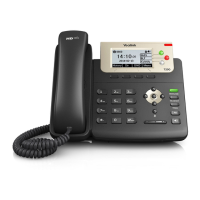
Yealink T29G - User Manual

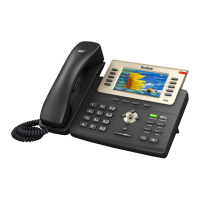
Yealink T29G
11 pages
Print Icon
To Next Page IconTo Next Page
Loading...
Table of Contents
1. Basic Call Features - with phone controls diagram……….Page 1
2. Customizing Your Phone…………………………………………………Page 4
3. Voicemail User Guide……………………………………………………..Page 6
4. Appendix A: Voicemail Function Flow Chart…..….…………Page 9
5. About SkyTalk Plus…………………………………………………………Page 10
SkyTalk Plus Yealink T29G Quick-Start User Guide

Other manuals for Yealink T29G

Questions and Answers

  • M
    Molly MorrowAug 17, 2025
    Why doesn't my Yealink Telephone get an IP address?
    • T
      tuckerjillianAug 17, 2025
      If your Yealink Telephone isn't getting an IP address, check the following: * Ensure the Ethernet cable is securely plugged into the internet port and is not loose. * Verify the Ethernet cable is not damaged. * Confirm that the IP address and related network parameters are set correctly. * Make sure your network switch or hub is working. * Ensure the Wi-Fi feature is disabled.
  • L
    Logan RodriguezAug 20, 2025
    Why does my Yealink Telephone display “No Service”?
    • J
      Jeffrey MarquezAug 20, 2025
      If your Yealink Telephone displays “No Service”, ensure that an account is actively registered on the IP phone at Menu->Status->More->Accounts.
  • U
    ufloresAug 22, 2025
    Why does my Yealink Telephone have no power?
    • S
      sydney29Aug 22, 2025
      If your Yealink Telephone has no power: * Reboot your IP phone. * Replace the power adapter.
  • A
    Adam ParsonsAug 25, 2025
    What to do if the LCD screen is blank on my Yealink Telephone?
    • K
      Kathleen BurkeAug 26, 2025
      If the LCD screen on your Yealink Telephone is blank, verify the following: * Ensure the phone is properly plugged into a functional AC outlet. * Confirm the phone is plugged into a socket controlled by a switch that is on. * If plugged into a power strip, try plugging it directly into a wall outlet. * If your phone is PoE powered, ensure you are using a PoE-compliant switch or hub.
  • C
    Crystal TrevinoAug 27, 2025
    How to solve IP conflict problem on Yealink Telephone?
    • D
      David CherryAug 27, 2025
      To resolve an IP conflict on your Yealink Telephone, you can: * Reset another available IP address for the IP phone. * Check network configuration via the phone's user interface at Menu->Settings->Advanced Settings (default password: admin)->Network->WAN Port->IPv4 (or IPv6). If Static IP is selected, choose DHCP instead.
  • A
    april07Aug 30, 2025
    Why doesn’t my Yealink Telephone upgrade firmware successfully?
    • B
      Bonnie WebsterAug 30, 2025
      If your Yealink Telephone isn’t upgrading firmware successfully, check the following: * Ensure that the target firmware is not the same as the current firmware. * Ensure that the target firmware is applicable to the IP phone model. * Ensure that the current or the target firmware is not protected. * Ensure that the power is on and the network is available during the upgrade. * Ensure that the web browser is not closed or refreshed when upgrading firmware via the web user interface.
  • S
    Susan TurnerSep 1, 2025
    Why do I get poor sound quality during a call on my Yealink Telephone?
    • T
      timothyrichardsSep 2, 2025
      Poor sound quality during a call on your Yealink Telephone can be due to several factors: * Users being too far from the microphone or too close to sensitive microphones. * Packet loss and jitter due to network congestion. * Noisy equipment causing interference. Turn off any noisy equipment. * Line issues. Try disconnecting the old line and redialing to see if another line provides a better connection.
  • R
    richard23Sep 4, 2025
    Why doesn’t my Yealink Telephone display time and date correctly?
    • F
      Fernando JonesSep 4, 2025
      If your Yealink Telephone doesn’t display the correct time and date: * Check if the IP phone is configured to obtain the time and date from the NTP server automatically. * If your phone is unable to access the NTP server, configure the time and date manually.
  • K
    Karen MartinezSep 6, 2025
    Why doesn’t my Yealink Telephone update the configuration?
    • A
      Amber WoodSep 6, 2025
      If your Yealink Telephone isn’t updating its configuration: * Ensure that the configuration is set correctly. * Reboot the phone, as some configurations require a reboot to take effect. * Ensure that the configuration is applicable to the IP phone model. * Be aware that the configuration may depend on support from a server.
  • G
    Gabrielle DavisSep 8, 2025
    Why does the Bluetooth headset affect Yealink Telephone’s voice quality?
    • V
      vsalasSep 9, 2025
      Your Yealink Telephone's voice quality may be affected if you use a Bluetooth headset while the 2.4 GHz band is enabled or in an environment with many other Bluetooth devices.

Yealink T29G Specifications

General IconGeneral
VoIP ProtocolsSIP
PoE SupportYes (IEEE 802.3af)
Headset PortRJ9
BluetoothNo
Weight1.04 kg
Display4.3" color display with backlight, 480 x 272 pixels
Line Keys10 line keys
Ethernet Ports2 x 10/100/1000 Mbps
Audio CodecsG.722, G.711, G.729, G.726, iLBC
USB Port1 x USB 2.0
Expansion Module SupportYes, supports up to 6 EXP20 expansion modules
EHSYes
Supported ProtocolsSIP
Operating Temperature-10~50°C
Humidity10% to 95% (non-condensing)

Related product manuals