NeoGate TG Series User Manual
17/62
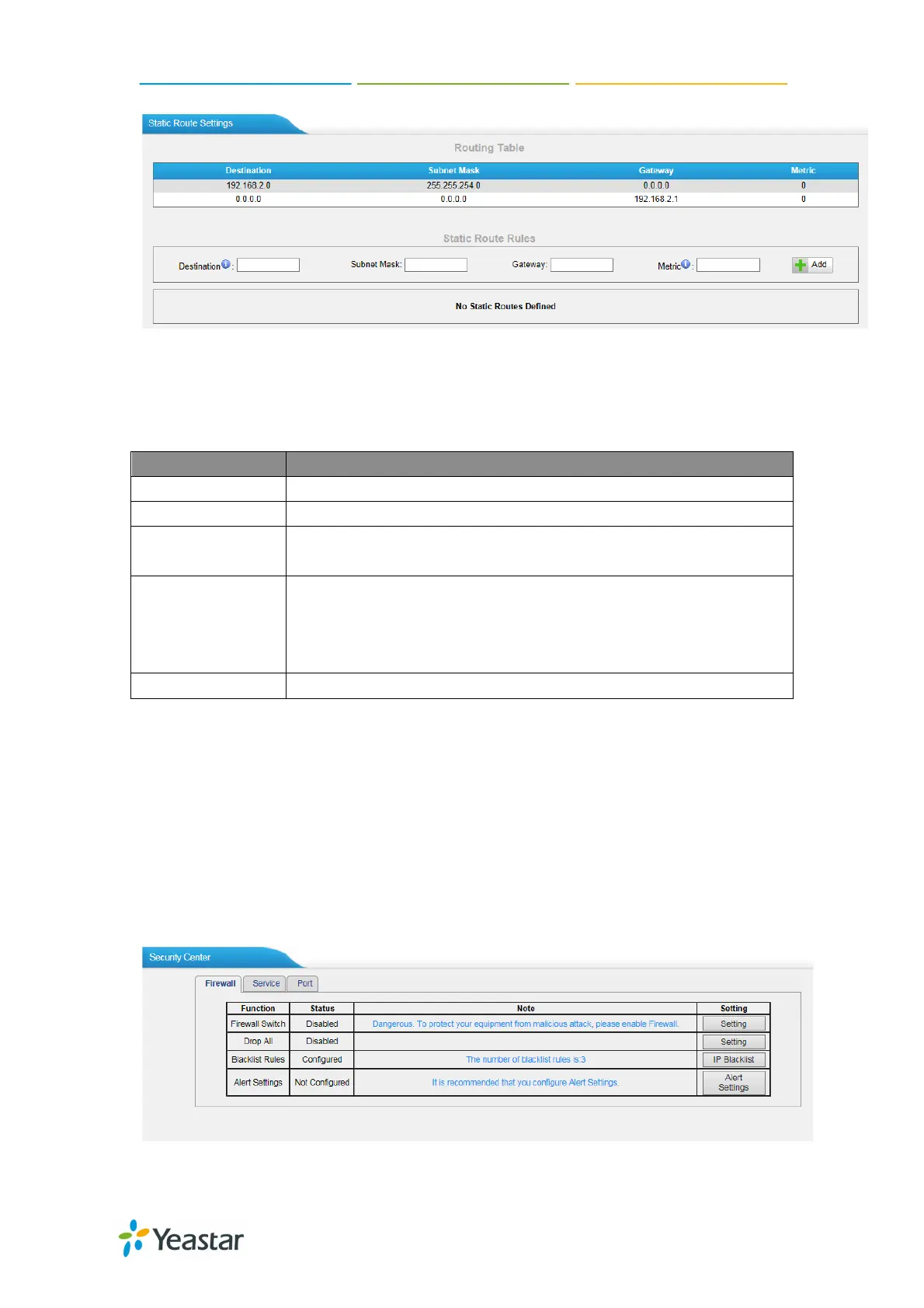
Figure 5-5
1) Route Table
The current route rules of NeoGate TG.
2) Static Route Rules
You can add new static route rules here.
The destination network to be accessed to by NeoGate TG.
Specify the destination network portion.
Gateway
Define which gateway NeoGate TG
access to the destination network.
Metric
The cost of a route is calculated by using what are called
routing metric. Routing metrics are assigned to routes by
routing protocols to provide measurable statistic which can
be used to judge how useful (how low cost) a route is.
Interface Define which internet port to go through.
5.2 Security Center
5.2.1 Security Center
You can check NeoGate TG security configuration in “Security Center” page. And
also, you can enter the relevant security settings page rapidly.
Firewall:
Figure 5-6
In the “Firewall” tab, you can check firewall configuration and alert settings. By



 To Next Page
 Loading...