6
YJACK VIEW® app, placing the YJACK PATH® in an area that has direct line-of-sight of the Bluetooth®
devices often provides the best results and longest communication ranges. Also keep in mind that there
could be obstructions and interference caused by signals not visible. If you believe that you may be
experiencing signal interferences, move the YJACK PATH® to a different location until the Bluetooth®
signal improves. If there is a ferrous metal surface near the placement of the YJACK PATH®, the magnet
on the bottom of the radio module can be attached to the surface for a more secure connection.
Status LED: What Does it Mean?
When powering on the YJACK® device, hold the power button until the status LED illuminates solid
yellow, then release the power button. Once powered on, the LED will flash every time the YJACK®
devices readings are broadcast, every 2 seconds. When the battery level reaches 10%, the LED will flash
red to indicate the low battery condition. When powering off the device, the LED stays red until the
power button is released and the device is powered down.
Changing the Display and Settings on the YJACK VAC®
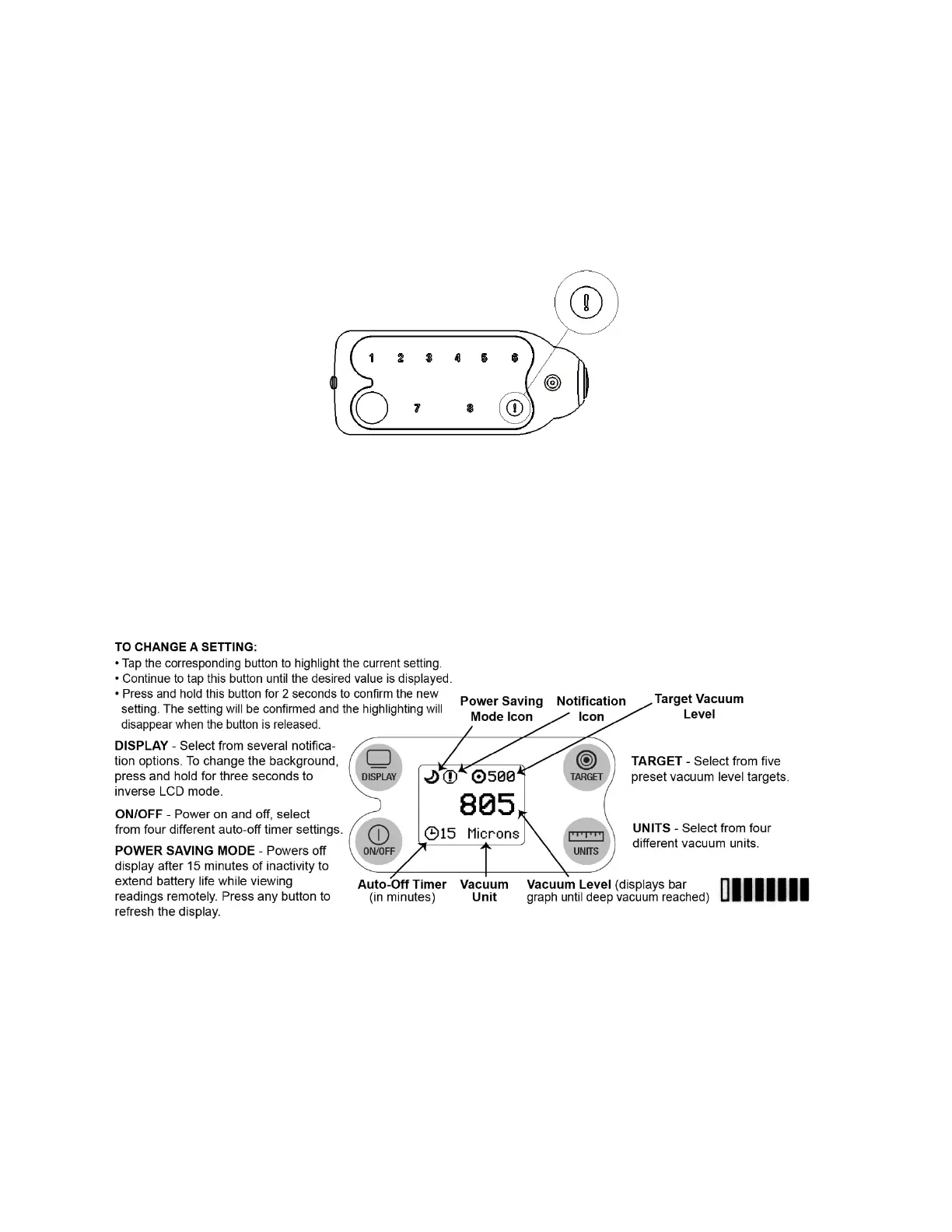
The diagram below outlines the button functions and device settings for the YJACK VAC®:



 To Next Page