31
www.yellowtec.com I info@yellowtec.com
User Software
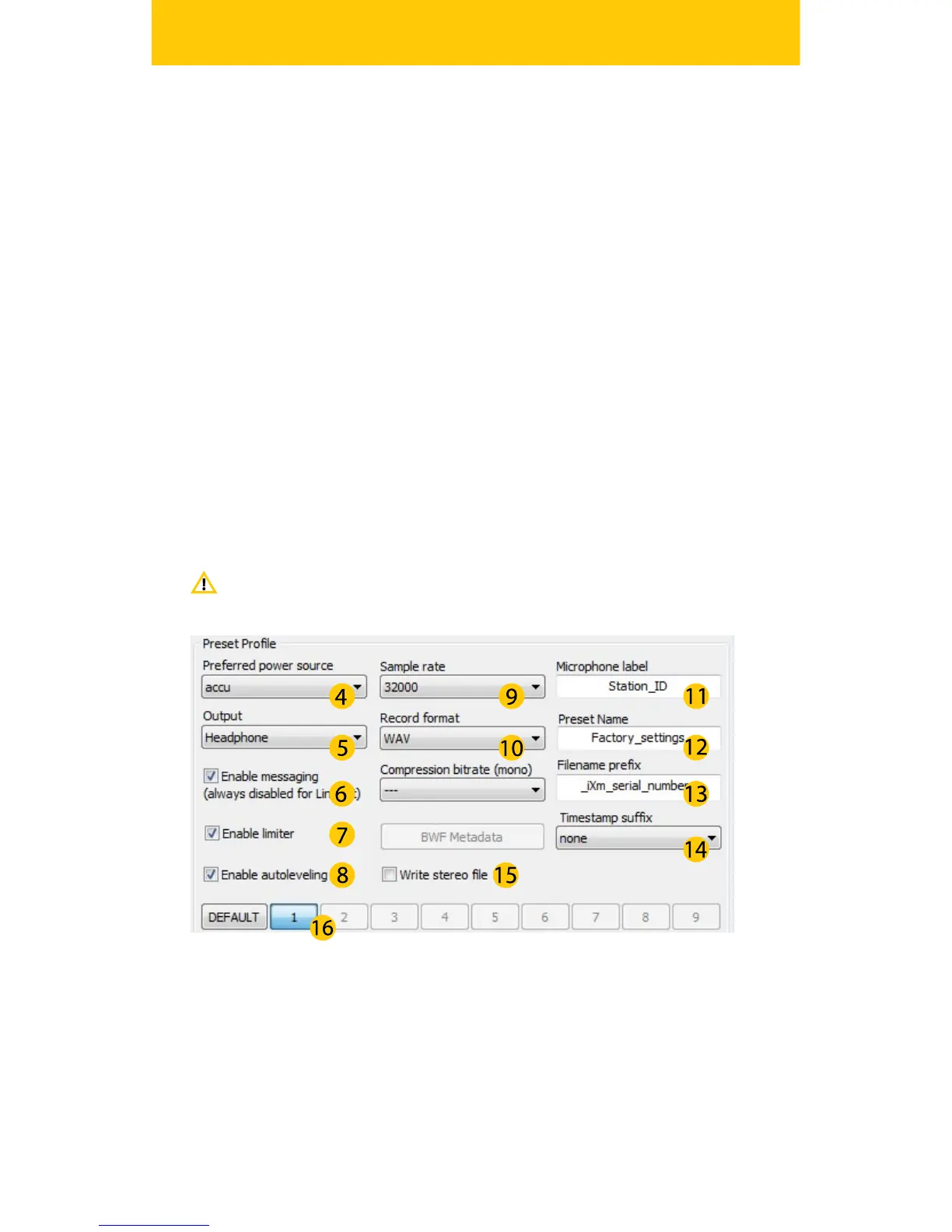
The Preset Prole lets you setup several options that makes handling
your iXm in the eld more comfortable.
Select Accu or Battery as your preferred power source.
Choose your green Jack on the Port Panel to be your Headphone,
Line-out or balanced Line-Out.
You can mute or enable the voice messaging
Activate the additional Limiter
Activate your LEA DSP Engine
Select your sample rate (32/44,1/48 kHz)
Select the le format for recordings (*.wav, *.bfw, *.mp2)
Select a name to label your microphone. (This may also be used
for le naming
Determine a name for the currently selected Preset
Determine the prex for your le naming.
Determine whether your lenames have a timestamp sux or
not.
You can also write stereo le
Select which preset you wish to activate
The following chapter will introduce you to the Amin Software and its
advanced functions.
(4)
(5)
(6)
(7)
(8)
(9)
(10)
(11)
(12)
(13)
(14)
(15)
(16)
NOTE: Only Preset 1 will be set as factory default


 To Next Page