30
www.yellowtec.com I info@yellowtec.com
User Software
User Software
The User Software displays the most important information of your
microphone and allows you to set the basic parameters for eld opera-
tions.
NOTE: All changes in your User Software will be saved
immediately and do not require a manual „save to device“
action.
The User Software allows you to monitor and change some of the set-
tings that are most useful for a eld operator. Those include the prex
naming of your les, setting sample rates and setting microphone
levels when you choose not to use the LEA engine. Other User Software
options will be explained below.
The Admin Software however provides a more detailed setup of your
microphone (see: Admin Software). For safety reasons it is password
protected and also allows you to create several dierent Setups. It can
also restrict the access of settings in the User Software to prevent misu-
se that might occur from wrong setups by eld operators.
Options:
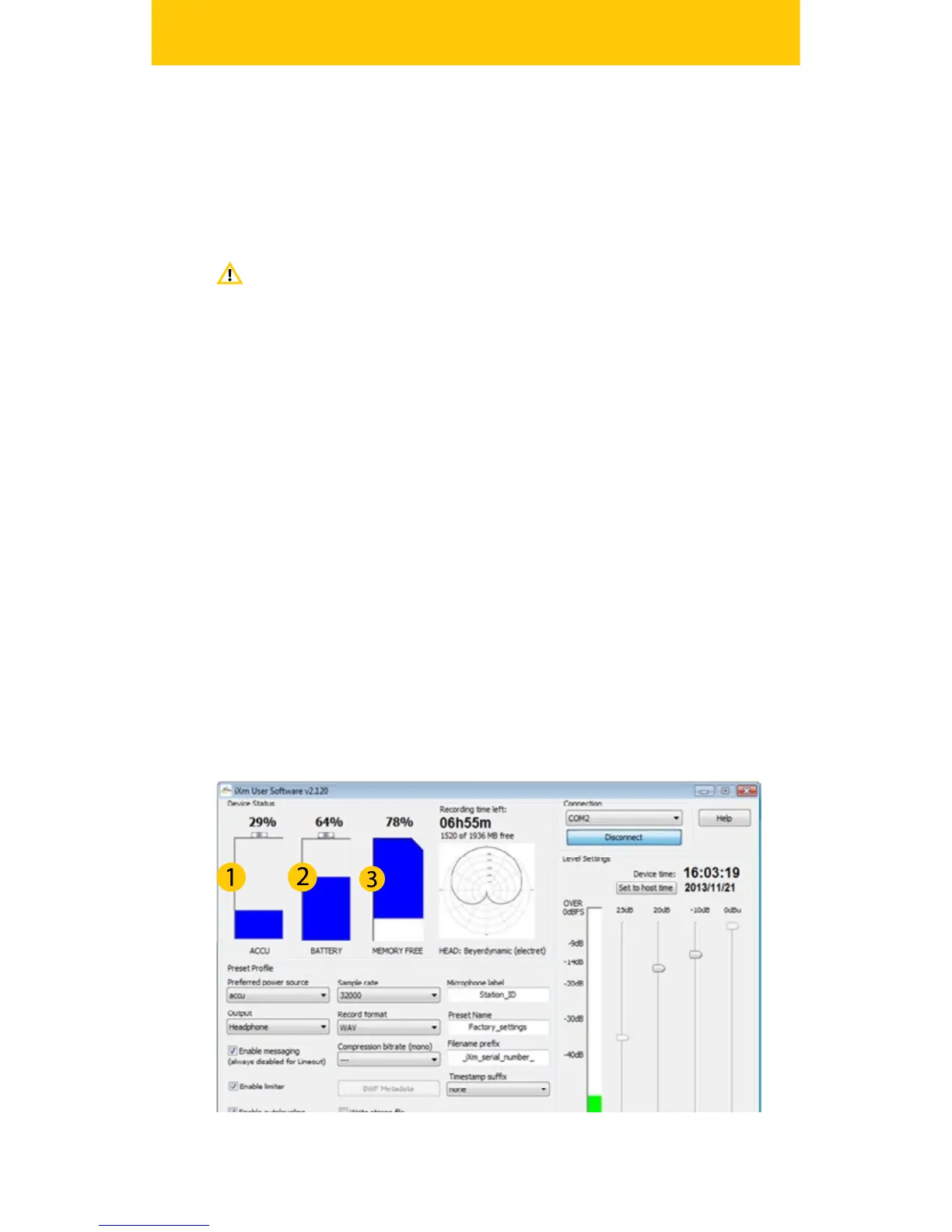
The Device Status will provide you with information about your remai-
ning internal battery capacity (1) and AA Battery (2) life as well as your
free memory (3). (Note: Recording time will vary depending on the le
format you choose). Next to that you will nd information about the
mircophone head you have installed.


 To Next Page