33
www.yellowtec.com I info@yellowtec.com
Admin Software
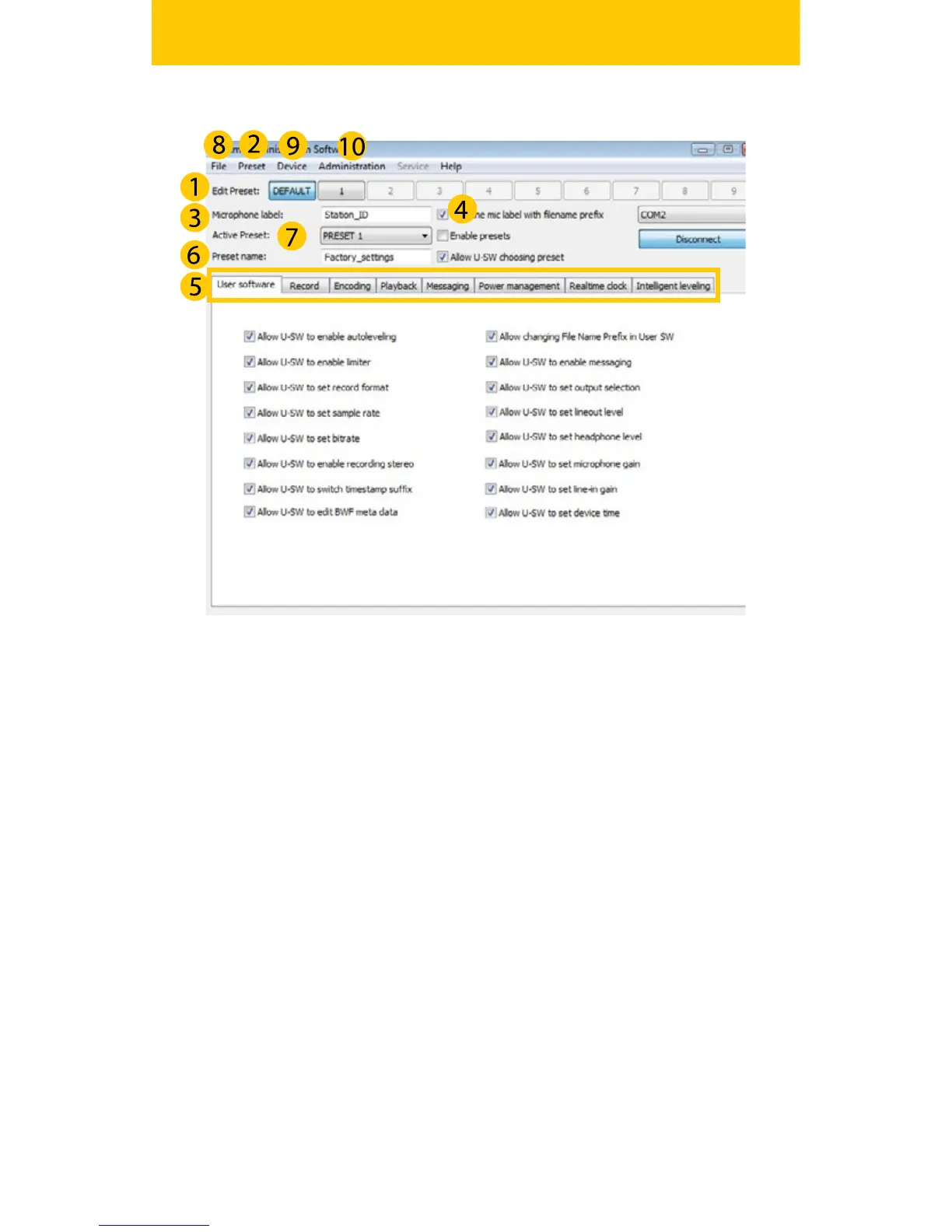
(1) edit preset allows you to save up to nine dierent congurations of
your iXm. In order to access presets you need to tick the box enable/
disable (2) preset. Note that you can send one preset only at a time.
You should name your microphone with a suitable laben, the (3) Micro-
phone Label. It appears in your software, if tagged (4) in your lename
prexes.
All congurable parameters are organized by tabs (5). Most parameters
will be self explanatory to the advanced user. Further information on
the setup of the parameters will be available from our website. Once
you are done, you should name your presets (6)Use activate preset
(7) to determine which of your presets to use.
Send your entire settings to your device via the tab File (8) or save your
settings to your PC. The tab device (9) gives you the option to view
your device information (rmware version) or update it. If you want to
create change or delete Users you can do so via the (10) Administrati-
on Tab. Please note that you have to be Superadmin for this.


 To Next Page