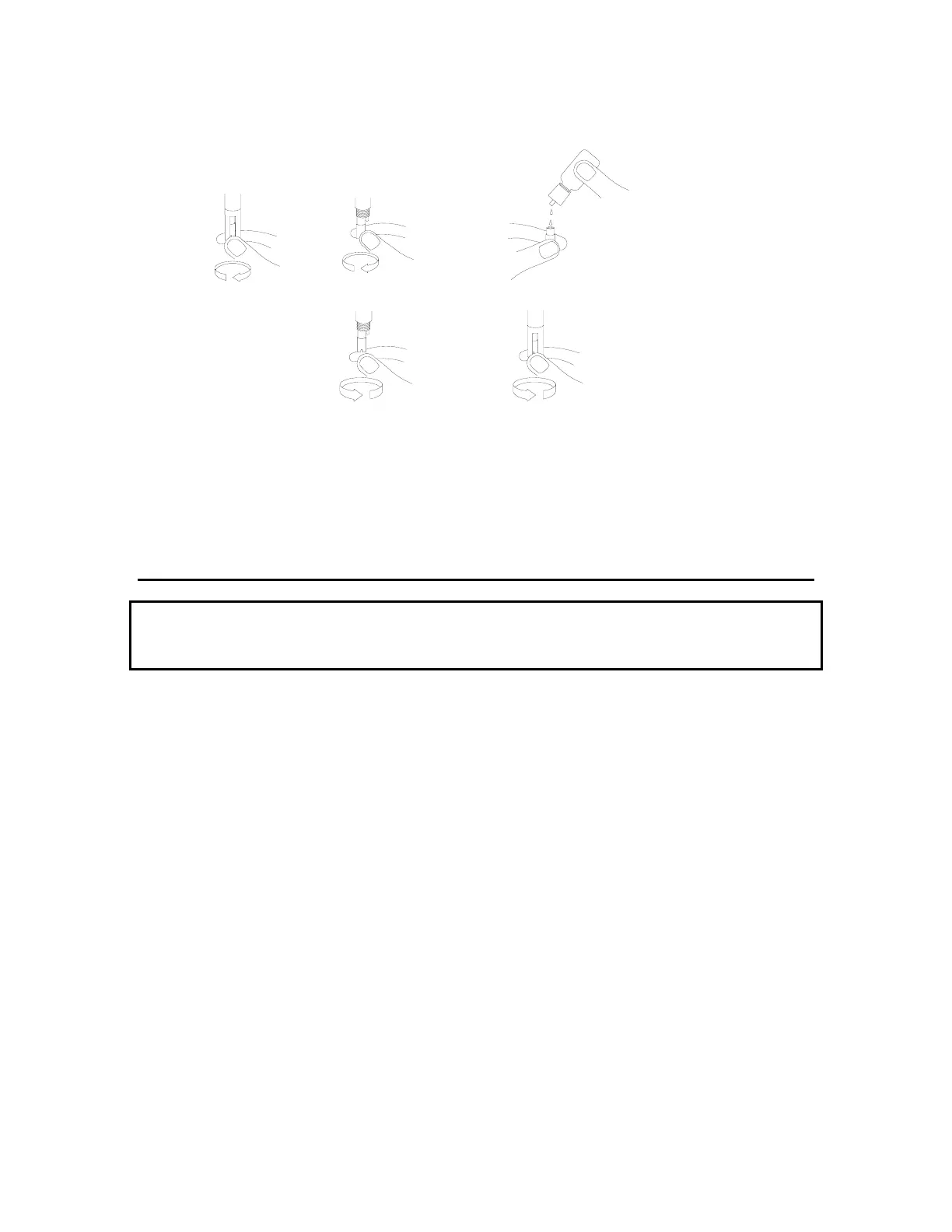
Figure 2
Unscrew guard
Screw guard on
Moderately tight
Unscrew cap
Fill membrane cap
with 6-7 drops of
KCl solution.
Tap cap with finger
to remove bubbles.
Screw cap on
moderately tight
3.3.2 MEMBRANE INSTALLATION FOR THE 5905 PROBE
New Probe Use
New probes are shipped with a dry membrane cap to protect the electrodes. A new membrane
cap must be installed before first use.
Follow these instructions to change membrane caps:
1. Remove the stir paddle from the probe by pulling it straight out. See figure 3.
2. Unscrew the old membrane cap from the probe. Before installing a new membrane, clean the
probe tip with deionized water in order to remove any contaminants.
3. Hold the membrane cap and fill it at least half full with the electrolyte solution provided. Screw the
membrane cap onto the probe moderately tight. A small amount of electrolyte should overflow.
4. Rinse off excess electrolyte from the probe with deionized water.
5. Reinstall the stir paddle.
YSI Incorporated YSI 58 DO Meter 7


 To Next Page