29
Find more information at www.zaco.eu
English
Troubleshooting
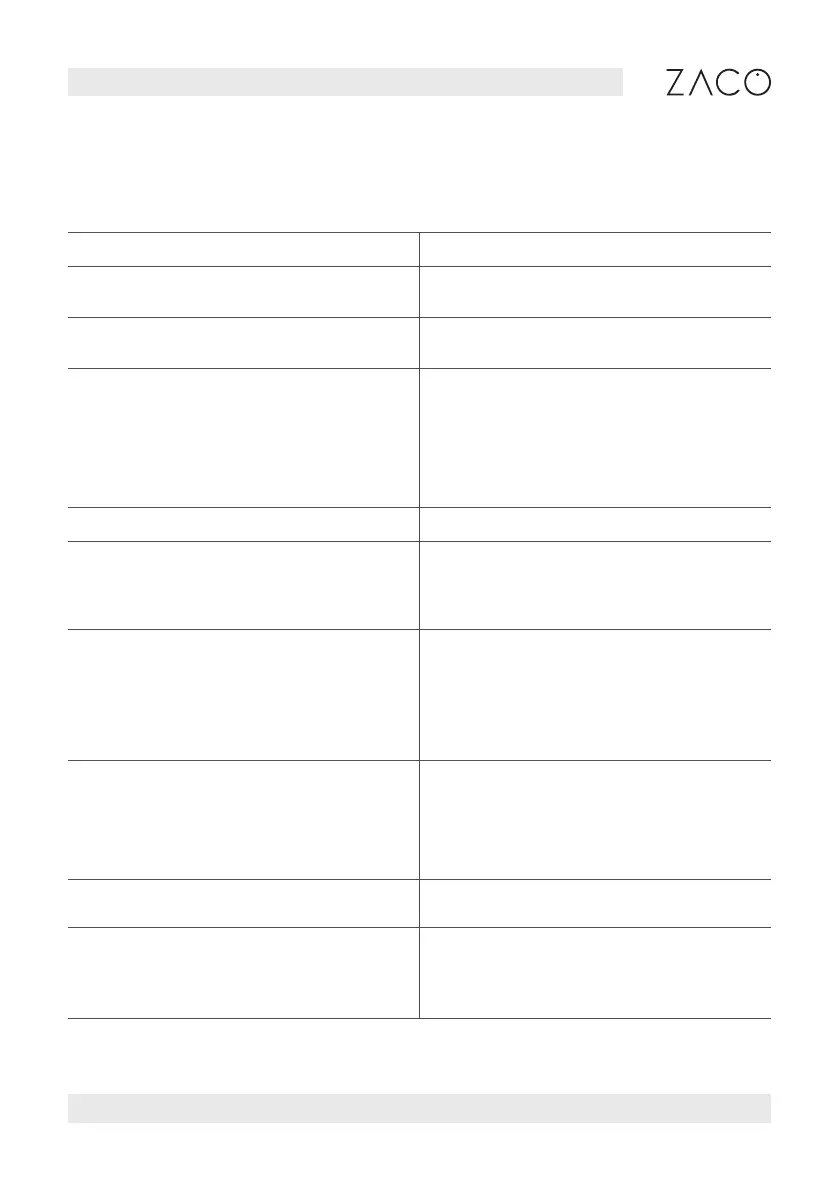
Fault Prompt Solution
Unable to power on. The battery is low. Please charge it
before using.
Robot fails to start cleaning. The battery is low. Please charge it
before using.
Robot cannot return for charging. 1. Too many barriers around the cleaning
station. Place cleaning station as descri-
bed earlier.
2. Robot is too far away from cleaning
station. Place robot near cleaning station
and try again.
Abnormal robot actions. Please shut down and restart the robot.
Abnormal sound during
cleaning.
Please check and clean the exterior
parts on the main brush, side brush,
left / right wheel after the robot is
turned OFF.
Cleaning performance deteriorates
or dust escapes.
1. Dustbin is full. Please empty the bin.
2. Filter screen is blocked. Please clean
the filter screen.
3. Main brush is blocked. Please clean
the main brush.
Robot is offline. 1. Weak Wi-Fi signal. Make sure robot is in
range of the Wi-Fi signal and check your
network settings.
2. Reset Wi-Fi connection, download
the latest APP and try again.
Robot fails to auto-resume. Make sure non-disturbance mode is
not activated.
Robot fails to charge. Make sure there is sufficient space
around the cleaning station, and that
there is no dust or blockage on the sur-
face of electrodes of cleaning station.



 To Next Page